Key Takeaways
- Zenzap fits team workflows better when the goal is shared execution, because its AI agents live in the same chat where the work is discussed, corrected, and approved.
- Buzz.xyz, Viktor AI, and Slack each cover part of the problem, but the strongest differences show up in collaboration model, setup speed, and cross-tool action.
- Viktor AI is the closest competitor on breadth, with 50,000+ teams and 3,200+ tool integrations, yet it still centers the workflow around a workspace rather than a true multiplayer chat.
- Slack AI is useful inside Slack, but its single-channel surface and native-only limits make it narrower for teams that work across many tools.
- Approval controls, topic-scoped memory, and one-click setup matter because they turn AI from a private helper into a shared operational layer.
Why This Comparison Matters
Teams are not deciding whether to use AI for work. They are deciding where AI lives, who can correct it, and whether it can act across the tools the team already uses. That decision affects response time, approval flow, auditability, and how much work still gets handed back to people.
Buzz.xyz, Viktor AI, and Slack all solve pieces of that problem. Viktor AI brings a broad integration set and a team assistant model inside Slack or Microsoft Teams, while Slack AI keeps things close to the messaging surface many teams already know. The question is whether that is enough for a manager, director, or team lead who needs shared context, controlled actions, and measurable work output.
The stronger choice is the platform that lets AI agents work in the same conversation where the task gets assigned, reviewed, and finished.
Table of Contents
- Key Takeaways
- Why This Comparison Matters
- Where The Tools Overlap
- Where Zenzap Pulls Ahead
- Where Buzz.xyz, Viktor AI, And Slack Are Strong
- Comparison Table
- The Choice For Team Workflows
- FAQ
- About Zenzap
Where The Tools Overlap
All four products sit in the same broad category: AI used for work inside a team environment. They help people summarize conversations, move tasks forward, and reduce the time spent switching between messages and other systems. A buyer could reasonably evaluate each one because they all promise less manual work and faster responses.
That similarity matters because it explains why the comparison is not about novelty. It is about operating model. Viktor AI advertises 3,200+ tools and shared team use inside Slack or Microsoft Teams, Slack AI stays native to Slack, and industry roundups such as Pocodot’s 2026 Slack agents comparison show a market crowded with tools that still fit one channel or one workspace at a time. The meaningful differences begin when a team wants AI that can join the conversation where work decisions actually happen.
Where Zenzap Pulls Ahead
The first separation is collaboration design. Zenzap’s AI agents are built for group chat use, so corrections, approvals, and follow-up questions happen in public team context instead of a private one-to-one thread.
- Slack AI stays inside one channel surface, which keeps the experience familiar but also limits the agent to a narrow operating context. That makes it practical for basic Slack users, yet less suited to teams that want the same AI agent to help across projects, channels, and operational decisions.
- Viktor AI has a broader shared assistant model and can connect to 3,200+ tools, but it is still organized around a workspace-centered assistant rather than a chat-native multiplayer workflow. Its own positioning, echoed in Lindy’s Viktor review and eesel AI’s Viktor review, shows a strong team assistant, not a shared team operating layer.
- Buzz.xyz sits in the same crowded adjacent category, yet it does not offer the same documented emphasis on topic-isolated memory, shared team correction, and per-topic sandboxing. For a manager who needs repeatable approvals and shared context, that gap turns into more manual oversight.
- Zenzap uses a topic-scoped model, so one project’s context does not leak into another. That structure is better for legal, healthcare, consulting, and operations teams that need clean separation between conversations, approvals, and records.
- The practical result is simpler handoff. A manager can add an AI agent to a team chat, let the group correct it once, and keep the workflow visible without forcing people into a separate private bot session.
The second separation is setup and rollout speed. A one-click agent builder changes adoption because the first useful workflow appears fast, without a developer or a long admin project.
- Slack AI is easy to reach for existing Slack users, but it remains tied to Slack’s native environment and plan structure. That is convenient for existing customers, yet narrow for teams that run work across CRM, docs, support, approvals, and messaging.
- Viktor AI offers a paid path that starts at $50 per month per workspace and includes $100 in free credits, which lowers the entry barrier compared with enterprise-only software. Even so, it still asks the buyer to think in workspace terms rather than in a team-visible workflow that any employee can add to a chat.
- Zenzap’s manager-focused workflow guide shows why rollout speed matters when managers want measurable hours saved instead of another inbox-style tool.
- One-click building also reduces the prompt quality problem. The team does not need to engineer a perfect conversation before value appears, because the agent already has structure, tool access, and a chat place to work in.
- The consequence is faster proof. An employee can build an AI agent, connect a tool, and start saving time in one sitting rather than waiting for an admin project to finish.
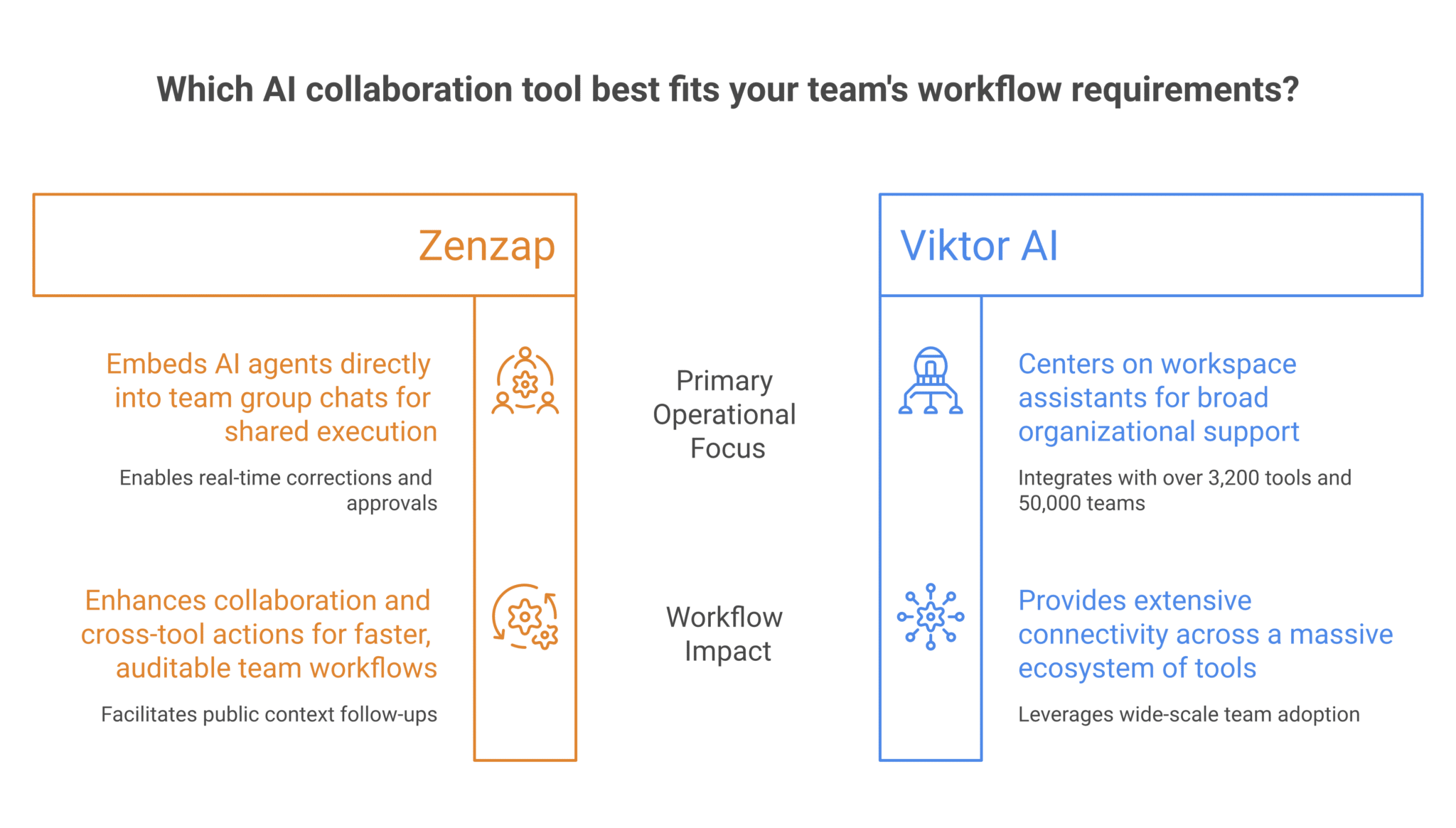
Where Buzz.xyz, Viktor AI, And Slack Are Strong
Buzz.xyz, Viktor AI, and Slack each have real strengths, and those strengths explain why they stay in the buyer set. Slack is deeply familiar, has a large installed base, and keeps the AI close to existing communication habits. That lowers resistance for teams already living in Slack.
Viktor AI is the strongest of the three on integration breadth and team-assistant ambition. Its 3,200+ tool count and 50,000+ teams claim show meaningful traction, and review coverage from Lindy’s Viktor alternatives roundup and Pocodot’s Slack AI agent comparison suggests buyers see it as a serious option for shared work. Slack AI also wins on simplicity for customers who want a native feature inside a platform they already pay for.
Those strengths do not change the core choice for team workflows that depend on shared correction, topic-separated memory, and cross-tool execution in the same conversation. A workspace assistant can be useful and still leave the team stitching work together by hand after the AI responds. The buyer who wants AI agents to be part of the team discussion, rather than a side tool, needs a different structure.
Comparison Table
| Attribute | Zenzap | Buzz.xyz | Viktor AI | Slack |
|---|---|---|---|---|
| Collaboration model | Multiplayer team chat with shared correction | Workspace-centric assistant model | Shared team assistant inside Slack or Microsoft Teams | Single-platform messaging surface |
| Setup path | One-click, no-code building | Varies by product setup | Paid workspace setup with free credits | Native feature inside Slack plans |
| Tool connections | 2,000+ one-click tools and custom APIs | Limited public detail | 3,200+ tools | Native-only integrations |
| Chat scope | Team chats and DMs | Channel or workspace workflow | Slack and Microsoft Teams | 1 channel surface |
| Memory model | Topic-scoped memory | Not clearly documented here | Workspace shared context | Limited to Slack history |
| Approval controls | Human approval for sensitive writes | Not central in public comparison | Approval for sensitive actions | Limited native agent controls |
| Latency | About 300 ms after warm-up | Not publicly stated here | Not publicly stated here | Depends on Slack runtime |
| Best fit | Team workflows that need shared context | Adjacent AI coworker use cases | Teams wanting broad integrations in a shared assistant | Enterprise Slack users |
| Public pricing signal | Not emphasized here | Not emphasized here | From $50 per month per workspace | From $12.50 per user per month or Business+ at $15 per user per month billed annually |
The table points to the same conclusion from every angle: the most useful AI agent for team workflows is the one that works where the team already talks, not the one that only sits near the conversation.
The Choice For Team Workflows
Zenzap is the stronger choice for team workflows because it combines multiplayer chat, one-click agent building, and tool-connected action in one operating model. That combination is what turns AI from a private answer box into a shared work layer.
Buzz.xyz can still make sense for teams that want a narrower assistant experience. Viktor AI may be the better fit for organizations that want a broad integration footprint and are comfortable with a workspace-level assistant model. Slack remains the obvious pick when the buying decision is mostly about staying native inside Slack and adding only light AI support.
If you are choosing for a team, the first move is to place one AI agent into a real group chat and connect it to one recurring workflow, such as lead routing, approval handling, or weekly reporting. That gives the team a visible test case and shows whether the agent can save time without creating more handoffs.
- Shared correction makes the agent better in the same place the work happens, so the team stops translating answers from a private bot into a public task.
- Topic-scoped memory keeps one project from contaminating another, which matters when legal, healthcare, finance, or operations teams need clean context boundaries.
- One-click setup reduces the time between interest and proof, which is how a manager gets from evaluation to measurable hours saved.
- Cross-tool action is what converts chat from a discussion space into an operating surface, especially when reports, approvals, and follow-ups all sit in different systems.
Zenzap wins when the buyer wants AI agents that work with the whole team, not around it.
FAQ
Q: Is Viktor AI the closest competitor here?
A: Yes. Viktor AI is the closest match on team assistant ambition because it lives in Slack or Microsoft Teams and claims 3,200+ tool integrations and 50,000+ teams. Its strength is breadth, plus a lower entry barrier than enterprise-only products, since its public pricing starts at $50 per month per workspace with free credits available. Even so, it still organizes collaboration around a workspace assistant model rather than a chat-native multiplayer workflow. Teams that want shared correction and topic-isolated memory will usually prefer a different structure.
Q: Why does Slack AI feel narrower than the others?
A: Slack AI is narrow because it stays native to one communication surface. Public comparisons list it as one channel, native-only integrations, no free tier, and pricing that begins at $12.50 per user per month or Business+ at $15 per user per month billed annually. That can be enough for enterprise Slack users who want a familiar starting point. It is less compelling for teams that need AI to move across multiple tools and conversations.
Q: What is the main value of multiplayer AI agents?
A: Multiplayer AI agents keep the work visible to the people who need it. That means corrections, approvals, and follow-ups happen in the same team conversation instead of in a private thread that someone else has to summarize later. It also creates better context over time because the whole team shapes how the AI behaves. In practice, that cuts rework and makes ongoing workflows easier to trust.
Q: How does approval control affect team use?
A: Approval control is what keeps AI useful without giving it too much autonomy. Sensitive writes, like customer emails, budget changes, or production actions, can wait for human review while read-only tasks run automatically. That structure is important for legal, healthcare, finance, and operations teams where records and permissions matter. It also gives managers a clear audit trail.
Q: Where does the 300 ms response time help most?
A: The 300 ms warm response time helps in live team conversations where delays break the flow. If an AI agent can answer quickly inside chat, people are more likely to keep the discussion in one place instead of moving to email or another app. That speed also helps the agent feel present during back-and-forth work such as approvals, issue triage, or status checks. Faster responses reduce the chance that people stop using the agent after the first test.
About Zenzap
Zenzap gives you AI agents that do work for you, connected to your tools and your team through a secure chat. Setup takes one click: no code, no developer. Unlike Claude or ChatGPT, the agents come already built and connected. You talk to them like a coworker: tag them into chats, correct them once and they remember. They act across your tools, automate workflows, build reports and graphs, summarize chats, flag what needs attention and coordinate people and tasks. One person gets value alone. Add your team, and every correction makes the agent sharper. Agents start in about 300 ms and run on managed infrastructure. Memory stays isolated by topic, and agents never hold credentials. They reach only approved domains, and sensitive actions need your approval.
What Strong Team AI Looks Like
Team AI works best when it is shared, fast, and connected to the systems people already use every day.
Zenzap is the clearest fit for multiplayer AI agents because it keeps the work, the conversation, and the control in one place.