


Key Takeaways
- Request a SOC 2 Type II report and review its system description, opinion, exceptions, and examination period.
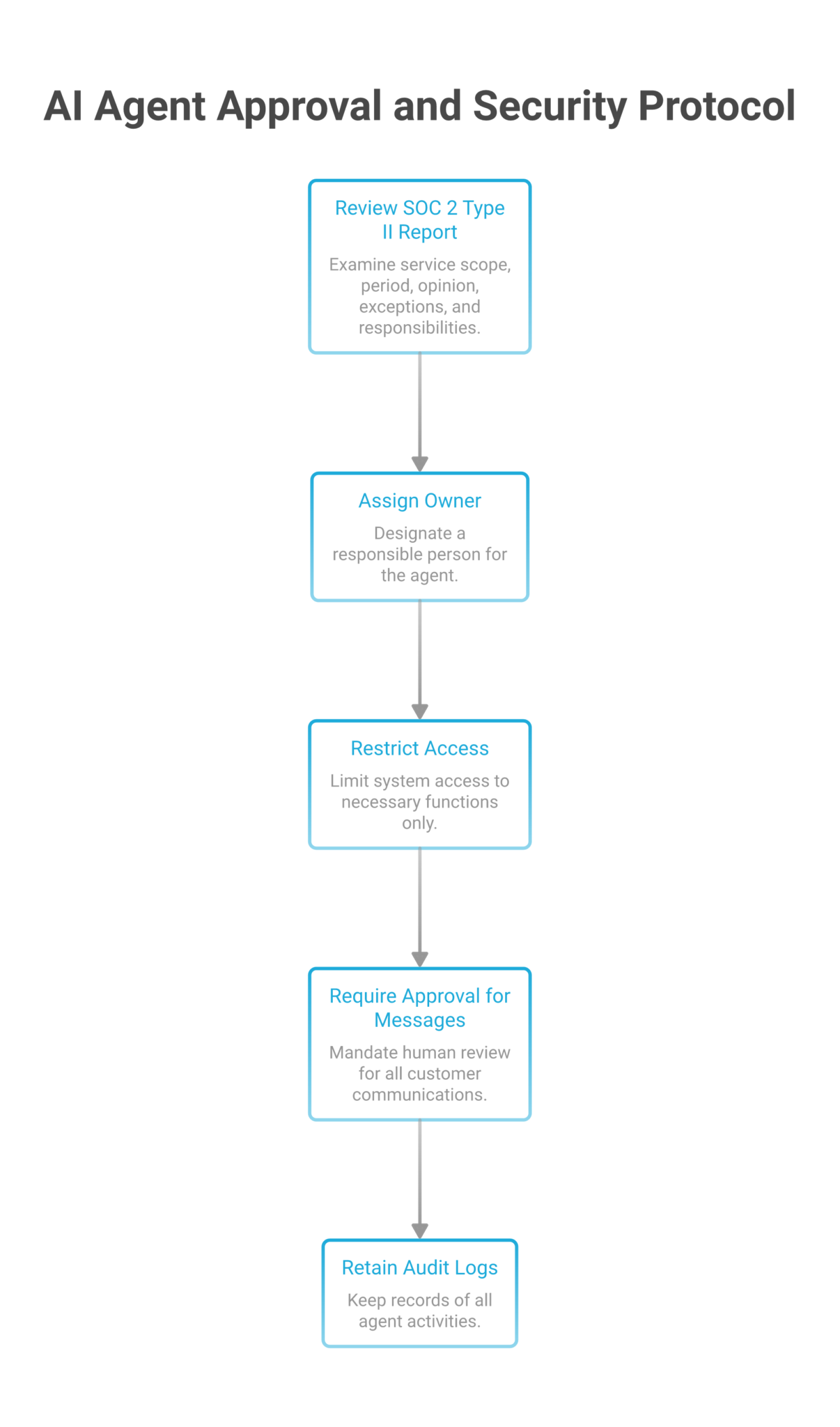
- Give an invoice follow-up AI agent a named owner, limited access, and an approval rule for customer messages.
- Complementary user entity controls assign your team responsibilities such as permission reviews and offboarding.
- Shared chat history provides context for a review. Audit logs provide event records that need their own retention and access controls.
A SOC 2 review becomes urgent when an AI agent sends the wrong invoice follow-up and nobody can show who authorized it. For managers using AI agents for business, the immediate task is to restrict access and retain evidence of decisions and actions. Zenzap maintains a SOC 2 Type II report covering Security, Availability, and Confidentiality for its platform. Customers can request the report through the Zenzap Trust Center and ask how the AI agent service is addressed in the current system description.
A SOC 2 report covers only the services, period, and criteria it names. Start with the vendor’s report, then check the permissions, approvals, and records your team operates. Our secure chat interface can bring the AI agent’s requests and the finance team’s decisions into one conversation for review.
SOC 2 and the Invoice Workflow
SOC 2 reports examine controls at a service organization against applicable Trust Services Criteria developed by the American Institute of Certified Public Accountants (AICPA). For a finance manager, the practical question is whether the described service and tested controls cover the AI agent used for invoice follow-ups.
The report and your responsibilities
The report gives your team a basis for deciding which controls to inspect and which responsibilities to assign.
- SOC 2 applies to service organizations seeking an examination of controls relevant to their services; read the system description to identify the AI agent service, its boundaries, and the criteria covered.
- The opinion and exceptions describe the auditor’s conclusions and any reported deviations; a qualified opinion signals an issue significant enough to modify the opinion, so review the affected controls and period.
- Complementary user entity controls (CUECs) are controls the service organization expects its customers to operate; your team must identify those listed in the report and assign each one to a responsible owner.
A SOC 2 report can inform your review of the service, while your organization still operates its own access and approval controls. For an invoice follow-up, document who can use the AI agent, who can approve a customer message, and where the decision is retained.
Type I and Type II Reports Answer Different Questions
A Type I report addresses the description and design of controls at a point in time. A Type II report also addresses operating effectiveness over a period, often 3 to 12 months. Cyberaccord’s comparison explains the distinction.
Ask for Type II when approving an AI agent because it provides evidence about how controls operated during the examination period. Review tests and exceptions relevant to access and monitoring, then request a bridge letter covering the interval from the report’s end date to today. A bridge letter is a vendor statement about that interval; it is not a new auditor’s opinion.
If a Type I report is the only one available, record the decision and ask when Type II evidence is expected. You can limit the invoice workflow to drafting until your review is complete.
Model Providers and the System Boundary
The large language model provider behind an AI agent is usually a subservice organization when its services form part of the described system. Hosting and other dependencies can also appear in the system description. Identify which provider receives invoice information and what that provider does with it.
Securisea’s explanation of SOC 2 methods describes two ways to treat a subservice organization. Under the carve-out method, the vendor’s auditor excludes the subservice organization’s controls from the examination. Under the inclusive method, relevant controls at the subservice organization are included in the description and examination.
For a carve-out, request the model provider’s own report and review the controls the vendor assumes that provider operates. Also check how the vendor monitors the provider. A provider’s name in a system description alone does not show that its controls were tested in the vendor’s report.
Restrict Access to Invoice Records
Give the AI agent access to the records it needs to prepare a follow-up, and limit who can change its connections or approval rules. The finance manager can allow invoice lookup and draft preparation while reserving customer emails for an authorized approver.
Our AI agents use a separate trusted proxy for authenticated tool calls, so they do not hold credentials directly. We also restrict internet access to approved domains and endpoints. Review access control settings alongside permissions granted in the connected invoice system: both determine what the workflow can reach.
The customer’s permission review is a practical CUEC. Record the AI agent’s owner, connected account, allowed actions, and reviewers; ask the invoice-system administrator to verify that the account cannot access unrelated records or perform unapproved writes. An auditor or compliance officer can receive the permission record and review date as evidence of your team’s control activity.
Record Approval Before a Customer Message
An approval record should identify the request, the decision, and the action that followed. A shared finance conversation lets authorized team members review a draft and add corrections before an approver decides whether to send it.
Approval record checklist
Use a test invoice to check the workflow from request through final outcome.
- Record the invoice reference, proposed recipient, message, requesting AI agent, and request time so the approver knows what is being authorized.
- Capture the approver’s identity, decision, and decision time, then connect that decision to the resulting send event or other recorded outcome.
- Test a rejected request and verify that no customer message is sent; retain the rejection and test result with the workflow evidence.
Our approval controls can require permission for sensitive actions. Check the configured rule and the records available for the specific send action before relying on them as evidence. Also decide who investigates a failed send and where that investigation is recorded.
Map Invoice Controls to Trust Services Criteria
Use the AICPA Trust Services Criteria references below as a starting point for reviewing controls. The mapping describes possible relationships, not an auditor’s conclusion that a particular control satisfies a criterion. Check the report, configuration, and actual evidence for each workflow.
| Control | Trust Services Criteria | What the manager should verify |
|---|---|---|
| Trusted credential proxy | CC6.1 | Authenticated calls use the trusted proxy and credentials remain outside the AI agent. |
| Scoped tool permissions | CC6.1, CC6.3 | Access matches the invoice records and actions needed for the workflow. |
| Access revocation | CC6.2 | Departing users and unnecessary connections lose access promptly. |
| Approved domains | CC6.6 | Outbound access is limited to the approved domains and endpoints. |
| Audit logs | CC7.2 | Available on the Enterprise plan; verify event coverage, access, retention, and export options. |
| Sensitive action approvals | CC8.1; PI1.3 if Processing Integrity is in scope | Approval rules, workflow changes, and processing checks are documented and tested. |
| Topic isolation | C1.1 if Confidentiality is in scope | Invoice context is restricted to the intended topic and authorized participants. |
| Shared conversation history | Supports CC7.2 review | Team members can review the discussion; conversation history is not a substitute for audit logs. |
The mapping makes one distinction clear: a control’s design, its actual configuration, and evidence of its operation are separate things to review. For CC8.1, pay particular attention to changes to the approval workflow itself; an approval before an invoice email does not by itself demonstrate effective change management.
Infographic alt text: Diagram showing an invoice follow-up AI agent reading invoice data through a credential proxy, requesting a finance manager’s approval in a shared chat, and recording the outcome for review.
Prepare Evidence for a SOC 2 Review
Build an evidence record around the actual workflow. The items below connect permissions, decisions, and operational checks without asking a reviewer to reconstruct the process from memory.
- Keep the vendor’s Type II report, relevant exceptions, bridge letter, and subservice organization reports together; the system description and auditor’s tests show what was covered during the examination period.
- Save an access record from your administration and connected invoice system showing the AI agent’s account, authorized users, and permissions; use it to review controls associated with CC6.1 and CC6.3.
- Retain the approval decision and available action logs for a sample follow-up, including the rejected test; together they let a reviewer trace the request and outcome for monitoring and processing review.
- Document periodic reviews and access changes, including offboarding; the customer-maintained record shows how your team operated the CUECs assigned to it.
Audit logs are available on the Enterprise plan; verify the events, retention period, and export options before relying on them.a. Our admin controls and access revocation guidance covers administrative decisions that accompany a departure.
A sample evidence entry can be short enough to maintain alongside regular finance work:
- Workflow: Invoice follow-up for overdue customer invoices.
- Owner: Finance manager; backup owner: Finance director.
- AI agent access: Read approved invoice records and prepare a draft; sending requires approval.
- Approval rule: An authorized finance team member reviews the recipient and message before sending.
- Review method: Compare the approval record with the action log, including a rejected test.
- Evidence location: Restricted finance compliance folder and the designated log location.
- Review date: Record the date of the completed review.
Ownership Changes and Access Removal
When the finance manager leaves, assign a new owner before the workflow continues. Remove the departing person’s access, review any connected accounts they controlled, and confirm that the replacement can view pending approvals and evidence.
Check the AI agent’s permissions independently of the departing employee’s chat membership. A connected account may remain active after a person leaves, so the new owner should verify the connection and remove any access the workflow no longer needs. Our chat history and access revocation guidance covers records and access during that transition.
Review One Invoice Workflow With Your Team
Choose one recurring invoice follow-up and trace it from invoice lookup to approval and send record. The manager, approver, and system administrator can review the same example together, identify missing evidence, and assign an owner for each correction.
A completed review gives the team a defined owner, documented access, an approval test, and a place to find the evidence. For a wider rollout, review the enterprise security options alongside your documented requirements. Keep the first workflow limited until the team can show who had access, who approved the message, and what happened after the decision.
FAQ
Q: Does a SOC 2 report certify an AI agent?
A: A SOC 2 report is an auditor’s report on a service organization’s system and controls, not a separate certification of an AI agent. Read the system description to determine whether the AI agent service is included.
Q: What’s the difference between SOC 2 Type I and Type II?
A: Type I addresses control design at a point in time; Type II also examines operating effectiveness over a period. A manager evaluating an ongoing workflow should ask for Type II evidence and a bridge letter for the subsequent interval.
Q: Does the AI model provider need its own SOC 2 report?
A: A model provider’s own report is useful evidence when its controls are carved out of the AI vendor’s examination. Check the system description and request the provider’s report to review those controls directly.
Q: What are CUECs and which ones apply to AI agents?
A: Complementary user entity controls are controls the service organization expects its customers to operate. For AI workflows, the report may assign customers responsibility for managing access, reviewing permissions, or other controls described in the report.
Q: Is a team conversation an audit log?
A: A team conversation can show the context around a request and decision. An audit log records events for review, so verify its coverage and retain it alongside relevant conversation history.
Q: What should happen when an AI agent’s owner leaves?
A: Assign a replacement owner, remove the departing person’s access, and review the AI agent’s connected permissions. The new owner should also take responsibility for pending approvals and evidence reviews.
About Zenzap
Zenzap gives you AI agents that do work for you, connected to your tools and your team through a secure chat. Setup takes one click: no code, no developer. Unlike Claude or ChatGPT, the agents come already built and connected. You talk to them like a coworker: tag them into chats, correct them once and they remember. They act across your tools, automate workflows, build reports and graphs, summarize chats, flag what needs attention and coordinate people and tasks. One person gets value alone. Add your team, and every correction makes the agent sharper. Agents start in about 300 ms and run on managed infrastructure. Memory stays isolated by topic, and agents never hold credentials. They reach only approved domains, and sensitive actions need your approval.