


Employees adopt AI tools faster than leaders can approve them. AI agents make that even riskier because they take action inside business tools, so if something goes wrong you can end up with a message sent to the wrong person, exposed data, or costly charges.
Here’s a quick test of whether this applies to your company: do you know which AI tools and AI agents your teams use today?
This guide covers what shadow AI looks like in 2026 and why AI agents raise the risk, then walks through 5 controls for keeping AI agents secure.
What Is AI Agent Governance?
AI agent governance is the set of rules, permissions, approvals, and records that decide what AI agents can access and do at your company. It answers 4 questions about every AI agent:
- Who owns it: Who is accountable for what the AI agent does.
- What it can access: Which tools and data the AI agent can see and change.
- What needs approval: Which actions someone needs to approve.
- What gets recorded: Which agent actions are logged and saved.
AI agents need different governance from AI chat tools because, while a chat AI tool produces an answer, an AI agent can actually update a record, send a message, or start a payment.
Permissions (what an AI agent can access) and approvals (a person’s sign-off before it acts) control how much damage one mistake can cause and help prevent costly mistakes.
You might think governance means a list of rules that slow people down. But done well, it can actually speed them up: clear rules and controls let people use AI agents with confidence, because everyone knows exactly what an AI agent can and can’t do.
What Is Shadow AI in the Workplace?
Shadow AI is any AI tool or AI agent that employees use without approval from IT or security. It usually happens out of convenience – the approved option is slower, harder to use, or missing.
It’s easy to think, what’s the big deal? So you pasted a paragraph into an AI tool to save a few minutes. But the issue is, the company can’t see what was shared or what was done with that data, and that can be a major security breach.
Shadow AI Is Already Common Among Knowledge Workers
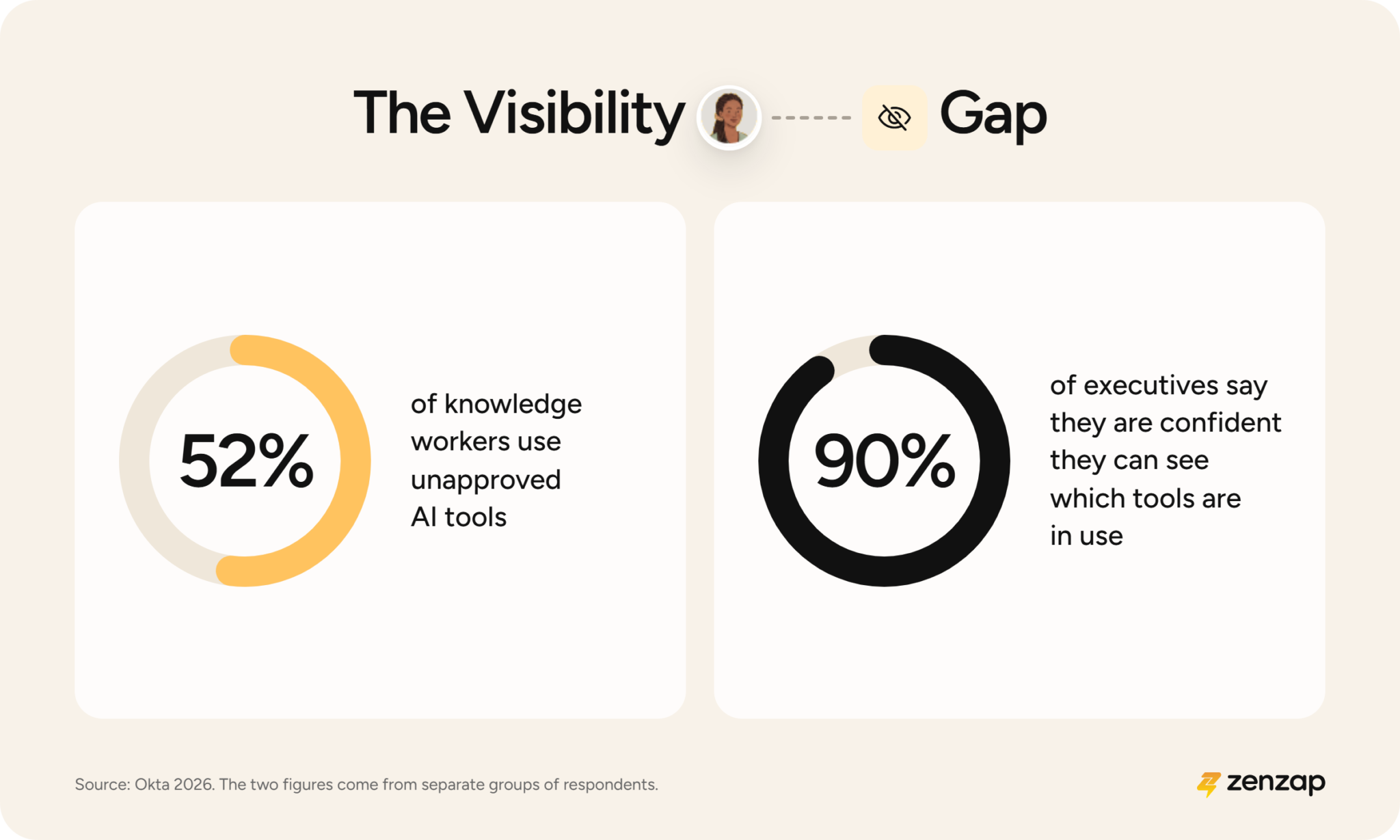
Research shows that 52% of knowledge workers use unapproved AI tools, while most executives say they are confident they can see which AI tools their organization uses.
This shows a huge visibility gap: leaders believe they can see what’s in use, while in reality, employees use tools leaders haven’t approved.
You might assume your teams already stick to approved tools. But this research suggests checking before you count on it.
Employees Share Sensitive Data With Unapproved AI Tools
Among workers who use unapproved AI tools, many share internal messages and emails, HR-related information, and confidential documents.
Most of this use comes from people trying to meet deadlines. They experiment with AI tools and often don’t know what data a tool can reach.
It’s not that employees are careless, they just have deadlines, pressure, and a tool that can get things done in seconds – they don’t think about it too much, they just do what’s easiest.
Executives Use Unapproved AI Tools Too
A recent survey found that nearly two-thirds of senior decision-makers use unapproved AI tools, far more than lower-level employees.
It’s tempting to aim policy at new hires or junior staff, but a policy aimed only at them leaves out the people with the widest access to sensitive data, and senior leaders also set the example for everyone else.
Why AI Agents Raise the Risk of Shadow AI
With a chat tool, the risk is what someone pastes in. With an AI agent, the risk is what it can do, because it can hold credentials, such as logins, and act inside your business tools on its own.
Think of it this way: asking a colleague for advice is one thing, but handing that colleague your login is something else. A chat tool is closer to the first, and an AI agent can be closer to the second.
AI Agents Often Exceed Their Intended Permissions
A recent survey found that 53% of organizations have had AI agents exceed their intended permissions, so the AI agents did things they weren’t supposed to do.
You expect AI agents to stay inside the limits you set, but limits that only exist on paper don’t hold up, so someone still has to set each AI agent’s access and check it regularly, which is why every AI agent needs an owner.
Governance Gaps Lead Enterprises to Pull Back AI Agents
One forecast predicts that by 2027, 40% of enterprises will pull back or shut down autonomous AI agents, because they only find their governance gaps after something goes wrong in live use.
Interest in AI agents is high, but a separate survey names security and risk as the top barrier to scaling them.
Why Banning AI Tools and Setting Blanket Rules Backfire
A ban takes away the approved path and leaves only the unapproved one, and one survey found that more than half of employees will find their own alternatives when they don’t have the AI tools they need.
While a ban can feel like the safest move, and it’s easy to see why leaders reach for it, in the end of the day people still have deadlines, and the unapproved tools are still a click away.
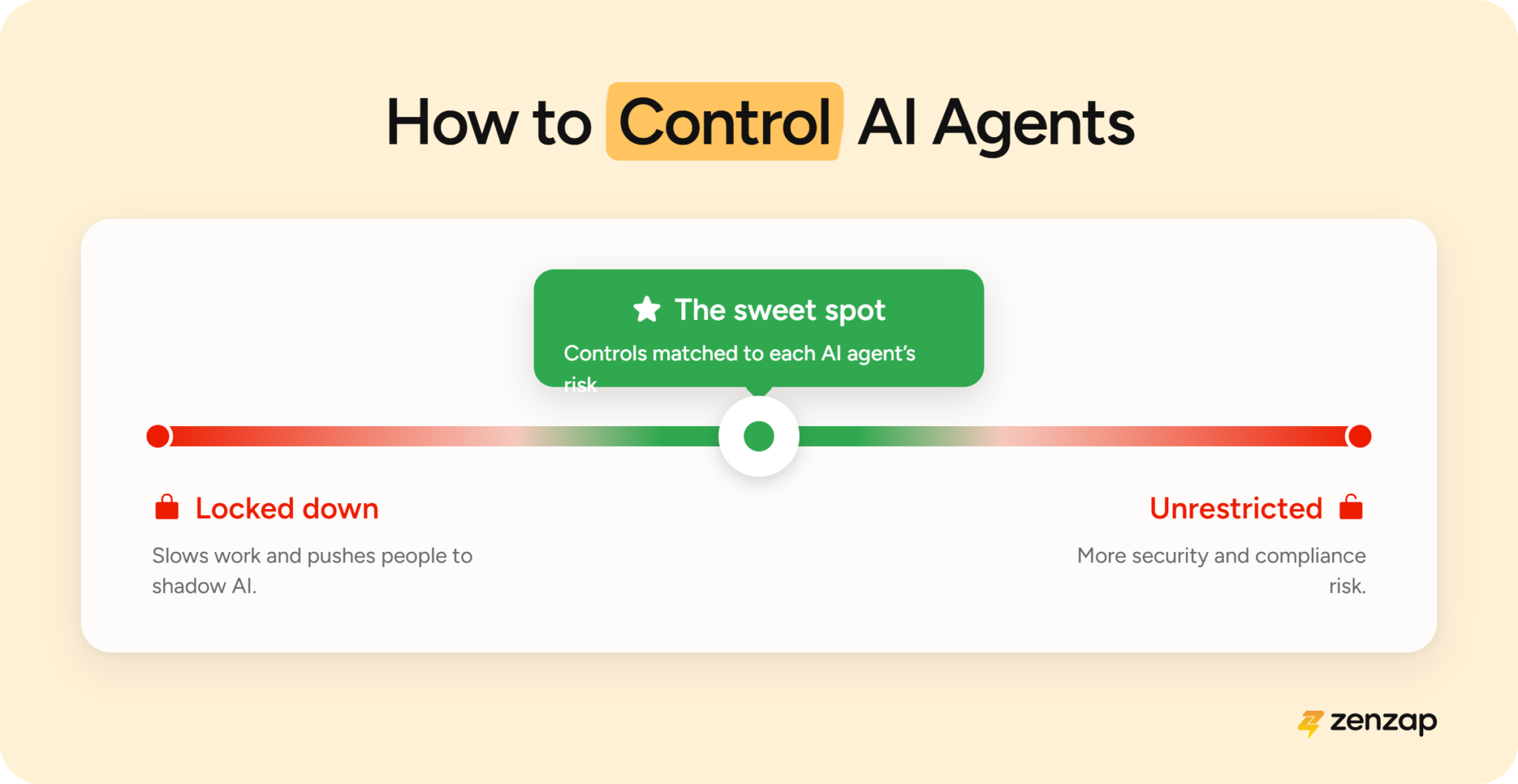
Blanket rules can easily fail in the other direction too. If you apply the same controls to every AI agent, you slow down the low-risk ones and push people to build workarounds, while the risky ones still don’t get enough protection.
Leaders get much better results when the approved path is the easiest path, and when the controls match the risk of each AI agent.
Match AI Agent Governance to Each AI Agent’s Autonomy Level
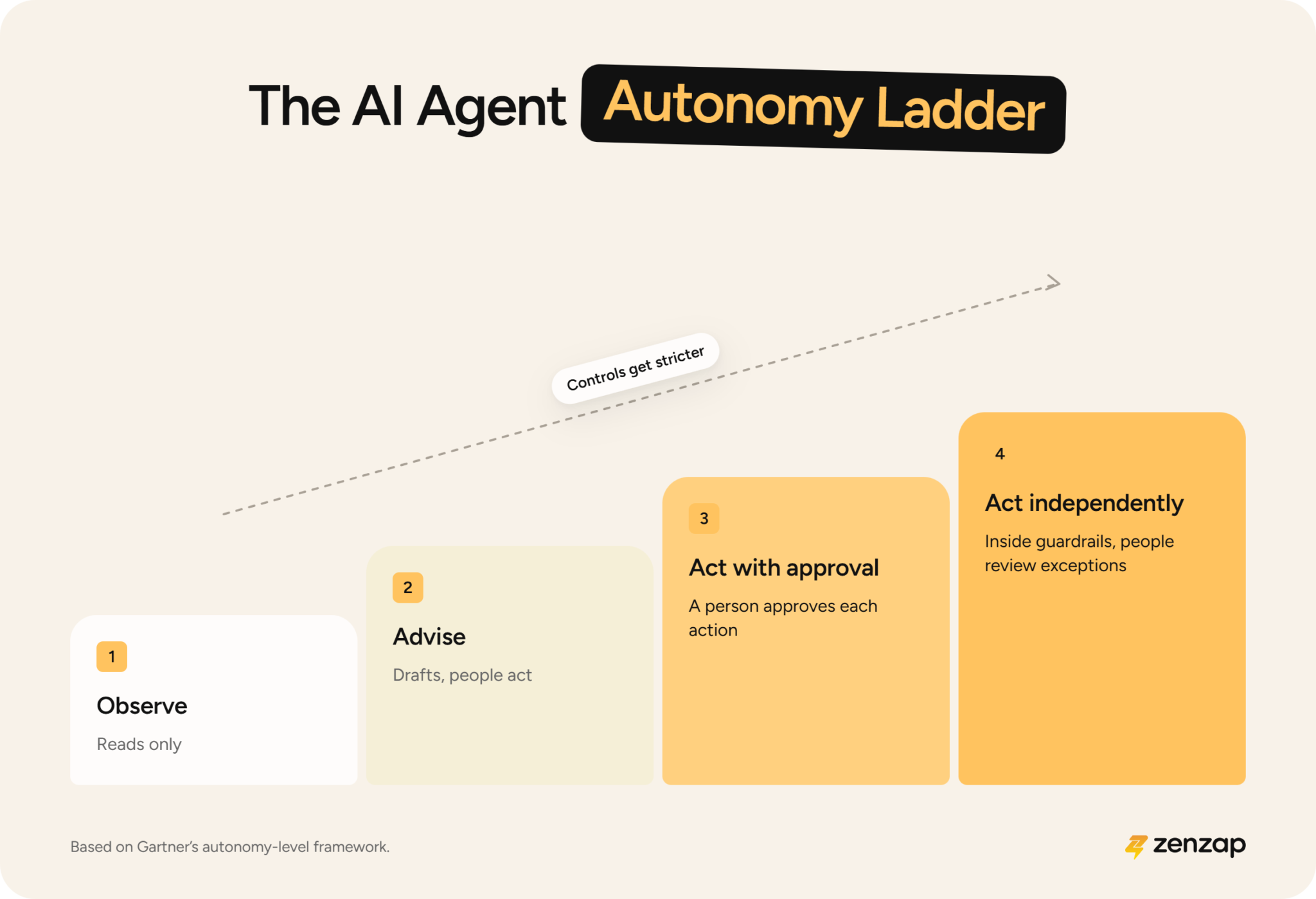
Analysts recommend classifying AI agents by autonomy level and matching the controls to each level. Here are the 4 levels of AI autonomy:
- 1. Observe: The AI agent reads defined data sources and only shows results to the person who asked. Governance focus: limiting which data it can see, requiring sign-in, keeping usage logs, and basic testing.
- 2. Advise: The AI agent drafts recommendations or proposed actions, and people review them and carry them out. Governance focus: the Level 1 controls, plus accuracy checks and training on how much to rely on what it produces.
- 3. Act with approval: The AI agent takes actions, like writing data or sending messages, but only after a person approves each one. Governance focus: approval workflows, activity logs, and incident response, plus care to avoid approval fatigue.
- 4. Act independently: The AI agent takes actions on its own within set guardrails, and people review the exceptions and the logs. Governance focus: continuous monitoring, rollback, automatic shutoffs, and a named owner.
A read-only AI agent that summarizes documents needs much lighter controls than one that can send messages or change records, so matching the controls to the level keeps low-risk work fast and risky work protected.
The best place to start is what each AI agent can actually do, because a label like “assistant” doesn’t tell you whether it can send a message or change a record.
The 5 Controls Every AI Agent Governance Program Needs
The 5 controls are a named owner for every AI agent, least access, approval before changes, an activity log, and an approved path people want to use. Here’s how each one works:
- A named owner for every AI agent: One person is accountable for what the AI agent does and what it can access.
- Least access per AI agent and per tool: Each AI agent gets only the access its job needs, set one tool at a time.
- Approval before actions that change data: A person confirms an action, like updating a record or sending a message, before it happens.
- An activity log: Every request an AI agent makes gets recorded, so leaders can go back and see what happened.
- An approved path people want to use: The approved AI agents are easy enough to use that employees stop looking elsewhere.
Good governance keeps every AI agent accountable and limited to what its job needs, and it makes the approved path the easiest one for employees.
You don’t need all 5 controls on day one. You can start with an owner and read-only access, and add approvals as an AI agent takes on more.
How to Roll Out AI Agent Governance: A Practical Order for Leaders
You can roll out AI agent governance by finding out what’s in use, writing a short policy, offering an approved option, starting read-only, and reviewing every month. Here are the steps in order:
- Find what’s in use: Ask employees which AI tools they use, and check sign-in and expense records.
- Write a short policy: Say which data can go into which tools, and put it where employees will see it.
- Offer an approved option: Give employees an approved AI agent they can start using right away.
- Start read-only: Begin with AI agents that observe and advise, then add actions that need approval.
- Review on a schedule: Check the activity log and permissions every month, and remove access nobody uses.
If this feels like a lot, just start with the first step, because knowing what’s in use makes every other step easier.
How Zenzap Approaches AI Agent Governance
Zenzap is a team chat platform built around AI agents, and it’s one of the leading solutions for governing AI agents across a company. Zenzap built its AI agents for business so owners and admins stay in control from the very first AI agent.
In Zenzap, a team and its AI agents can work in the same chats, an approach called multiplayer AI, so everyone in the chat can see what each AI agent is doing. This guide to multiplayer AI agents covers the approach in more depth.
When you’re comparing AI agent platforms, here are good questions to ask every vendor: who owns each AI agent, what can it reach, what needs approval, and what gets logged?
Here’s how Zenzap handles each control:
- Named owner: Every AI agent has an accountable owner, and it only works in group chats the owner belongs to.
- Least access: Admins set a rule for each AI agent and each connected tool: Always allow, Needs approval, or Never allow. If rules conflict, the most restrictive one wins. Admins can also turn off a connector, which is a connection to a business tool, for the whole organization.
- Approval: Actions that change something can require approval through an Approve or Deny card in the chat. If nobody responds, it counts as a denial, an approval only covers that one request, and declined actions aren’t retried. Actions that cost money have spending caps.
- Activity log: Every outbound request, meaning anything an AI agent sends to another system, is logged with its destination, action type, outcome, and credential type, but never with secrets. If the logging system goes down, calls to connected apps stop.
- Isolation: Each AI agent runs in its own isolated cloud computer for each group chat, with no admin rights or infrastructure credentials. Outbound traffic goes through a firewall proxy, a checkpoint that holds the credentials, so the AI agent never sees them.
- Memory and removal: What an AI agent remembers stays separate for each conversation, and it’s purged when a member is removed or an organization leaves.
- Compliance: SOC 2 Type II, GDPR, and HIPAA compliant, with US or EU data residency.
Prompt injection can’t be eliminated by any single layer, and Zenzap doesn’t claim otherwise. Zenzap treats external content as information to read, and it keeps credentials out of the AI agent’s view.
Zenzap’s stance is that owners stay in control, even if that slows an AI agent down. The people who run an AI agent are accountable for what it does, and an AI agent they can control is one teams will trust with more work.
In Short: AI is Secure When the Approved Path Is the Easy Path
Shadow AI increases where approved tools are slow or missing, and AI agents add real risk because they act inside your business tools.
Strong governance gives every AI agent an owner, limited access, approval for actions that change data, and an activity log, and it gives employees an approved AI agent that’s easy enough to use that they stop looking elsewhere.
Start by building your first AI agent in Zenzap and get AI agents that can really be secure and under your control.
AI Agent Governance and Shadow AI FAQ
What is an AI agent?
An AI agent is AI that takes actions for people inside business tools, like updating a record or sending a message, while a chatbot only answers questions. You tell an AI agent what you want done, and it does the work, which is what makes AI agents so useful.
What is AI agent governance?
AI agent governance is a set of rules for what AI agents can access and do at a company. It covers who owns each AI agent, what it can reach, which actions need approval, and what gets recorded. Done well, it’s what lets a company use AI agents with confidence.
What is shadow AI?
Shadow AI is AI that employees use without approval from IT or security. It usually happens because the approved option is slower, harder to use, or missing, and it can expose company data. It also shows that employees want help from AI, and an approved option lets a company turn that demand into a benefit.
Why are AI agents riskier than AI chatbots?
AI agents are riskier than AI chatbots because they take action, while chatbots only answer questions. An AI agent can update a record or send a message, so one mistake can change real data or reach a real person. But that same ability to act makes AI agents more valuable, because they finish work for people, so the risk comes down to controls: an owner, limited access, and approvals.
How do you find shadow AI in the workplace?
You find shadow AI in the workplace by asking employees which AI tools they use and checking sign-in, expense, and network records for tools nobody approved. It’s safest to assume some already exists, because leaders can’t govern what they can’t see. And what you find is useful: the tools employees choose show where AI already helps, so they’re good candidates for an approved option.
Should you ban AI tools in the workplace?
Banning AI tools in the workplace backfires, because more than half of employees will find their own alternatives when they don’t have the AI tools they need. AI helps people work faster, so a better approach is to offer an approved AI option that’s easy to use and set controls that match the risk.
Who is responsible when an AI agent makes a mistake?
Your organization is responsible when an AI agent makes a mistake, so every AI agent needs a named owner. That owner is accountable for what the AI agent does and what it can access, and an activity log and approval steps help them catch and fix problems. With a clear owner, an AI agent is easier to trust and easier to give more work.