Key Takeaways
- Build AI agents when the work is repeatable, tool-based, and easy to measure. Hiring AI employees makes sense only when the job requires broad judgment, human accountability, and constant exception handling.
- Use payback speed as the first filter. A customer service AI agent with a median payback period of 4.1 months is a different decision from an engineering workflow that may take 9.3 months to break even.
- Put governance in the design from day one. Security, approval controls, scoped access, and audit logs matter more once AI agents start touching real systems.
- Favor a shared chat model when multiple people need to see the same context, correct the same AI agent, and keep work moving inside the same thread.
- Measure the outcome in hours saved, revenue recovered, errors avoided, or leads moved, not in the number of AI tools you bought.
Introduction
Managers are no longer choosing between a person and software in the abstract. They are deciding whether a workflow should be handled by AI agents, staffed by a human, or run by a mix of both. The fastest wins come from work that repeats, crosses tools, and leaves a trail you can measure. For managers evaluating build AI agents vs hiring AI employees, the real question is which tasks deserve judgment and which tasks deserve automation.
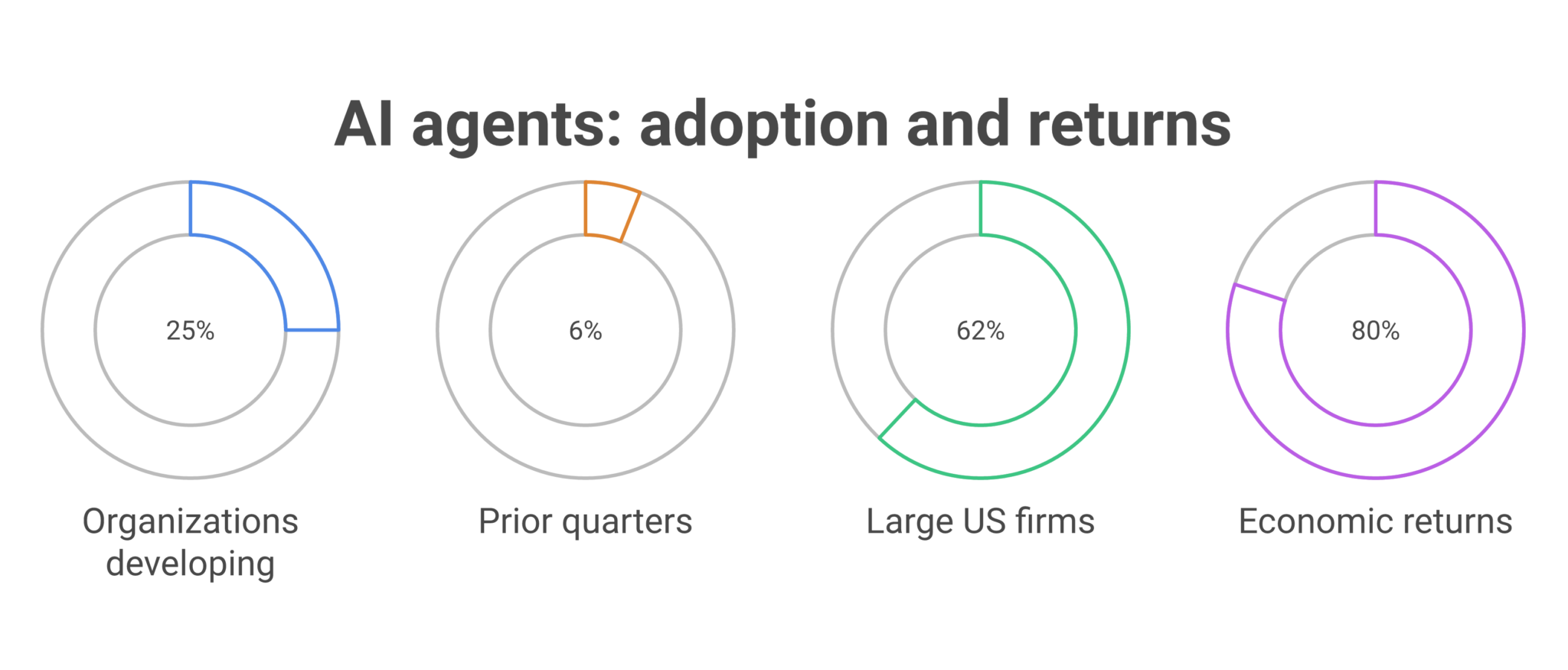
The market is already moving. Microsoft’s 2026 Work Trend Index says it analyzed “trillions of anonymized Microsoft 365 productivity signals” and surveyed “20,000 workers using AI across 10 countries,” which shows how quickly organizations are reorganizing work around AI at scale (Microsoft Work Trend Index 2026). KPMG’s Q3 2026 pulse found that 25% of organizations were actively developing or implementing multi-agent systems, up from 6% in the prior two quarters, while 62% of large US organizations were already building, developing, or deploying AI agents (KPMG Q3 AI Pulse 2026). That is not experimentation. It is operations.
Managers who make the wrong call usually do not lose because the AI was bad. They lose because the workflow was vague, the permissions were unclear, or the team had no way to see what the AI was doing. The better comparison is simple: hire people for judgment, build AI agents for repeatable execution, and choose a control layer that lets the team manage both without adding chaos.
Table of Contents
- Why the comparison is about work design, not hype
- Where AI agents beat AI employees on speed and cost
- Where AI employees still win on judgment and accountability
- The governance stack managers need before rollout
- What the best workflow map looks like in practice
- Questions managers should ask before choosing either path
Why The Comparison Is About Work Design, Not Hype
The clearest decision rule is to separate judgment from execution. AI agents are strongest when a manager can describe the task, connect the tools, and define the approval rules. AI employees, human or AI-assisted, matter when the work is ambiguous, emotionally sensitive, or full of exceptions that change every week.
BeamSec reports that more than half of organizations now deploy AI agents for multi-stage workflows, with 16% running cross-functional processes across multiple teams, and 80% saying their AI agent investments already deliver measurable economic returns (BeamSec on enterprise AI agents). Those numbers fit a manager’s reality. Most teams do not need a new generalist. They need one workflow that stops bouncing between inboxes, spreadsheets, calendars, and ticketing tools.
A useful way to think about the choice is by work type. If the task is invoice follow-up, lead routing, report generation, scheduling, or daily status collection, build the AI agent. If the task requires negotiation, hiring decisions, conflict handling, or policy judgment, keep the human in the loop. The mistake is trying to hire AI employees to do work that is already structured enough for automation.
| Dimension | Building AI agents | Hiring AI employees |
|---|---|---|
| Best fit | Repeatable workflows with clear inputs, outputs, and approval points | Broad roles with ambiguous judgment, shifting priorities, and human accountability |
| Setup | Connect tools, set permissions, define actions | Recruit, train, manage, and retain people or people-like roles |
| Risk profile | Security, access control, auditability, and bad automation design | Hiring cost, turnover, inconsistency, and training overhead |
| Value metric | Hours saved, errors reduced, revenue moved faster | Decision quality, accountability, and relationship handling |
Where AI Agents Beat AI Employees On Speed And Cost
AI agents win when the work repeats often enough to compound savings. Digital Applied reports that knowledge workers using production AI agents recover a median 6.4 hours per week per seat, with senior practitioners saving 10 to 12 hours and customer service reps saving 8 to 9 hours (Digital Applied AI agent ROI analysis) . That is the kind of number managers can plan around.
The same report says median payback periods land at 4.1 months for customer service, 6.7 months for marketing operations, and 9.3 months for engineering. It also says only 41% of agent rollouts cross positive ROI within 12 months, while 19% never reach payback. In other words, the workflow choice matters as much as the AI choice.
A manager should also look at time to first value. Digital Applied says vendor-deployed AI agents reach positive ROI 2.4 times faster than custom builds, with time to first value averaging 38 days for vendor agents versus 94 days for in-house custom builds. That gap is hard to ignore when the business needs a result this quarter, not next year.
The clearest high-return use cases are operational. Customer service, code review, and marketing operations show the highest productivity gains in that analysis, while legal and clinical work lag because the risk and judgment burden is higher. If you need a practical test, start with invoice follow-up automation, lead routing automation, or employee onboarding automation before you touch a workflow that affects patient care or legal exposure.
Where AI Employees Still Win On Judgment And Accountability
AI employees make sense when the job is closer to a role than a workflow. They are the better fit when the task needs discretion, escalation judgment, or conversations that depend on tone, trust, and context that changes every day.
That line matters in legal, health care, HR, and customer-facing leadership. A hiring manager can ask a human employee to interpret nuance, weigh tradeoffs, or pause for a policy review. An AI agent can route the case, summarize the file, or flag the issue, but it should not be left to improvise where the cost of a mistake is high.
PwC’s 2026 work on agentic AI notes that 75% of business executives believe agents will reshape the workplace more than the internet did, and 88% are opening additional budgets for internal AI initiatives (PwC AI Agent Survey). That level of investment does not erase the need for people. It raises the bar for deciding which tasks require human judgment and which can be handled by AI agents under a tighter operating model.
Managers should resist the urge to copy a job description into a system and call it automation. A better approach is to split the role into tasks. Let people handle conflict resolution, exception handling, and approval ownership. Let AI agents handle intake, routing, reporting, summarization, and follow-up across tools.
The Governance Stack Managers Need Before Rollout
The control layer is where most AI projects succeed or fail. Without scoped access, approval rules, and a clear audit trail, even a useful AI agent can create more work than it removes.
That concern shows up in the data. Merge’s AI agent statistics report says 72% of companies cite security risks and 70% cite implementation difficulty as reasons they hesitate on MCP, while 75% plan to outsource their integrations with MCP servers. The same source says 73% of companies will use MCP by the end of 2026, with 43% already connected and another 53% planning to do so within 12 months. Security and implementation are not side issues. They are the adoption gate.
Managers also need to watch for false confidence in vendor claims. LoopStudio says Gartner estimates only about 130 of the thousands of vendors marketing agentic AI offer genuine agentic capabilities, with the rest falling into “agent washing” (LoopStudio AI agents statistics 2026). That is a warning to check permissions, memory boundaries, and approval controls before buying anything that claims to act on its own.
A practical governance checklist is short. Limit the domains and tools the AI agent can reach. Require approval for sensitive write actions. Keep memory scoped to the topic or workflow. Keep a visible trail of every action. If your team cannot explain what the AI did yesterday, the rollout is too loose.
What The Best Workflow Map Looks Like In Practice
The strongest implementation map starts with one owner, one workflow, and one measurable result. From there, you can expand into team chat so the same AI agent can handle context from multiple people without losing the thread.
Our guide to building AI agents that work across tools and team chats lays out the operational pattern in plain terms: connect the work tools, define the job, and keep the AI agent inside the same conversation where the team already works. That pattern matters because context is part of the job. A marketing manager, a clinic director, and a construction ops lead all need different workflows, but they all need the same thing, a place where the AI can see the request, take action, and stay accountable to the team.
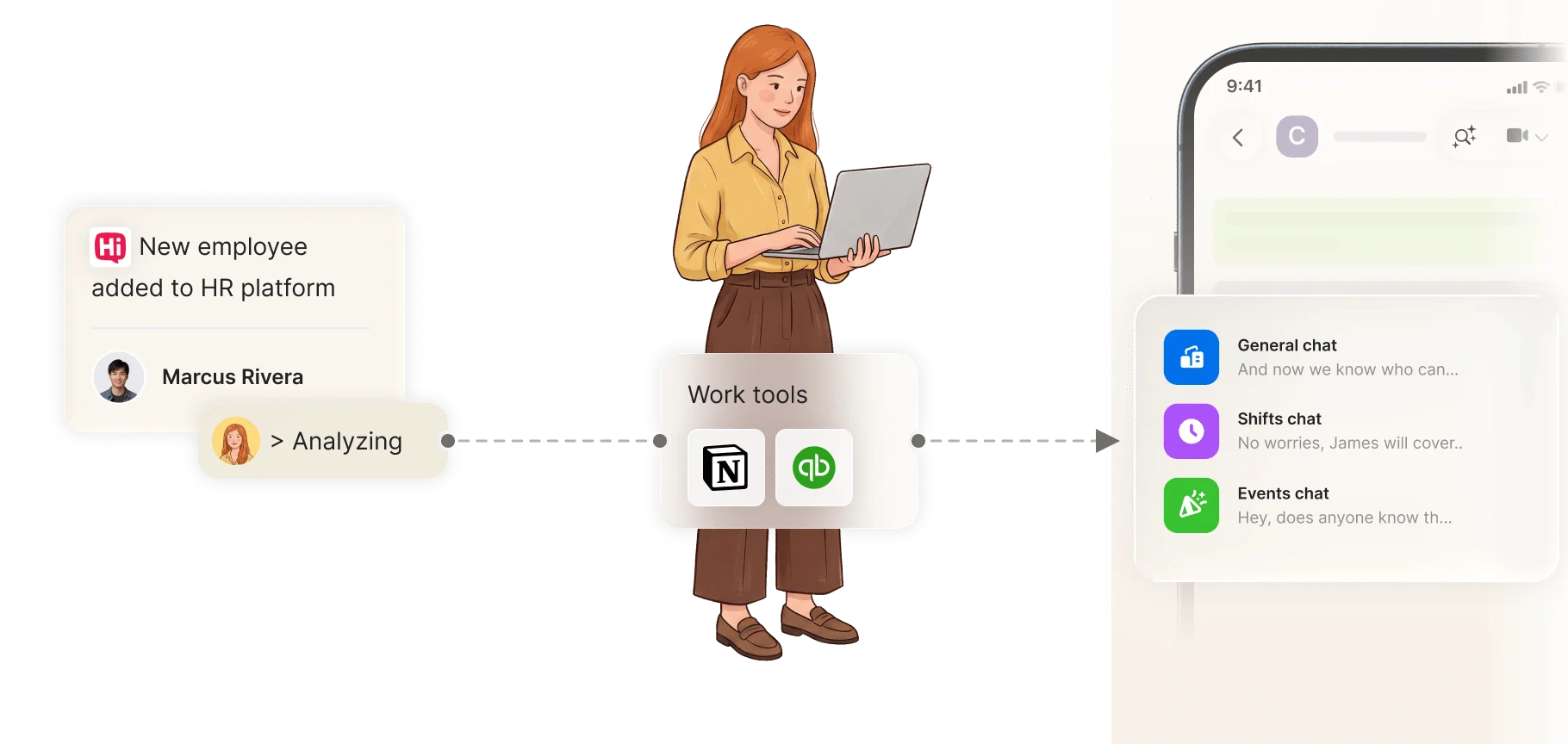
A manager can use that model for lead routing, invoice follow-up automation, daily project reporting, customer service triage, and onboarding checklists. One person can get value alone, then the team can reuse the same AI agent once the workflow proves itself. That is the practical middle ground between a private chatbot and a full role replacement.
We also wrote about what managers should and should not do with AI agents in secure team chats in this internal guide. The short version is direct: give the AI agent a narrow job, give it the right context, and keep human approval where the risk is real.
Questions Managers Should Ask Before Choosing Either Path
The best decision starts with a few blunt questions. If you cannot answer them cleanly, the workflow is not ready for automation, and the role is probably not ready for an AI employee either.
Ask whether the task repeats often enough to measure. Ask whether the input, action, and output can be described in plain language. Ask whether the risk of an error is low enough for approval-based automation. Ask whether the team needs shared visibility or private handling. If the answer is yes to all four, build the AI agent first.
One more question matters for budget holders. If a knowledge worker can recover 6.4 hours per week and a 10-person team can recover roughly 64 hours weekly, what work will you redirect into that time? Without that answer, even a strong AI agent will feel like a novelty instead of an operating change.
For managers in SAAS, legal, retail, health care, construction, and service businesses, the right choice usually is not a dramatic one. It is a workflow choice. Choose people for judgment, choose AI agents for repeatable execution, and keep both visible inside the same secure operating process.
Choose The Workflow Before You Choose The Role
If you start with the job title, you will overhire or overautomate. If you start with the workflow, the decision becomes clearer, because the work itself tells you what belongs to a person and what belongs to an AI agent.
That is why the strongest teams are treating AI agents as operational resources, not as substitutes for every kind of employee. They are using them to cut repetitive work, move faster on routine tasks, and keep human attention on the exceptions, the approvals, and the conversations that require judgment. That approach keeps control tight and value measurable.
FAQ
Q: When should a manager build an AI agent instead of hiring for the work?
A: Build an AI agent when the work repeats, uses the same tools, and has measurable outputs. A good example is lead routing, invoice follow-up, daily reporting, or onboarding checklists. If the task can be described in steps and approved in advance, automation usually pays back faster than a new hire. If the work depends on discretion, trust, or constant exception handling, a human role is the better fit.
Q: How do I know if the workflow is ready for an AI agent?
A: The workflow is ready when you can explain the input, action, and output without adding a lot of caveats. You should also know who approves the sensitive steps and what systems the AI agent must touch. If the team already does the task every week, that is a strong signal. If the process changes every day, it may need more human involvement first.
Q: What numbers should I use to justify the decision?
A: Start with hours saved, payback period, and error reduction. Digital Applied found a median of 6.4 hours saved per week per seat, with customer service payback at 4.1 months and marketing operations at 6.7 months. Those numbers make it easier to compare against hiring cost and management overhead. If you cannot estimate the savings, the use case is probably too vague.
Q: Why do governance controls matter so much?
A: Because AI agents can create new risk if they can reach the wrong tools or take the wrong action. Security risks and implementation difficulty are major reasons companies hesitate on integrations, according to Merge’s AI agent statistics summary. Approval controls, scoped access, and audit trails reduce that risk. They also make it easier to explain what the AI agent did and why.
Q: Can one person get value from AI agents without rolling them out to the whole team?
A: Yes. One person can connect a tool, automate a process, and see a measurable result on their own. That is often the fastest way to prove value. Once the workflow works, the team can join the same chat and use the same AI agent with shared context. That is often how adoption spreads inside a company.
Q: What is the biggest mistake managers make with AI employees?
A: They try to use them as a substitute for every job instead of a tool for specific tasks. That usually leads to weak controls, unclear ownership, and disappointing results. The better move is to break work into parts and decide which parts need judgment and which parts need execution. Once you do that, the choice becomes much easier.
About Zenzap
Zenzap gives you AI agents that do work for you, connected to your tools and your team through a secure chat. Setup takes one click: no code, no developer. Unlike Claude or ChatGPT, the agents come already built and connected. You talk to them like a coworker: tag them into chats, correct them once and they remember. They act across your tools, automate workflows, build reports and graphs, summarize chats, flag what needs attention and coordinate people and tasks. One person gets value alone. Add your team, and every correction makes the agent sharper. Agents start in about 300 ms and run on managed infrastructure. Memory stays isolated by topic, and agents never hold credentials. They reach only approved domains, and sensitive actions need your approval.