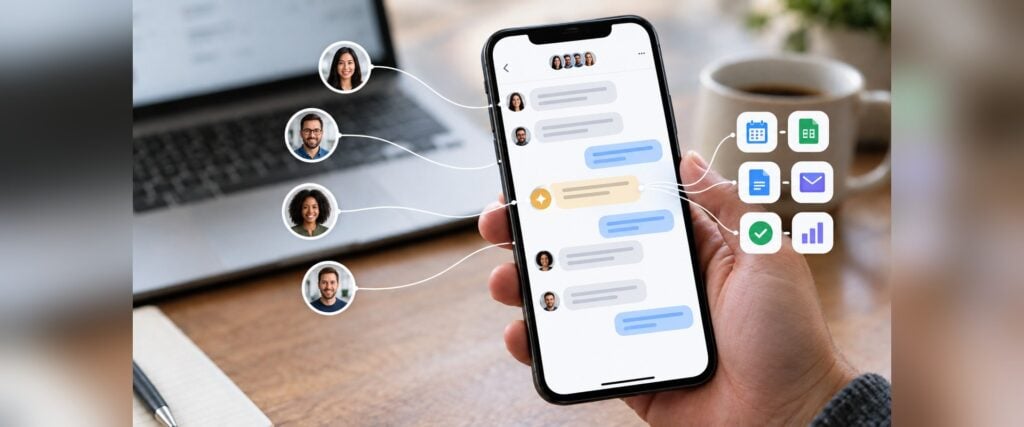


AI agents for the workplace are AI systems that work with your team in the same chats and take action for your team: they update a record, send a report, flag a problem, or coordinate a handoff in your business tools. A chatbot answers a question. An AI agent finishes part of the job.
More employees use AI for work every year, and more organizations are putting AI agents to work. Most of the productivity gains so far belong to individuals, and leaders are still working out how whole teams can use AI together.
Because those gains stay personal, AI is shifting from single-player AI, where one person works with one AI assistant, to multiplayer AI, where a whole team and its AI agents work together in the same chats.
Zenzap is leading the shift toward multiplayer AI for work. Its platform is a team chat built around AI agents.
This guide is for the leaders deciding how their company and teams use AI. The guide explains the AI agent market for work in 2026, lays out the 6 types of AI agent solutions your company can choose from, and shows how to evaluate them.
What Are AI Agents for the Workplace?
An AI agent is software that takes a goal in plain language and works toward it using connected tools. For example, an AI agent can log a closed deal in HubSpot or post a reminder that a certification expires in 30 days.
People often confuse chatbots, rule-based automation, and AI agents:
- Chatbots answer questions and take no action in your tools.
- Rule-based automation follows a fixed script and breaks when something changes.
- AI agents understand plain language, take action in connected tools, and adapt when the request changes.
AI agents also go a step beyond AI assistants, which help a person with a request and wait for the next instruction. AI agents handle specialized tasks and can carry a complex task from start to finish.
What the 2026 Data Shows About AI Agents for the Workplace
The 2026 data shows that AI use is widespread and AI agents are spreading, but business results depend on whether teams change how they work together.
AI Use Among Employees Is Widespread
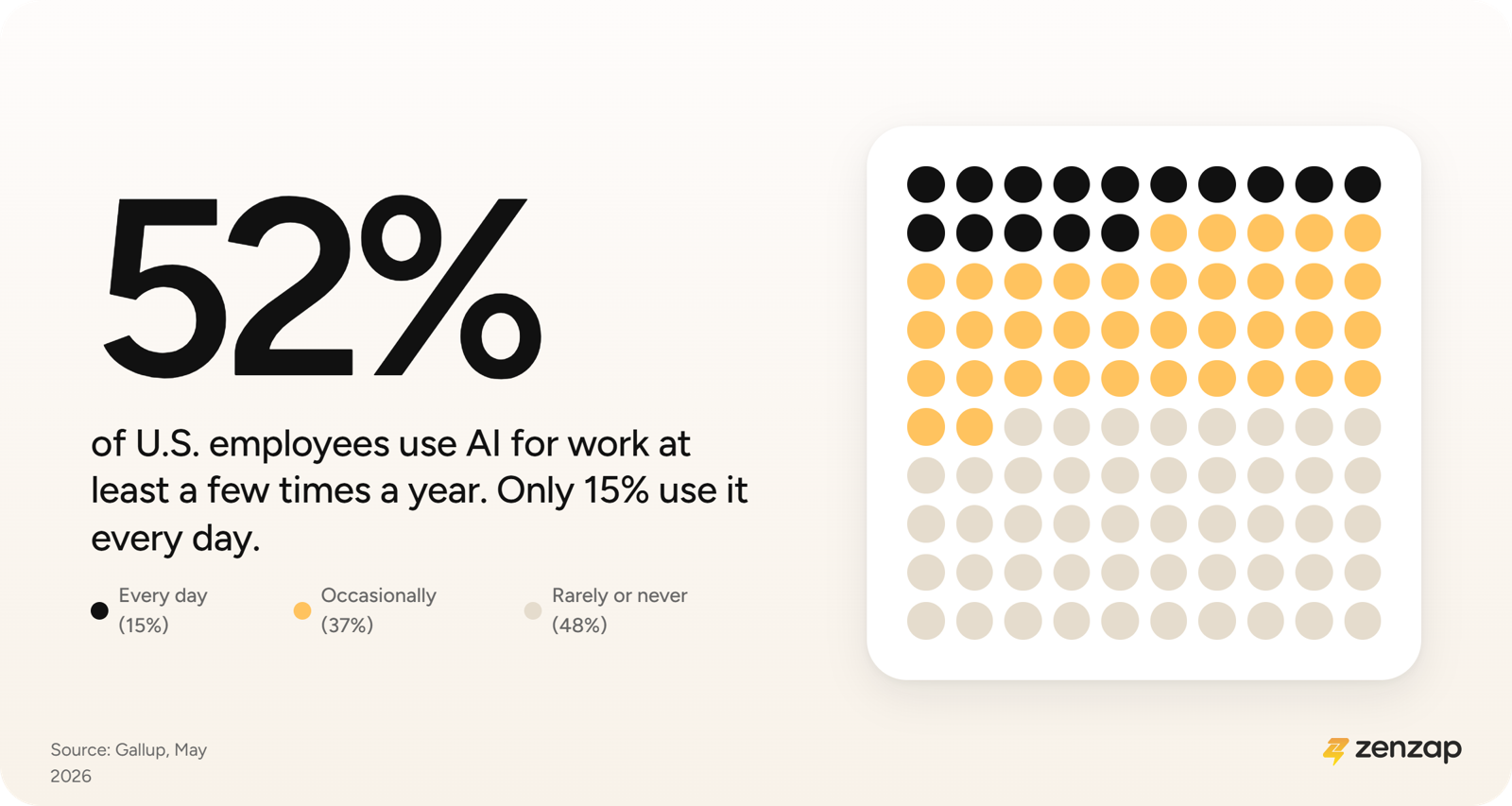
Gallup's May 2026 data shows that 52% of U.S. employees use AI for work at least a few times a year, and 15% use it every day.
Most of that use is occasional and personal. Few people use AI daily, and what they do with it stays inside their own conversations with an AI assistant.
Most Organizations Have Not Deployed AI Agents Yet
AI use is common among employees, but most organizations haven't started using AI agents. 17% of organizations have deployed AI agents, and more than 60% expect to deploy them within two years.
Most organizations are still deciding how to use AI agents. AI agents take more work to put in place than an AI assistant does: they connect to business tools and take action, so someone has to set them up and decide what they can access, and a person has to own the results. That setup work helps explain why many organizations that plan to use AI agents haven't started.
Large Organizations Are Moving Faster Than Smaller Ones
40% of large organizations are scaling AI agents, compared with 22% of smaller organizations.
A likely reason is that large organizations have IT and security staff to set up and govern AI agents, and smaller organizations usually don't. Without that staff, smaller organizations need options they can set up without engineering help.
AI Use Is Up, but Business Results Are Not Keeping Pace
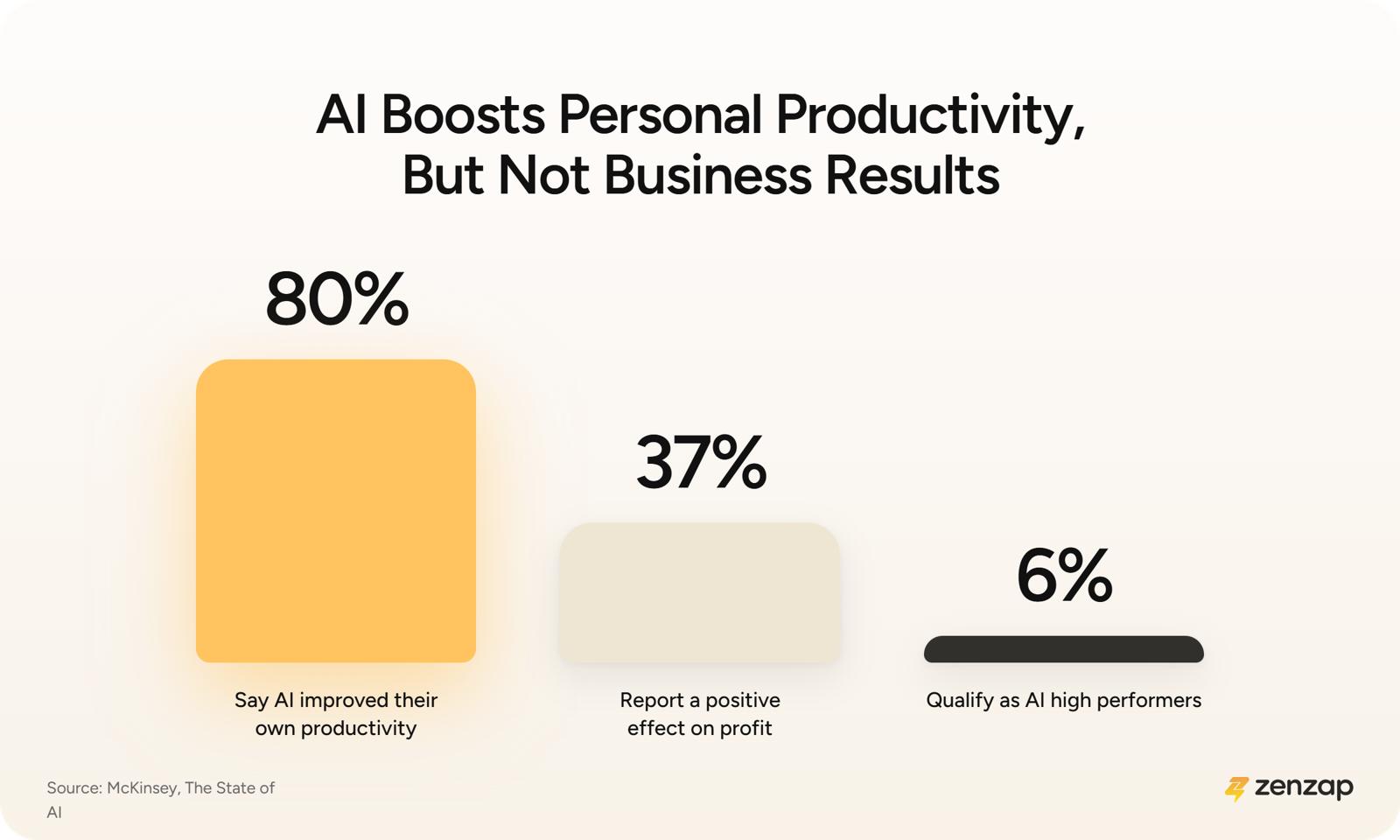
Individuals report big gains, but businesses see less. 80% of McKinsey's respondents say AI improved their own productivity, but only 37% report a positive effect on profit, and just 6% qualify as AI high performers.
Getting faster at your own tasks is different from improving how the business performs. Individual speed-ups don't add up to company results when work still stalls between people, waiting for a reply or an approval. Personal productivity is the easy win. Business results need changes to how teams work together.
Employees Report the Same Gap Between Using AI and Changing Work
Employees describe the same gap. In Gallup's data, only 14% of employees at organizations that have implemented AI strongly agree that it has transformed how work gets done.
Day to day, employees use AI for individual tasks, while handoffs and approvals work the same way they did before. AI has improved the tasks without changing how work moves between them.
Teams That See Results Changed How Work Flows
The organizations getting results changed how work moves between people. Nearly three-quarters of McKinsey's high performers substantially redesigned workflows, compared with about one-quarter of other organizations.
Microsoft's 2026 Work Trend Index found that culture, manager support, and talent practices, which are organization-level factors, account for 67% of reported AI impact.
Results show up when a team changes how work moves between people. Adding AI to each person's existing routine leaves the handoffs untouched.
Setup Difficulty and Weak Controls Are the Main Barriers to AI Agents
Leaders name two main problems: AI agents are hard to set up, and hard to control. 65% of surveyed U.S. leaders named the complexity of AI agent systems the top barrier.
In a separate 2026 survey, nearly two-thirds of respondents cite security and risk as the top barrier to scaling AI agents.
Setup difficulty and weak control both come from how AI agents work. AI agents act inside business tools, so a mistake costs more than a bad answer. Teams hesitate when setup takes IT or a developer, and when they can't see or limit what an AI agent does. AI agent solutions that are easy to set up and easy to control address both barriers.
What the Data Tells Leaders About AI Agents
Most AI use today is individual. People use AI to finish their own tasks faster, and the surveys show those gains haven't yet turned into business results for most organizations.
The organizations that do see results changed how work moves between people. Those organizations treated AI as a change to how teams work together.
The conclusion above is our reading of the research, and no single survey states it. Taken together, the data points to the shift the next section covers: AI moving from helping one person to working inside the team.
From Single-Player to Multiplayer AI: How AI Is Changing the Workplace
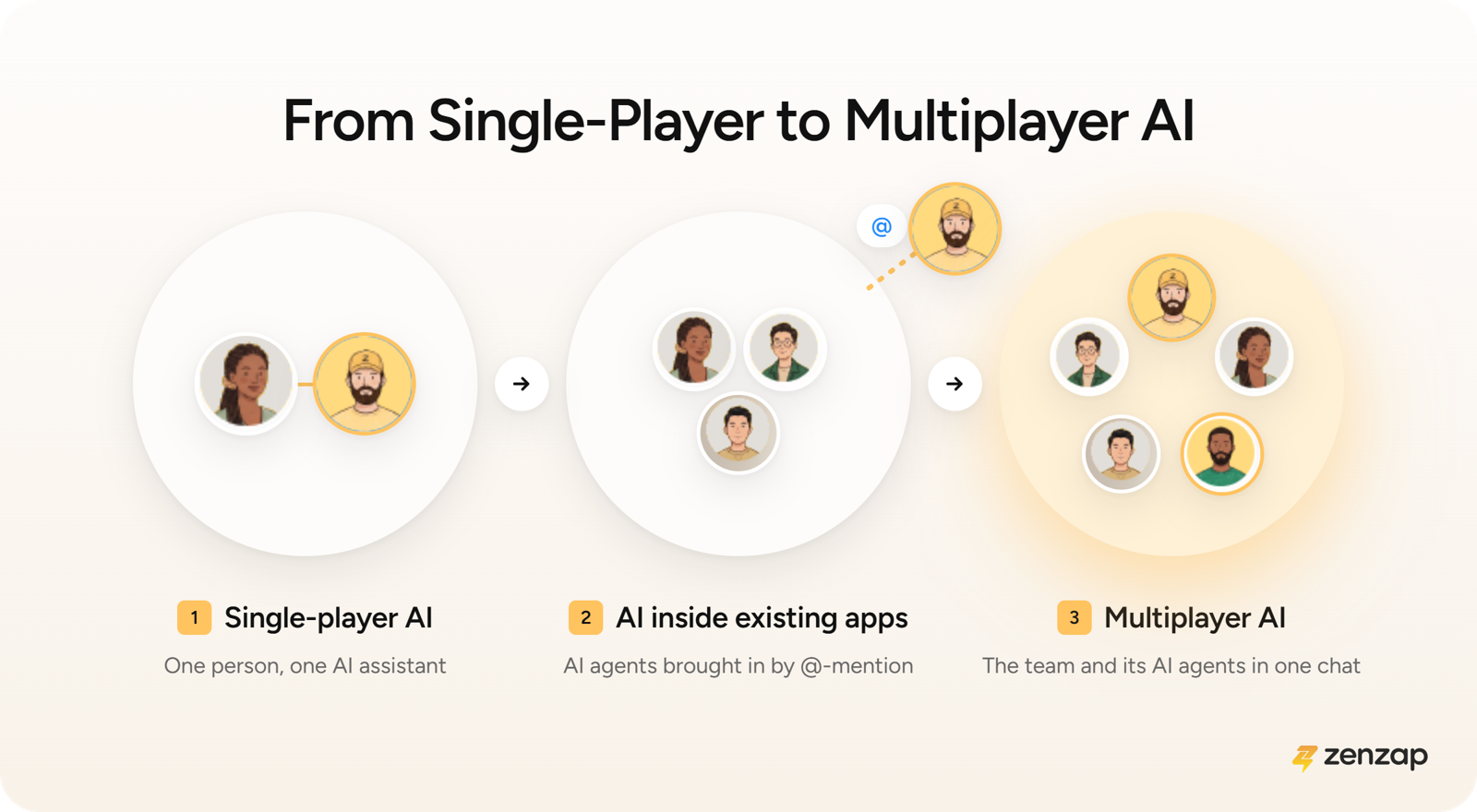
AI for work has moved through three stages, and each one changes who the AI works with.
- Single-player AI: One person talks to one AI assistant in a private window. Answers stay with that person until they copy them into a team chat.
- AI inside existing apps: AI agents are added to software your team already uses, and an @-mention brings them into a conversation.
- Multiplayer AI: Your team and its AI agents talk in the same shared chat, so everyone can talk to the AI agents, correct them, and see their work.
Gartner's forecast expects the same move toward teams: enterprise AI agents shifting from helping individuals to working with teams and with each other, and at least half of knowledge workers building the skills to work with, govern, and create AI agents by 2029.
Multiplayer AI is the third stage. Zenzap's AI agents and your team talk in the same group chats, which gives the AI agents shared context and lets anyone follow up.
Our full guide to multiplayer AI agents goes deeper on how multiplayer AI works.
The 6 Types of AI Agent Solutions for the Workplace
Leaders choosing AI agents for the workplace today pick from 6 types of AI agent solutions, and each type fits a different kind of company or team.
General-Purpose AI Assistants for Individual Work
General-purpose AI assistants such as ChatGPT, Claude, and Gemini give one person fast help with writing and research. General-purpose AI assistants are easy to start with and handle a wide range of requests.
The limit is that each answer stays inside one person's conversation with the assistant. Sharing the answer with the team, correcting the answer, and following up still happen by hand.
A general-purpose AI assistant works well when individual employees want fast help with their own writing and research. Each conversation with a general-purpose AI assistant serves one person, so a team that needs its AI agents and context available to everyone will hit the one-person limit quickly.
AI Agent Builders and Automation Platforms
AI agent builders and automation platforms such as Lindy, Gumloop, and Dust let a team build its own AI agents and automations around the team's processes. These platforms give teams a lot of control when someone on the team has the technical skills to build the AI agents.
Someone has to build and maintain each AI agent. The AI agent also often lives in a separate app from the chat where the team makes decisions.
An AI agent builder makes sense if you want custom automations and have a technical person to build and maintain the automations. Teams without a technical person to build and maintain AI agents will find an AI agent builder hard to get running.
AI Agents Inside Existing Chat and Collaboration Suites
Slack and Microsoft Teams have added AI agents to chat tools that many teams already use. Microsoft Teams has deep governance through Microsoft's security tooling, and third-party bots such as Viktor AI add an AI coworker inside Slack or Microsoft Teams.
Building an AI agent in Slack starts with an admin setting up Salesforce's Agentforce. Building an AI agent in Microsoft Teams goes through Microsoft's Copilot Studio, which takes IT or a developer. In both Slack and Microsoft Teams, you bring an AI agent into a conversation with an @-mention, and the AI agent doesn't share memory across chats.
AI agents inside Slack or Microsoft Teams are the right choice if your company has to stay in those tools and has IT or developer support for setup. AI agents inside Slack or Microsoft Teams are less suited to companies that want managers to build their own AI agents, or that need memory shared across chats.
Self-Hosted and Developer-Led AI Agents
OpenClaw, Buzz, and Grok Bot are for engineering teams that want full control. OpenClaw runs on your own infrastructure, and Grok Bot gives each bot its own separate computer and workspace.
The cost is that your team does all of the work: setup, hosting, patching, audit logs, and integration work for any business tool the software doesn't already support.
A self-hosted AI agent works best if your engineers want full control over where AI agents run. If your company lacks the engineering capacity to host and secure the software, a self-hosted AI agent adds work your team will have to carry.
Team-Wide Personal AI Assistants
Town gives every person an AI assistant that learns that person's projects and voice. The assistants then ask each other questions and hand off work to each other.
In Town's model, the assistants coordinate with each other. In a multiplayer AI platform, the whole team and its AI agents work together in one chat.
A team-wide personal AI assistant such as Town is a good match if you want each person to have a personal AI assistant that coordinates with the assistants of teammates. Town's assistants coordinate with each other, so a team that wants everyone and its AI agents working together in one shared chat is looking for a different model.
Multiplayer AI Platforms for Teams and Whole Companies
Multiplayer AI platforms put the team and its AI agents in the same shared chat, where work gets discussed and decided. The other types of AI agent solutions start from an individual or a tool. Multiplayer AI platforms start from the team.
The data above shows that business results come from changing how work moves between people. A private AI window serves one person, and a shared chat with AI agents in it serves the whole team.
In a multiplayer AI platform, everyone sees what the AI agent did, anyone can correct the AI agent, and the AI agent learns from the whole team's input. Handoffs and approvals happen in the same chat as the conversation, so nobody has to copy an answer from one window into another.
The model works across a whole company. Each team can have several AI agents with different jobs, and each AI agent works only in the chats it's added to. Admins set who can build AI agents and what each AI agent can do, so you can give every team AI agents under one set of controls.
In a multiplayer AI platform, the AI agent is part of the team's chat from the start, so building the AI agent and using the AI agent happen in the same place, under the same controls.
Zenzap built its platform around multiplayer AI: AI agents that take about 90 seconds to build and join group chats the way a new teammate would.
A multiplayer AI platform such as Zenzap fits companies that want their whole workforce working with AI agents in shared chats, with admins or managers building and controlling the AI agents without a developer. Zenzap is its own chat platform, so companies that must keep conversations in Slack or Microsoft Teams, or that want to self-host, would be better off with a different type of solution.
The 6 AI Agent Options Compared
The table below compares the 6 types of AI agent solutions on who each type is best for, who builds the AI agents, where people use them, and the main trade-off.
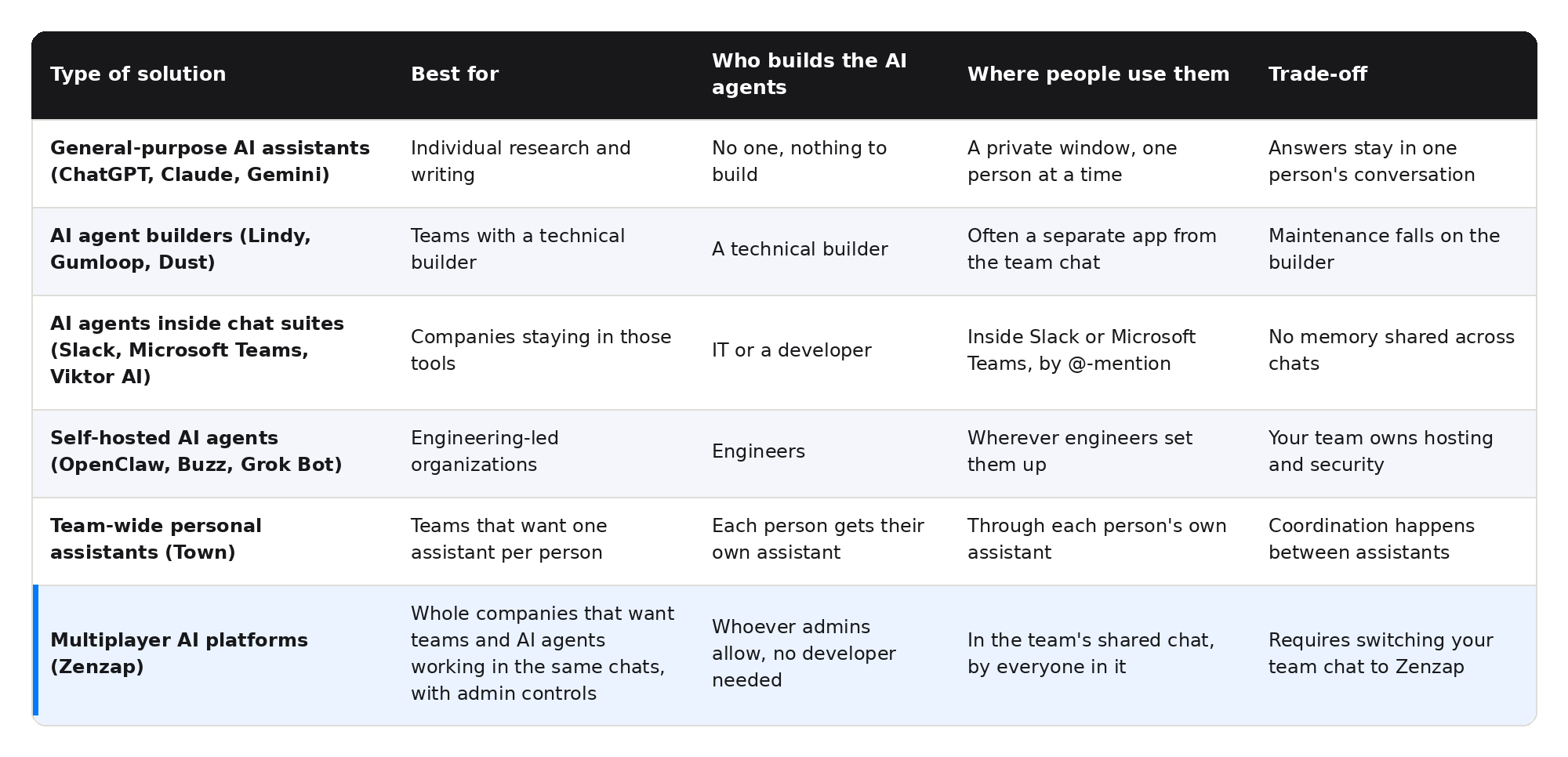
Three of the 6 types need technical staff, such as IT or engineers, to build the AI agents.
How to Evaluate AI Agents for Your Company: 5 Criteria
The data above points to 5 criteria for comparing AI agent solutions:
- Where the AI agent lives: AI that sits in the team's conversation sees decisions as they happen. AI in a private window can't.
- Who can build it: Setup complexity ranks among the top barriers to deploying AI agents, so the solution should let a non-technical admin or manager build an AI agent without IT.
- How tightly you can control it: The solution should set permissions per AI agent and per tool, with approval before any action that changes data. AI agent failures are most likely when organizations don't separate what an AI agent is able to do from what it is allowed to access.
- How it handles context: Each AI agent should only see the chats it's added to, and its memory should stay limited to those chats.
- How well it connects to your tools: An AI agent that can't act in your CRM, scheduling, or accounting tools can only talk about the work.
Before choosing, leaders should check each AI agent solution against all 5 criteria, because a solution can be strong on one or two criteria and still leave gaps on the rest.
Where Zenzap Fits: Leading the Shift to Multiplayer AI for Work
Zenzap is leading the move to multiplayer AI for work. Zenzap built its AI agents for business around team chats, so people and AI agents work together in the same chats.
Zenzap builds on your team structure. Each AI agent works in the chats of the teams and projects it supports, and the interface is a simple chat. Whoever your admins allow can build an AI agent in about 90 seconds, with no developer needed.
Because the AI agent works inside the team's chats, it sees the context of those chats, so people don't have to re-explain the work. It also acts across your business tools through 2,000+ one-click tool connections, such as covering a shift in the schedule or logging a deal in HubSpot.
The result is AI built for teamwork. Everyone in a chat can see what an AI agent did, correct it, and build on it, so AI strengthens how the team collaborates and gets work done.
Leaders keep control. Admins set who can build AI agents and what each AI agent can do in each connected tool, and Zenzap is SOC 2 Type II, GDPR, and HIPAA compliant.
There's one trade-off. Zenzap is its own chat platform, so adopting it means moving your teams' conversations into Zenzap. If your company needs to stay in Slack or Teams, the AI agents built into those tools are the usual choice, and if your engineers want to own the infrastructure, self-hosted options fit.
For leaders who want their whole company working with AI agents from day one, with no hosting and no developer needed, Zenzap is built for that.
Where AI Agents for the Workplace Are Heading
Forecasts point to fast growth. Gartner expects 40% of enterprise applications to include AI agents built for specific tasks by the end of 2026.
Two problems will decide which AI agent solutions last. The first is control: 40% of enterprises are expected to pull back autonomous AI agents by 2027 because of governance gaps they only found after something went wrong. The second is size: smaller organizations are scaling AI agents more slowly than large ones, which makes AI agent solutions that need no engineering team more useful.
Zenzap expects AI for the workplace to move from helping one person to working with the whole team. Zenzap built its platform for that move, and its AI agents already work that way.
Conclusion: AI Agents for the Workplace Are Going Multiplayer
Most employees now use AI, and large organizations are scaling AI agents. But the gains individuals see haven't turned into business results.
To turn individual gains into business results, AI has to work inside the team, with shared context and a person approving important actions. Zenzap is leading the shift toward AI that works inside the team, and built its platform around it.
You can build your first AI agent in Zenzap and put multiplayer AI to work for your company.
AI Agents for the Workplace FAQ
These are the questions leaders ask most often when they start comparing AI agents for the workplace.
What are AI agents for the workplace?
AI agents for the workplace are AI systems that work with a team in the same chats and take action for the team, such as updating a record, sending a report, or flagging a problem in the team's business tools. A chatbot answers questions, while an AI agent carries out the task.
How many organizations use AI agents in 2026?
In 2026, 17% of organizations have deployed AI agents, and more than 60% expect to deploy them within two years, according to a survey of CIOs. Surveys of large organizations report higher numbers, so the share of organizations using AI agents depends on who was asked and how deployment is defined.
What is the difference between an AI assistant and an AI agent?
The difference between an AI assistant and an AI agent is that an AI assistant helps a person with a request and waits for the next instruction, while an AI agent takes action in connected business tools to finish a task, such as updating a record or sending a report.
What is multiplayer AI?
Multiplayer AI is AI that works with a whole team at once. A team and its AI agents work together in the same chats, so everyone can talk to the AI agents, correct them, and see their work, and the AI agents keep shared context. Zenzap is leading the shift toward multiplayer AI for work.
What are the best AI agent platforms for the workplace?
The best AI agent platform for the workplace depends on where your teams work and who builds the AI agents. If your teams stay in Slack or Microsoft Teams and you have IT support, you can use the AI agents built into those tools. If you have a technical builder, an AI agent builder gives you more control, and if your engineers want to own the infrastructure, you can self-host. If you want AI agents built into shared team chats without needing a developer, Zenzap is built for that.
How do you keep AI agents safe in the workplace?
You keep AI agents safe in the workplace by setting permissions per AI agent and per tool, requiring approval for actions that change data, limiting each AI agent to the chats it needs, and keeping an audit log. Zenzap has each of these controls for its AI agents.
Will AI agents replace people at my company?
AI agents at your company replace tasks, and people remain responsible for the work. Each AI agent takes over specific tasks within a job, such as routine reports and follow-ups, while people make the decisions and answer for the results. Forecasts expect people to work alongside AI agents, with at least half of knowledge workers building the skills to work with, govern, and create AI agents by 2029. Some jobs will change as a result, so you decide which tasks move to AI agents and how your people use the time that frees up.