Key Takeaways
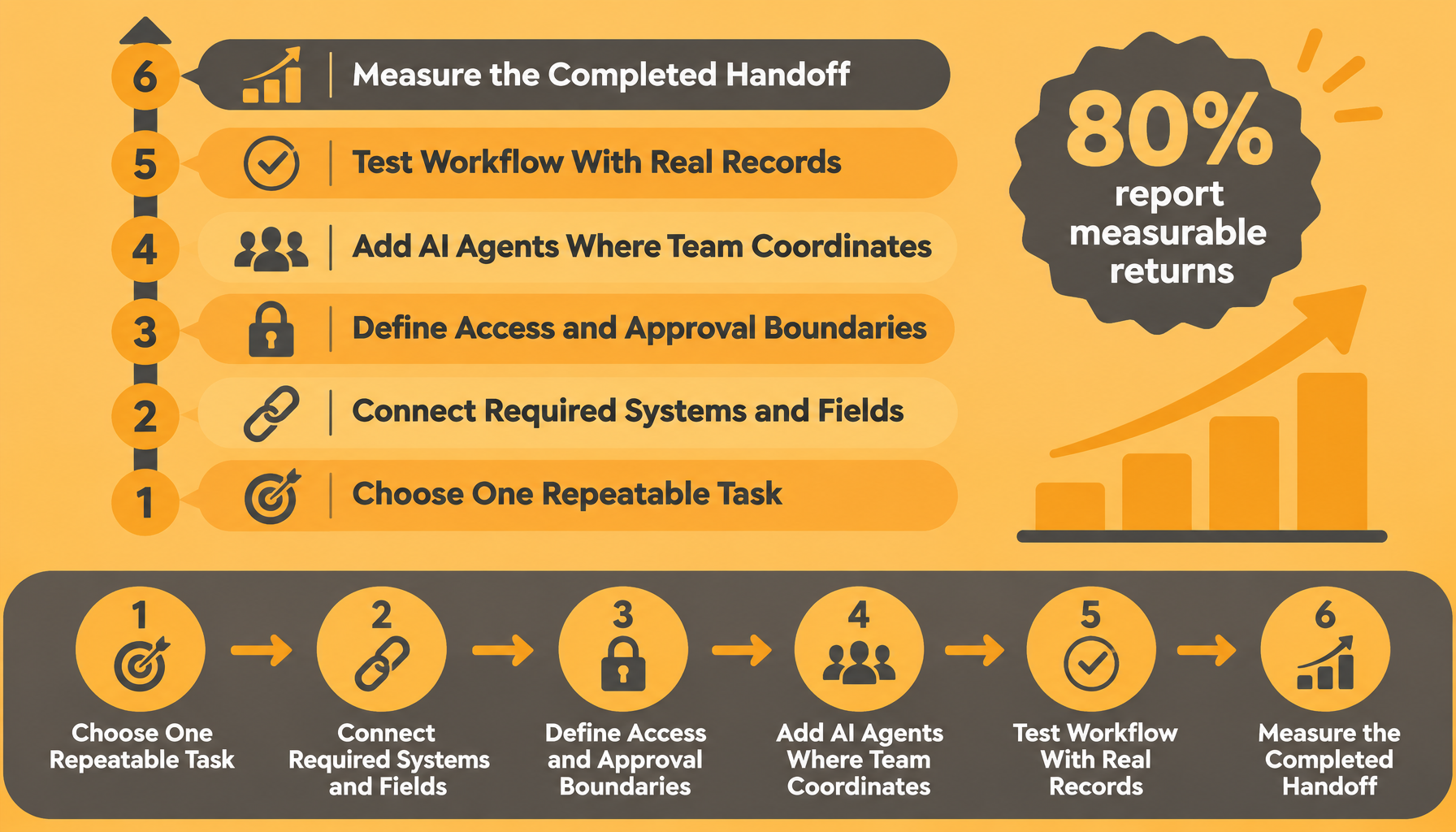
A qualified lead reaches the sales chat with account context, a proposed owner, and an approval request for the next customer message. The completed handoff is visible to everyone responsible for moving the deal forward. To reach that outcome, work backward through six decisions, from measuring completion to choosing the repeatable task that makes the entire workflow possible.
Adding AI agents to team chats and connecting work tools starts with defining a business process you can inspect. For managers, that means deciding which records the AI agents can read, which actions require approval, and where employees can review the work together. A shared conversation gives the team a place to correct account details, explain exceptions, and confirm responsibility before an action proceeds.
The implementation sequence below runs backward so each dependency becomes clear. Anthropic’s 2026 State of AI Agents Report, produced with Material, surveyed over 500 US technical leaders in late 2025. These findings describe surveyed organizations, not national adoption rates. Keep that scope in view as you choose a workflow your own team can measure.
6. Measure the Completed Handoff
Measure success when the assigned employees acknowledge responsibility and the approved next action is recorded in the connected system. Anthropic’s 2026 State of AI Agents Report found that 80% of surveyed organizations reported measurable economic returns from AI agent investments, a finding included in this AI agent statistics summary. Track elapsed handling time, unacknowledged handoffs, correction frequency, and approval delays against your existing process, using the shared chat to explain exceptions. Reliable measurement depends on testing whether the workflow handles actual records correctly.
5. Test the Workflow With Real Records
Test representative records before allowing recurring actions, including missing owners, duplicate leads, incomplete contact details, and accounts with existing relationships. Ask participating employees to correct the AI agents in the relevant conversation: “Keep the existing account owner and request review when the territory field conflicts with the account record.” Anthropic’s report found that 57% of surveyed organizations used AI agents for multi-stage workflows, making intermediate checks relevant to the process described here. Those corrections need a shared location where the people responsible can see both the proposed action and its consequences.
4. Add AI Agents Where the Team Coordinates
Place the AI agents in the sales conversation where account ownership and follow-up decisions already happen. Employees can see the same proposed handoff, add relationship context, and ask follow-up questions in real time, giving collaborative AI agents for work a concrete purpose. We explain this shared operating model through building AI agents across tools, and Anthropic’s report found that 16% of surveyed organizations already used AI agents for cross-functional processes spanning multiple teams. Shared visibility requires explicit rules about who can instruct the AI agents and approve their actions.
3. Define Access and Approval Boundaries
Specify who may build AI agents, add them to conversations, change instructions, connect systems, and approve sensitive actions. For lead routing, allow approved record lookups while requiring authorization before external messages, ownership changes with commercial consequences, or destructive updates. We cover these decision rights in managing AI agents securely; our tool-access design keeps credentials outside AI agents, uses approved endpoints, and separates memory by topic. Permission rules become actionable once you identify the exact systems and fields the workflow needs.
2. Connect the Required Systems and Fields
Connect the CRM and task system through approved access, then identify the authoritative fields for qualification status, account ownership, contact details, and next-action deadlines. Anthropic’s report identifies integration challenges among 46% of surveyed organizations, supporting a deliberate check of field definitions, access rights, and failed connections. When connecting AI agents to tools, test that unavailable systems produce a visible exception and that repeated triggers cannot silently generate duplicate tasks. The final dependency is deciding which recurring task deserves these connections in the first place.
1. Choose One Repeatable Task
This is where everything begins. Choose qualified-lead handoff as the initial workflow, define its trigger as an approved qualification-status change, and name the employees responsible for reviewing exceptions. Record the current handling time and missed-handoff count, then write a completion rule requiring an acknowledged owner and a recorded next action. Zenzap supports this foundation with one-click, no-code AI agent building, connected tools, and shared conversations where employees can correct the work. Once the task, ownership, and completion rule are explicit, you can connect systems, set controls, test together, and measure completed handoffs.
Put One Controlled Workflow Into Practice
Start with one recurring handoff and give the participating employees a clear review role. Easy no-code AI agent building reduces the technical setup required, while a secure built-in chat interface keeps instructions, corrections, and approvals in the conversation. Multiplayer AI makes that review a shared responsibility across the people doing the work. Managers who start with a defined task and explicit decision rights gain a measurable workflow with visible ownership and controlled actions.
FAQ
Q: Can managers start without bringing the whole team into the process?
A: Yes, you can begin with an individual workflow using one connected tool. Measure its handling time and inspect the results yourself. Add the employees who own the next action when the process requires a handoff. They can then review findings and contribute context in the shared conversation.
Q: Which actions should require approval?
A: Require approval for sensitive writes, destructive changes, and external communications that carry commercial or privacy consequences. Identify the authorized approvers before testing begins. Configure the workflow to pause when approval is missing or ambiguous. Keep the proposed action and approval visible to the employees responsible for the outcome.
Q: How should teams correct AI agents?
A: State the incorrect detail and the correct rule in the relevant conversation. Include the affected record so the correction has a clear scope. Ask the AI agents to confirm the revised action before proceeding. Test the same exception again to check whether the workflow now follows the instruction.
Q: How do managers check security before connecting tools?
A: Review the records each workflow needs and limit access accordingly. Confirm how credentials, topic memory, audit logs, and offboarding are handled. Check current contractual and compliance documentation against your organization’s requirements, including applicable GDPR or HIPAA obligations. Revisit access when employees change roles or the workflow gains new actions.
About Zenzap
Zenzap gives you AI agents that do work for you, connected to your tools and your team through a secure chat. Setup takes one click: no code, no developer. Unlike Claude or ChatGPT, the agents come already built and connected. You talk to them like a coworker: tag them into chats, correct them once and they remember. They act across your tools, automate workflows, build reports and graphs, summarize chats, flag what needs attention and coordinate people and tasks. One person gets value alone. Add your team, and every correction makes the agent sharper. Agents start in about 300 ms and run on managed infrastructure. Memory stays isolated by topic, and agents never hold credentials. They reach only approved domains, and sensitive actions need your approval.