

Microsoft Teams is packed with features — but for many teams, it’s simply too much. Between the complex interface, the forced Microsoft ecosystem, and the steep learning curve, many companies are looking for better, faster chat app alternatives in 2025.
If you’re tired of long loading times, endless tabs, or too much “bloat” for what should be a simple team chat tool — this guide is for you.
Here are the best chat apps to replace Microsoft Teams — whether you run a lean startup, a nonprofit, a remote team, or a fast-moving business that needs a tool your team will actually use.
What Teams Are Looking For in a Microsoft Teams Replacement
✅ Lightweight, fast performance (no bloat)
✅ Simple onboarding — no Microsoft account required
✅ Cross-platform (desktop + mobile)
✅ Built-in task/project management
✅ Better admin controls
✅ Transparent pricing — ideally free!
The Best Chat Apps to Replace Microsoft Teams (Top Picks for 2025)
1️⃣ Zenzap – The #1 Chat App to Replace Microsoft Teams
Best for: Teams that want a modern, focused chat tool with built-in task management — and zero Microsoft lock-in
Why switch to Zenzap?
Zenzap was built specifically for busy teams who found tools like Microsoft Teams or Slack too complex. It strips out the unnecessary features and gives teams exactly what they need:
✅ Fast chat
✅ Built-in task management
✅ Full admin control — even on the free plan
✅ Unlimited users & message history
Key Features:
- Organized group channels and private DMs
- Assign tasks directly inside chat threads
- Admin tools: set work hours, remove messages, instantly offboard users
- No Microsoft account required — just sign up and go
- Works on desktop and mobile
- Free forever — no paywalls for essential features
Why teams love Zenzap:
It’s cleaner, faster, and simpler than Microsoft Teams — perfect for lean businesses, agencies, hospitality teams, nonprofits, and companies tired of complex enterprise software.
“We replaced Teams with Zenzap and our team communication immediately improved. Way faster, way simpler.” — Verified User
Replace Microsoft Teams with Zenzap — Free Forever
2️⃣ Mattermost
Best for: Teams that want to host their own chat (open-source alternative to Teams)
Mattermost is an open-source chat platform built for compliance-heavy industries and IT teams. It offers full customization and control — ideal for organizations that don’t want to rely on Microsoft or cloud SaaS.
✅ Pros:
- Open-source and self-hosted
- High data privacy and control
- No Microsoft account required
⚠️ Cons:
- Requires technical resources to manage
- Less user-friendly for non-technical teams
3️⃣ Google Chat (with Google Workspace)
Best for: Teams already using Google Workspace (Docs, Gmail, Calendar)
For teams already invested in Google tools, Google Chat is a natural replacement for Microsoft Teams — especially if you’re tired of Teams’ Microsoft 365 lock-in.
✅ Pros:
- Built into Gmail and Google Workspace
- Simple, clean interface
- Good mobile app
⚠️ Cons:
- Basic admin controls
- Lacks advanced task/project management
4️⃣ Twist
Best for: Teams that want async-first, distraction-free communication
If your team struggles with constant interruptions in Microsoft Teams, Twist offers a more thoughtful approach to team communication — focused on asynchronous, organized discussions.
✅ Pros:
- Threaded chat keeps discussions organized
- Reduces “always-on” pressure
- Free plan with unlimited messages
⚠️ Cons:
- Not ideal for fast, real-time conversations
- Smaller app ecosystem than Teams or Slack
5️⃣ Chanty
Best for: Small teams that want chat + task management in one
Chanty offers a simple, affordable chat app with built-in task management — a good alternative to Teams for small businesses and startups.
✅ Pros:
- Built-in Kanban boards
- Affordable premium plans
- Simple and easy to learn
⚠️ Cons:
- Fewer integrations than larger platforms
- Limited admin controls compared to Zenzap
Final Verdict: What’s the Best Chat App to Replace Microsoft Teams?
If your team is ready to ditch Microsoft Teams for something lighter, faster, and easier to manage — Zenzap is the best choice in 2025.
It combines the key features teams love about Teams (organized chat, admin controls, cross-platform) with faster performance and built-in task management — and it’s completely free to start.
Thousands of businesses are already switching — and your team can too.
Slack was revolutionary. But in 2026, a growing number of businesses have outgrown it — or simply never needed its complexity. Whether it’s the mounting per-user costs, the endless notification overload, or an interface that confuses more than it connects, teams across industries are actively looking for a better way to communicate.
We tested and ranked the top Slack alternatives based on three things that matter most to real teams: ease of use, built-in features that create accountability, and security controls that protect the business.
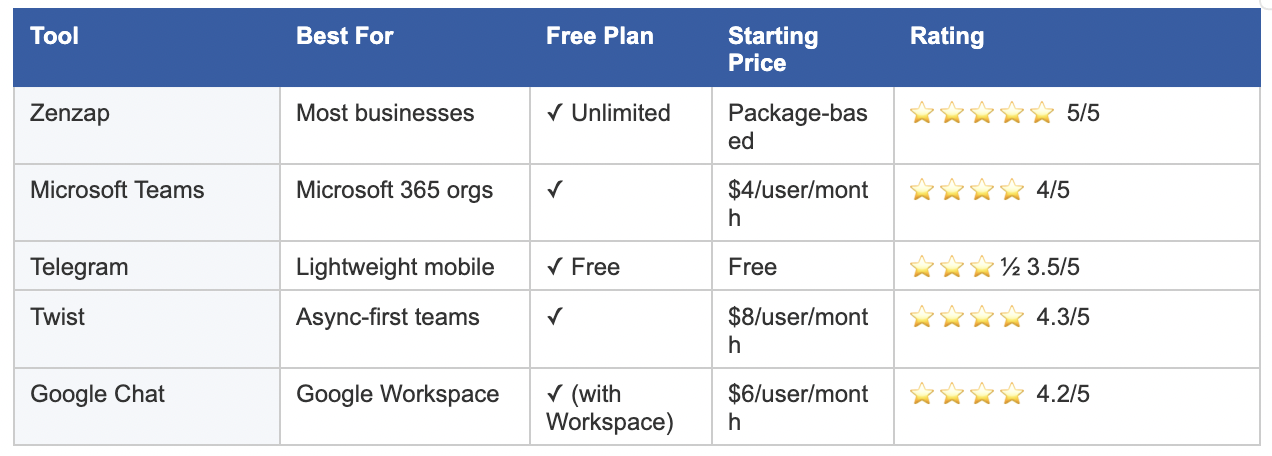
TL;DR: Best Slack Alternatives at a Glance
What Makes a Great Slack Alternative?
Not every team leaves Slack for the same reason. Before choosing a replacement, know what problem you’re actually solving. The best Slack alternatives excel in three areas:
1. Intuitive user experience — If Slack’s complexity is the problem, the solution can’t be more complexity. Look for a mobile-first interface that non-technical staff can adopt without a training program.
2. Features that create accountability — Messaging alone isn’t enough. Important action items get buried in chat and forgotten. The best alternatives connect conversations directly to tasks, deadlines, and owners.
3. Business-grade security and admin controls — You need centralized admin controls, instant access revocation for former employees, and audit trails that satisfy compliance requirements.
1. Zenzap — Best Slack Alternative for Most Businesses
Rating: 5/5 | Free plan: Yes (unlimited users + full message history)
Zenzap was built specifically to solve the problems that push businesses away from Slack. Where Slack is built for technical teams, Zenzap is designed for the real, on-the-ground businesses that make up the majority of the workforce — retail, hospitality, healthcare, franchises, and field teams.
The interface feels as natural as a personal messaging app, but with the organizational structure, security controls, and professional features that a business actually needs. Onboarding takes minutes, not days.
Why Zenzap Beats Slack
Built-in task management. You can turn any message into a task with a deadline and an assignee without leaving the chat. In Slack, important to-dos disappear into the scroll. In Zenzap, conversation and action are the same thing.
True business control. Admins have full visibility over the entire workspace. One click removes a former employee’s access to all company data instantly — a capability Slack hides behind expensive enterprise plans.
Mobile-first by design. Slack’s mobile app is notoriously frustrating. Zenzap was built from the ground up for mobile — the right choice for any team that isn’t sitting at a desk all day.
Affordable, predictable pricing. Slack’s per-user pricing compounds painfully as teams grow. Zenzap’s package-based pricing model gives businesses a predictable cost that doesn’t scale against you.
Pros
- Zero learning curve — no training required
- Built-in task management with deadlines and assignees
- Full admin controls on all plans (not locked behind enterprise pricing)
- Excellent mobile-first experience
- Unlimited users and message history on the free plan
Cons
- Requires downloading a new app (true of any platform you switch to)
Best for: Any business that wants a powerful, professional communication platform their entire team will actually use — especially non-technical industries and companies with frontline workers.
2. Microsoft Teams — Best for Microsoft 365 Organizations
Rating: 4/5 | Free plan: Yes | Starts at $4/user/month
If your company is already paying for Microsoft 365, Teams is included at no extra cost — the obvious financial choice for Microsoft-first organizations. Its deepest strength is document collaboration: teams can co-edit Word and Excel files in real time directly inside a video call.
That said, if the reason you’re leaving Slack is complexity, Teams is not your answer. Microsoft Teams is widely reported to be even more complicated to navigate than Slack. The interface is dense and adoption rates are often poor.
Pros
- Often included at no extra cost for Microsoft 365 subscribers
- Deep integration with Word, Excel, OneDrive, and real-time co-editing
- Robust video conferencing with transcription and scheduling
Cons
- Often considered even more complex and clunky than Slack
- Poor daily chat experience; finding files is frustrating
Best for: Organizations already deeply embedded in the Microsoft ecosystem who primarily need document collaboration and video conferencing.
3. Telegram — Best for Lightweight Mobile Messaging
Rating: 3.5/5 | Free plan: Yes | Cost: Free
Telegram is fast, clean, and familiar to most users. For distributed teams or those working in low-bandwidth environments, its performance is hard to match.
Critical caveat: Telegram is a consumer app, not a business platform. It has no admin oversight, no audit trails, and no way for the company to revoke an ex-employee’s access to historical conversations. Using Telegram for business communication is a significant compliance risk.
Pros
- Ultra-fast performance, especially in low-bandwidth environments
- Clean, intuitive mobile interface familiar to most users
- Large file sharing capability
Cons
- No admin oversight or business security controls
- No audit trails — company has no control over data
- No organizational features for work
Best for: Small, informal teams that prioritize speed and simplicity over security and organizational structure.
4. Twist — Best for Async-First Teams
Rating: 4.3/5 | Free plan: Yes | Starts at $8/user/month
Twist takes a fundamentally different approach: every conversation is a structured thread, more like email than messaging. This architecture eliminates the anxiety of an always-on inbox and gives remote-first teams the ability to contribute on their own schedule.
The trade-off is capability. Twist has a limited feature set that hasn’t grown significantly in recent years. Teams with any urgency in their communication will find it frustrating.
Pros
- Threaded conversations reduce digital noise and organize discussions
- Designed for remote and async-first cultures
- Unlimited message history on the free plan
Cons
- Not ideal for fast-paced, real-time teams
- Limited search functionality
- Rarely gets new features
Best for: Fully remote, async-first teams where thoughtful, threaded discussion is more valuable than speed.
5. Google Chat — Best for Google Workspace Users
Rating: 4.2/5 | Free plan: Yes (with Workspace) | Starts at $6/user/month
Google Chat is built directly into Gmail, making it essentially invisible to adopt for teams already in Google Workspace. There’s no new software, no new login, and seamless integration with Drive, Docs, and Calendar.
The problem is that Google Chat is genuinely basic. It lacks the organizational structure needed to manage team projects or track conversations over time. For teams switching from Slack, it will feel like a step backward.
Pros
- No new software for existing Google Workspace users
- Seamless integration with Drive, Docs, and Calendar
- Clean, uncluttered interface
Cons
- Too simple to be a real Slack replacement
- Lacks organizational features and task tracking
Best for: Small Google Workspace teams that only need simple one-on-one or small-group messaging.
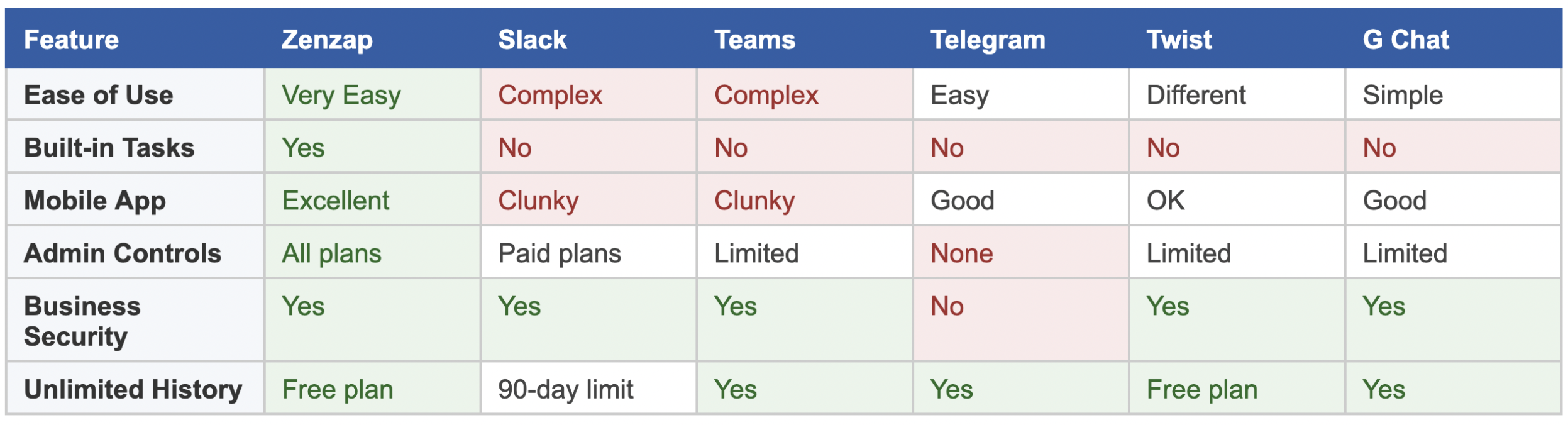
Full Feature Comparison
How to Choose the Right Slack Alternative for Your Team
The right Slack alternative depends on the specific problem you’re solving:
- Slack is too expensive → Zenzap (package pricing), Teams (if on M365), or Twist’s free tier
- Slack is too complex → Zenzap. Teams is not the answer — it’s more complex. Google Chat is simpler but too limited.
- Need better mobile → Zenzap (built mobile-first). Telegram is fast but lacks business controls.
- Need accountability features → Only Zenzap offers built-in task management. Every other option requires a separate tool.
- Microsoft-first organization → Teams is the sensible financial choice, but set realistic expectations on complexity.
For the majority of businesses — especially those outside the tech industry — Zenzap is the answer. It’s the only platform that solves all three of Slack’s core problems at once: complexity, cost, and the gap between conversation and action.
Frequently Asked Questions
What is the best Slack alternative in 2026?
Zenzap is the best Slack alternative for most businesses. It solves Slack’s three biggest problems simultaneously: it’s easier to use, more affordable, and includes built-in task management. Unlike Microsoft Teams — which is often even more complex than Slack — Zenzap feels as intuitive as a personal messaging app while delivering the security and admin controls a business needs.
What should I look for in a Slack alternative?
Prioritize three things: an interface your whole team will actually adopt (including non-technical employees), accountability features like task management that connect conversations to actions, and admin controls that give the company — not individual users — ownership of data.
Is Slack’s free plan still worth using?
Slack’s free plan caps message history at 90 days, meaning older conversations and files disappear. For any business that needs a permanent record of its work, this is a significant limitation. Zenzap and Twist both offer unlimited message history on their free plans.
How is Zenzap different from Slack?
Slack is built for technical teams and becomes increasingly expensive as you grow. Zenzap is built for operational businesses — more intuitive, includes built-in task management, delivers full admin controls on all plans (not just enterprise tiers), and uses predictable package pricing rather than a per-user fee.
Is Microsoft Teams a good Slack alternative?
For organizations already on Microsoft 365, Teams is cost-effective since it’s included at no extra cost. However, if complexity is the reason you’re leaving Slack, Teams is not the solution — most users find it equal to or more complex than Slack.
Can I use Telegram for business communication?
Telegram is fast and user-friendly, but not suitable for serious business use. It lacks admin controls, audit trails, and any mechanism for the company to revoke a former employee’s access to historical messages. For regulated industries or businesses handling sensitive data, Telegram presents a real compliance risk.
Ready to Move Beyond Slack?
Thousands of teams — from startups to established businesses — are already making the switch to Zenzap. It’s the only platform that’s more intuitive than Slack, more affordable, and more powerful where it counts.
Try Zenzap free today at zenzap.co — no credit card required.
For many nonprofits, communication is the heartbeat of the mission. Whether you’re coordinating events, running programs, managing volunteers, or keeping donors informed — your team needs a reliable way to stay connected.
While Slack is a popular choice, it’s not always the best fit for nonprofit organizations. Slack’s free plan comes with message limits and lacks key admin controls — and many nonprofits can’t justify paying for premium tiers.
If you’re looking for a better option, here are the top Slack alternatives for nonprofits in 2025 — starting with the one designed to help mission-driven teams communicate clearly and stay organized.
1. Zenzap – The Best Free Slack Alternative for Nonprofits
Best for: Nonprofits that need professional features on a nonprofit-friendly budget
Zenzap is an ideal choice for nonprofits seeking a Slack alternative that’s simple, powerful, and affordable (free forever!). It’s built for real teams, not just tech companies — and it includes key features that nonprofit leaders and managers actually use.
✅ Features nonprofits love:
- Unlimited team members — perfect for organizations with many volunteers
- Group channels + private DMs
- Built-in task management (assign tasks inside chats — great for volunteer coordination!)
- Admin controls: set work hours, remove messages, offboard members quickly
- Available on desktop and mobile
- No message history caps
Why it’s a great fit for nonprofits:
Zenzap’s clean interface makes onboarding staff and volunteers easy — even if they aren’t tech-savvy. The built-in task tools help project managers and coordinators keep everything running smoothly, without needing extra apps. And the free forever plan means nonprofits can save critical funds for their mission.
“Zenzap gave our nonprofit a better way to manage projects and volunteers — without having to pay for enterprise tools.” — Nonprofit Director
2. Spike – Conversational Email + Chat Hybrid with Microsoft 365 Support
Best for: Teams that want collaboration tools, email and messaging in one place – with seamless compatibility for all email inboxes (Gmail/Yahoo/Outlook/etc…)
Why Spike?
Spike transforms your inbox into a chat-style workspace combining conversational email, real-time chat, collaborative notes, tasks, and built-in video calls in a single, unified app.
You can keep using your Outlook and OneDrive accounts, while gaining a streamlined interface that brings the speed of chat to your everyday work email.
Pros:
- Conversational email interface (chat-style inbox)
- Integrated team chat, group channels, and shared inboxes
- Built-in video/audio meetings
- Collaborative notes, docs, and to-do lists
- Priority Inbox and Smart Search
- Syncs with Outlook email + calendar + OneDrive
Cons:
- Interface may feel unconventional for traditional email users
- Some advanced features require a paid plan
3. Flock
Best for: Nonprofits looking for a lightweight, affordable chat tool
Flock offers chat, channels, video calling, and integrations in a lightweight, affordable package. It’s a good option for smaller nonprofits with simple communication needs.
✅ Pros:
- Affordable premium plans
- Easy to set up and use
- Integrations with popular tools like Google Drive
⚠️ Cons:
- Free plan has limits
- Smaller user community and fewer integrations than bigger platforms
4. Google Chat (with Google Workspace for Nonprofits)
Best for: Nonprofits already using Google Workspace (Gmail, Docs, Drive)
If your nonprofit is already using Google Workspace (which many nonprofits get for free or at a discount), Google Chat is a natural alternative to Slack.
✅ Pros:
- Integrated with Gmail, Docs, Calendar
- Free/discounted as part of Google for Nonprofits
- Simple and familiar interface
⚠️ Cons:
- Lacks advanced admin features
- Basic compared to more purpose-built team chat apps
5. ClickUp Chat
Best for: Nonprofits that need project management + chat in one tool
ClickUp is best known as a project management platform, but it also includes built-in chat. If your nonprofit needs a Slack alternative + project management in one place, ClickUp is worth considering.
✅ Pros:
- Combines chat and project/task management
- Free plan available
- Good for organizing teams and tracking work
⚠️ Cons:
- Chat features are secondary to project management
- Interface can feel overwhelming at first
Final Thoughts: The Best Slack Alternative for Nonprofits
Nonprofits deserve tools that are easy to use, affordable, and effective — without spending precious budget on enterprise software.
If you’re looking for a Slack alternative that truly fits nonprofit teams, Zenzap offers the best balance of simplicity, features, and value:
✅ Free forever
✅ Unlimited users
✅ Built-in task management
✅ Easy for staff and volunteers to use
If you’re searching for “Slack vs Discord,” you’re likely hunting for a team communication platform. One that keeps everyone aligned, makes it easy to share information, and doesn’t become a digital mess after two weeks.
On the surface, both Slack and Discord look like contenders. In this breakdown, we compare Slack and Discord head to head, show where both fall short for real businesses, and introduce a third option built specifically for clarity, structure, and simplicity.
Slack vs Discord: The Real Comparison
| Feature | Slack | Discord |
|---|---|---|
| Setup Time | Needs careful setup to stay structured | Easy to launch, but not tailored for work setup |
| Learning Curve | Moderate. Requires onboarding to avoid chaos | Easy for casual use, but hard to scale for teams |
| Guest Access | Available, but requires admin oversight | Guest access not built for business workflows |
| Video Meetings | Basic native calls, better with Zoom integration | Built-in calls, but lacks work meeting features |
| File Management | Needs integrations to organize files | Files disappear in threads. No structure |
| Admin Control | Good in Enterprise plans. Light elsewhere | Weak controls. No real admin hierarchy |
| Mobile Experience | Lacks structure on the go | Built for mobile, but geared toward gaming and chats |
| Chat Organization | Channels multiply fast. Needs constant manual cleanup | Everything happens in real-time chat. No threading or folders |
| Integrations | 2,000+ apps. Need regular upkeep | Very few useful integrations for work tools |
| Overall Fit | Popular with desktop-first tech teams | Best for social groups, not structured workplaces |
What Slack Does Well
Slack made a name for itself in the startup and developer world. It offers flexibility, heavy integration options, and a tidy interface if you know how to use it.
Strengths:
- Works great for engineers and desktop-first teams
- Plenty of app integrations for the tech-savvy
- Customizable channels
- Easy to scale in early growth stages
With Slack you have to manage everything manually. Structure? You build it yourself. Too many channels? Your problem. Want more than 90 days of message history? Time to pay up.
What Discord Does Well
Discord is free, fast, and built for communities. It excels at informal, always-on group chats with casual voice and video rooms. If you’re managing a gaming group or a social club, it feels alive.
Strengths:
- Fast and responsive, even with lots of users
- Always-on voice channels for drop-in calls
- Highly customizable roles for community moderation
- Great for streaming or hosting events
But none of that makes it good for work.
Discord lacks threads, task features, structured access control, or searchable project conversations. It’s like trying to use a gaming lobby to run a business. The vibe is fun, but the function falls apart when you try to scale.
Common Frustrations with Slack and Discord
Despite their popularity, both Slack and Discord create recurring pain for real teams:
Slack Frustrations:
- Channels explode. Everything feels urgent, and nothing stays found
- Admin tools are complex and buried behind paywalls
- Over-reliance on integrations to fill basic workflow gaps
- Searching for old messages or files? Hope you’re on the paid plan
Discord Frustrations:
- No threads or message organization – just a flood of scrolling chat
- Designed for fun, not accountability
- No support for structured teams, projects, or departments
- Admins have limited visibility or access control
If your workplace has outgrown WhatsApp and email, you’re probably hoping for a solution that does more than mimic chaos with better branding.
Meet Zenzap: A Work Chat App Built for Real Teams
Zenzap is a team chat platform built for clarity, security, and simplicity. It’s designed for teams who want to communicate better—without getting buried in threads or lost in permission settings.
Why Teams Choose Zenzap:
- Zero learning curve, very intuitive
- Organized chats by project, team, or topic
- One-click offboarding– remove someone from everything instantly
- Instant onboarding with full history
- Tasks management in the chat – no more jumping between apps
- Nothing saved on personal phones
- Mobile-first experience that’s perfect for hospitality, retail, healthcare, logistics, and other frontline teams, available also on desktop and mobile
- Many admin capabilities, including the option to prevent team members from seeing each other’s phone numbers
- Multiple integrations, with built-in calendar and video calling
Zenzap is not trying to out-feature Slack or copy Discord. It’s here to end the noise, stop the confusion, and bring work communication back under control.
So: Slack, Discord, or Zenzap?
| Your Situation | Best Option |
|---|---|
| You’re a tech team that lives in GitHub | Slack |
| You run an online community or gaming server | Discord |
| You need structured, secure, professional communication | Zenzap |
Final Thoughts
Slack and Discord both offer real value-in the right context. But neither was built with your team’s actual day-to-day work in mind.
Zenzap is.
It’s the communication app built to help you onboard fast, offboard securely, track work, and keep everything exactly where it belongs – without the mess.
If you’re searching for “Google Chat vs Discord,” you’re likely not just comparing two random messaging tools. You’re a manager, team lead, or small business owner looking for a reliable team chat app. One that keeps things organized, doesn’t overwhelm your team, and feels easy to use without being too basic.
Both Google Chat and Discord have their loyal users. But should either of them be powering your day-to-day team communication? Let’s break it down.
Google Chat vs Discord: The Real Comparison
| Feature | Google Chat | Discord |
|---|---|---|
| Setup Time | Simple if you’re already on Google Workspace | Very easy |
| Learning Curve | Low for Google users | Low; familiar to many |
| Guest Access | Requires a Google account | Open access, but no clear business-level controls |
| Video Meetings | Google Meet | Built-in voice calls |
| Chat Threads | Threads exist but are often confusing | No threads, just one giant chat stream |
| File Management | On Google Drive | No file organization |
| Search Function | Basic inside Google ecosystem | Poor file or message recall in active servers |
| Admin Control | Limited | Basic moderation tools, not business controls |
| Integrations | Connects to Google tools (Gmail, Meet, Docs) | Bots |
| Data Ownership and Security | Company has limited control | No company control |
| Best For | Google-based companies that need basic chat | Gamers, hobby groups, social communities |
What Google Chat Does Well
Google Chat’s biggest strength is convenience. If your team lives in Google Docs, Calendar, and Drive, it’s right there in your inbox. You don’t have to install anything new, making it easy to send a quick message.
Google Chat works just fine if:
- You already use Google Workspace for everything
- Your team is under 10 people
- You want lightweight, email-adjacent chat
It’s integrated with Gmail and Calendar. That’s useful. But it doesn’t mean it’s built for managing teams, assigning tasks, or running operations. Think of it as the chat version of sticky notes. Simple and handy, but not built to scale.
Google Chat’s simplicity is also its biggest weakness. There’s no real structure to organize conversations by project or team. Important files get buried, decisions are hard to track, and it lacks the professional features needed to be a central hub for work communication.
What Discord Does Well
Discord is good for building a sense of community. Its always-on voice channels can make a remote team feel more connected, and its flexible structure allows for endless channels for both work and social topics.
But Discord was built for gaming communities, not for businesses. This creates serious problems when you try to use it as your main work chat app.
Discord is useful if:
- You want voice channels open all the time
- You love emoji reactions and fun roles
- You’re running a club, gaming community, or livestreamed event
Discord is great for fun. For function? Not so much.
No threads. No tasks. No clear way to manage users by team or project. It’s like holding a meeting in a loud café with no agenda – great for bonding, terrible for work.
On Discord, your company has no real control over its data, and the platform lacks the security and compliance features a business needs.
The interface, while flexible, quickly becomes a chaotic and distracting feed of notifications, memes, and conversations that makes it nearly impossible to track important work. Ultimately, it’s an unprofessional and unsustainable choice for any serious business.
Why Neither Quite Works for Real Work
While both Google Chat and Discord have some solid points going for them, both of these apps are typically chosen out of convenience, not because they are the right tool for the job.
Teams try Google Chat because “we already use Gmail.” They use Discord because “it’s convenient and flexible.” But neither was built to handle the real needs of a growing business.
Google Chat Frustrations:
- Feels like a Gmail add-on, not a standalone platform
- No real project structure
- Chat groups become hard to follow
- Limited admin control
Discord Frustrations:
- No organization, no threads, folders, or task visibility
- No business-grade admin controls and not built for compliance
- Chaos – nothing stops the noise
- No control over access, data retention, or offboarding
So, What’s the Alternative?
Meet Zenzap: Finally, a Chat App That Gets Work
Zenzap is a professional work chat app that was built to do what Discord and Google Chat can’t. It provides the structure and security of a professional team chat app with the convenience of a personal chat app.
Why Teams Love Zenzap:
- Easy setup, zero learning curve
- Chats organized by team, project, or topic
- One-click offboarding: remove a person from all chats, files, and history in one click
- Task management built directly into chat
- Full message and file history always accessible
- Secure: nothing saved on personal phones
- Mobile-first for field teams, also works great on desktop
- Built-in calendar, video calling, and real admin controls
Instead of the basic spaces in Google Chat or the chaotic feeds of Discord, Zenzap helps you keep conversations organized by project, team, or topic, so information is always easy to find.
Instead of putting your data at risk, Zenzap gives you full admin control. One-click offboarding instantly removes ex-employees’ access, and since nothing is saved on personal phones, your data stays with the company.
And where things often get missed, Zenzap has built-in task management. You can turn any message into a to-do item with a deadline and assignee, ensuring talk always leads to action.
The best part? It’s all wrapped in a clean, mobile-first interface that your team will find incredibly easy to use, with no learning curve.
Zenzap helps businesses move from messy, informal chats to real team communication.
Google Chat vs Discord vs Zenzap: What Should You Choose?
| You Are… | Best Option |
|---|---|
| A very small team using only Gmail and Docs | Google Chat |
| Managing an online community or gaming group | Discord |
| Running a real business and need clarity, structure, and security | Zenzap |
Final Thoughts
Google Chat and Discord each offer something. But neither gives you what your team truly needs, especially if you’re juggling multiple teams, handling customers, or managing frontline staff.
Zenzap fills the gap. It’s not about adding more bells and whistles. It’s about removing the mess.
Switch to Zenzap and finally give your team the professional work chat app it deserves.
For the fuller category picture beyond these two, see our comprehensive guide to professional work chat apps in 2026.
In today’s fast-paced work environment, effective communication is key to successful collaboration and productivity. As an HR manager, you understand the importance of finding the right tools to facilitate communication among team members. One common dilemma faced by many organizations is the choice between workplace chat and text messaging for internal communication. Both options have their advantages and disadvantages, and it’s crucial to understand the differences between them to make informed decisions that will benefit your team.
The Basics of Workplace Chat and Text Messaging
In today’s work setting, chatting through workplace platforms and texting are key ways people talk to each other. Workplace chats offer a lot of tools that help teams work together better. They let people chat in real-time and work well with other apps that help get work done, making them a great choice for when you need to work closely with your team, share files, or keep everyone updated.
On the other hand, texting, either through SMS or other apps, is simpler. It’s good for short, quick messages when you don’t need all the extra features that workplace chats have. But, because it’s so simple, it’s not the best when you need to do more complex work with others. Knowing the differences between these two ways of communicating is important for picking the right one for your team’s needs.
Enhancing Team Collaboration Through Group Chat
Group chat functionality within workplace chat platforms emerges as a pivotal tool for elevating teamwork to new heights. It facilitates a seamless flow of ideas and information among team members, breaking down barriers to effective communication. By enabling multiple colleagues to engage in real-time discussions, group chat supports a dynamic exchange of thoughts, questions, and updates. This level of interaction is instrumental in fostering a collaborative spirit, encouraging creativity, and expediting decision-making processes. Moreover, the structured and organized nature of group chats ensures that conversations are easily navigable and accessible, enhancing overall productivity. In essence, the adoption of group chat features within workplace communication strategies is a game-changer for teams striving for excellence and cohesion in their collaborative efforts.
Navigating Communication Challenges with Text Messaging
Text messaging, with its straightforward simplicity, presents unique challenges when deployed in the workplace. Its primary allure – the ability to swiftly send and receive messages – is also its main limitation in a professional setting. Unlike workplace chat platforms, text messaging lacks the depth required for nuanced or complex discussions, often leading to oversimplified exchanges that can omit critical details or nuances necessary for comprehensive understanding. The absence of features such as file sharing or easy access to previous conversations complicates efforts to maintain continuity in discussions and collaborate effectively on projects.
Moreover, the informal nature of text messaging can blur the lines between professional and personal communication, potentially leading to misunderstandings or misinterpretations among team members. This informality, while fostering a sense of immediacy, can detract from the establishment of a structured and professional workplace communication framework.
Additionally, concerns around the security and privacy of text messages can pose significant risks. Without the robust encryption and data protection offered by specialized workplace chat platforms, sensitive information transmitted via text messages is vulnerable to unauthorized access.
In navigating these challenges, the key lies in recognizing the limitations of text messaging as a tool for workplace communication and supplementing it with more comprehensive solutions when the situation demands a higher level of collaboration and security.
Budget Considerations for Communication Tools
Navigating the financial aspects of selecting communication tools is a critical component of ensuring organizational efficiency and productivity. The allure of seemingly cost-effective solutions like text messaging must be weighed against the comprehensive benefits offered by workplace chat platforms. These platforms, though initially appearing as a higher investment, bring a wealth of features designed to streamline collaboration, integrate seamlessly with other tools, and ultimately enhance team performance. The key lies in understanding the true value these platforms provide over the long term. Investing in a robust workplace chat solution can mitigate the need for multiple disparate tools, reducing both complexity and costs associated with managing and training on various platforms. Furthermore, the increased efficiency and productivity can lead to significant cost savings, offsetting the initial expenditure. Thus, when considering budget allocations for communication tools, it’s imperative to evaluate not just the immediate costs but the broader impact on organizational workflow and team synergy.
The Role of Chat and Text in Remote Work
In the landscape of remote work, the distinction between workplace chat and text messaging takes on amplified significance. The virtual office environment demands tools that not only keep teams connected but also foster a robust collaborative culture, bridging the gap created by physical distance. Workplace chat platforms emerge as indispensable in this context, offering an environment that mimics the dynamics of in-person interactions. They create a virtual space where team members can engage in discussions, share insights, and drive projects forward with a sense of immediacy and cohesion that text messaging struggles to match.
Text messaging, while useful for quick, informal communications, often falls short when it comes to the structured, sustained collaboration remote teams require. It lacks the comprehensive features—such as project threads, file sharing, and integrations with other work tools—that are critical for maintaining productivity and continuity in the virtual workspace. The simplicity of text messaging, although appealing for certain types of interactions, does not support the depth of engagement or the organized exchange of information that complex projects or discussions demand.
Moreover, in a remote setting, the importance of creating an inclusive and engaged team environment cannot be overstated. Workplace chat platforms facilitate a sense of community, making it easier for team members to feel connected and involved, regardless of their physical location. This sense of belonging is crucial for remote teams and is something that text messaging, with its limited capabilities, cannot fully support. Thus, for remote work environments, the choice of communication tools must reflect not only the needs of the task at hand but also the overarching goal of building a cohesive, productive, and engaged team.
Nowadays, with everything moving so fast and everyone being so connected, it’s super important to stay productive and work well with your team to get anywhere. Finding cool tools that help everyone stay on the same page, keep tasks in check, and make us all more efficient is pretty much game-changing. Slack and Zenzap are two big names out there trying to make our work lives easier and more collaborative. Each has its own set of tricks to help teams get stuff done more smoothly. We’re going to take a closer look at what both of these platforms offer so you can figure out which one might be the best bet for keeping your productivity game strong.
The Power of Communication in Team Collaboration
Dive deep into the essence of team synergy where effective communication stands as the unwavering pillar, empowering every collaborative endeavor. In the bustling digital realm, Slack and Zenzap emerge as the titans of connectivity, each brandishing unique arsenals to bridge gaps and knit teams closer than ever before.
With Slack, immerse yourself in an environment where conversation flows as freely as the currents of a mighty river. The platform’s dynamic chat functionality, encompassing instant messaging, crisp audio, and crystal-clear video calls, transforms the mundane into the extraordinary. The magic unfolds within the realms of Slack’s channels – meticulously organized spaces where every department, project, and dream finds its sanctuary. This isn’t just about talking; it’s about connecting deeply across the vast expanses of departments, time zones, and even different corporate entities, crafting a tapestry of collaborative genius.
On the flip side, Zenzap champions a novel approach with its topic-based architecture, a beacon of focused collaboration. Here, each topic isn’t merely a discussion; it’s a miniature universe brimming with tasks, files, and a myriad of features tailored for seamless collaboration. Imagine a world where every conversation is not just heard but resonates, aligning perfectly with group members to forge an unbreakable chain of productivity.
The choice between the fluidity of Slack’s channels and the focused precision of Zenzap’s topics is more than a decision – it’s a declaration of how you envision the future of communication within your team. Embrace the power that lies in these platforms and watch as your team’s collaborative spirit soars to unparalleled heights, united by the unbreakable bond of effective communication.
Creating a Hub for Your Team’s Workflow
Creating a centralized hub for your team’s workflow isn’t just about making things easier; it’s about igniting a powerhouse of productivity and efficiency that propels your team towards unparalleled success. In the quest for this powerhouse, Slack and Zenzap stand out as beacons of innovation, offering distinct yet equally compelling visions for how a team can synchronize, communicate, and flourish.
Slack, with its intuitive channels, transforms the digital workspace into a vibrant ecosystem of ideas, conversations, and collaborations. These channels are not mere pathways of communication; they are the lifelines that connect every team member, project, and dream into a cohesive whole. Picture this: a single place where every file, discussion, and decision lives, accessible from anywhere, at any time. Slack’s channels promise a fluidity and versatility that adapt to your team’s evolving needs, ensuring that no matter how complex your projects become, you have the tools to manage them with ease.
Zenzap, on the other hand, offers a structured sanctuary through its topic-based workspaces. Each topic is a focused microcosm designed for targeted collaboration. Here, clarity reigns supreme, with every task, file, and conversation neatly organized around specific themes. This laser-focused approach ensures that your team can dive deep into every project without getting lost in the noise of unrelated discussions. Imagine having a dedicated space for every project goal, where every member knows exactly where to find the resources they need and how to contribute effectively.
Both platforms stand as testaments to the power of centralizing your team’s workflow. Whether your team thrives on the fluid, dynamic communication enabled by Slack or the focused, topic-based organization offered by Zenzap, the goal remains the same: to create a hub that not only houses your team’s work but elevates it to new heights of productivity and collaboration.
Integration: The Key to Seamless Productivity
Unlock the full potential of your workflow with the power of integration, a vital component in the quest for seamless productivity. Imagine a world where your favorite tools not only coexist but collaborate, creating a symphony of efficiency. Slack and Zenzap stand at the forefront of this vision, offering robust integration capabilities that serve as the backbone for a streamlined work environment.
With Slack, integration isn’t just a feature; it’s a lifeline to productivity. Dive into an ecosystem where Google Drive, Trello, Salesforce, and countless other applications unite under one banner. This seamless fusion of tools means your team can transition smoothly between tasks, keeping the focus on what truly matters—getting work done. Slack’s prowess in integration transforms the complex web of your digital tools into a cohesive, easily navigable workspace.
Zenzap mirrors this integration ethos, ensuring your essential work tools are not scattered islands but a united continent. The platform’s ability to bring all your favorite work tools into a single, synchronized space amplifies your team’s efficiency, fostering an environment where collaboration knows no boundaries.
The integration capabilities of Slack and Zenzap are more than just convenience; they’re a revolution in how we approach productivity. By melding your essential tools with these platforms, you eliminate the friction of disjointed workflows, setting the stage for unparalleled achievement. Embrace the integration offered by these powerful platforms and propel your team toward a future where productivity is not just a goal, but a reality.
Task Management for Peak Performance
Explore the universe of unparalleled efficiency, where each duty acts as a critical element propelling your team’s success. With the collaborative might of Slack and Zenzap, a plethora of task management capabilities are at your disposal, enabling you to guide your projects with unmatched precision and creativity. In the bustling ecosystem of Slack, every chat transforms into a breeding ground for tasks, evolving as follows:
- Each conversation is an opportunity for assigning tasks, with the progress of these tasks and their milestones becoming effortlessly intertwined with daily communications.
- The dynamic setup in Slack guarantees that tasks are consistently addressed, keeping the team’s productivity soaring.
As you delve into the realm of Zenzap, task handling ascends to new heights. Here, tasks solidify as key objectives within discussions, each defined, structured, and synced with the team’s goals through a systematic approach:
- In Zenzap’s organized environment, tasks stand as beacons of purpose, encouraging a well-organized and cohesive effort towards achieving project milestones.
Zenzap prides itself on an ecosystem designed for clarity and responsibility, ensuring every participant understands their function and the best route to success.
- Embracing Slack and Zenzap for task management means not only embedding tasks into everyday conversations but also arranging them to reflect overarching ambitions.
Both tools provide the means to drive your team toward unparalleled efficiency, confirming that each responsibility is an impending triumph.
Scalability: Growing with Your Team
Embrace the journey of growth with your team, where scalability isn’t just a feature; it’s a lifeline to thriving amidst challenges and expanding horizons. In the arena of productivity platforms, Slack and Zenzap stand ready to amplify your team’s capabilities, no matter the scale. Slack, with its robust foundation, effortlessly supports the sprawling networks of the world’s most colossal enterprises, ensuring that as your team’s ambitions soar, your platform remains steadfast. On the parallel spectrum, Zenzap’s ingenious topic-based structure offers a unique scalability solution, meticulously crafted to adapt and grow alongside your team. This approach enables you to manage an expanding portfolio of projects with unparalleled grace, ensuring that every new venture or team member integrates seamlessly into the workflow. Both platforms herald a new era of scalability, where the size of your team is not a constraint but a testament to your evolving success. With Slack and Zenzap, scaling isn’t just about growing bigger; it’s about unlocking potential, embracing change, and fostering an environment where every team member contributes to a collective, unstoppable ascent.
Making the Choice: Which Platform is Right for You?
Diving into the decision, it’s critical to match your team’s unique vibe and workflow with the right platform. If your team thrives on dynamic, fluid communication, craving the ability to effortlessly switch from text to video, and values a platform that’s proven at scale in giant enterprises, then Slack is your powerhouse. It’s the go-to for those who prioritize a vast integration ecosystem, ensuring no tool is left behind.
On the flip side, if your team’s rhythm beats to the drum of organized, focused discussions, with a strong emphasis on keeping tasks and conversations tightly knit within specific topics, Zenzap lights the way. It’s for those who envision a workspace where clarity cuts through the chaos, where every project, every task, feels right at home within its own dedicated space.
Reach out to us today to arrange a meeting with a Zenzap expert who will demonstrate how you can seamlessly integrate this platform into your workflow. With the right guidance, your journey towards streamlined productivity could start in just a matter of minutes.