


Viktor gives your workspace one shared AI agent that everyone can tag in a Slack or Teams channel, and for many teams, that’s a good way to start.
Every team has its own reason for looking for a Viktor alternative, and the right one depends on what yours needs most.
Below, you’ll find the most common reasons teams look for a Viktor alternative, what to look for, and how ten platforms compare on team collaboration, with honest pros and cons for each.
AI Agents for Work: Why Teams Need to Share Them
More teams are putting AI agents to work every year. In McKinsey’s latest survey, 62% of respondents say their organizations are at least experimenting with AI agents. As AI agents move from a test with one team to everyday work across several departments, the questions change.
Each department has its own tools, its own data, and its own rules about what requires a person’s approval. One shared AI agent has to hold all of that at once, so you start comparing platforms on how well they help your team work together the way it already works.
Why Teams Look for a Viktor Alternative
Viktor works one way, as one shared AI employee that people tag in a channel. If you’re looking for a Viktor alternative, you probably want one of these four things.
- A better fit with how your team works: Every team has its own process. You may want AI agents that follow your process in the place your team already works together.
- Less complexity: You want the people who know the job to build and change AI agents, without waiting on IT or developers.
- Specialist AI agents: When one AI agent holds every login and one memory, any request can reach any tool, and details from one team can shape answers for another. A separate AI agent for each job keeps its access, rules, and context with that job.
- Control and clear ownership: Sending an invoice needs more checks than summarizing a meeting, and when a workflow breaks, someone needs to know which AI agent to fix.
What to Look For in a Viktor Alternative
Whatever your reason for looking for a Viktor alternative, the same set of questions helps you compare platforms fairly.
These 7 points cover who builds each AI agent, where your team works with it, and how much each AI agent is allowed to do. Checking them first helps you avoid an AI agent platform that works for one person but breaks down once your whole team starts using it.
- Who can build: A good Viktor alternative lets the person who needs the AI agent build it, without handing the work to IT or developers.
- Fits where you work: A good Viktor alternative works within the apps your team already uses, or gives the team one place to work with AI agents.
- Teamwork: A good Viktor alternative lets AI agents work with each other and with people in the same conversation.
- Specialist AI agents: A good Viktor alternative lets you build an AI agent for a specific job, with its own tools and permissions, when one shared AI agent isn’t enough.
- Fixing workflows: A good Viktor alternative makes workflows easy to change and tells you when one breaks.
- Context: A good Viktor alternative learns from your team’s conversations, so nobody has to upload docs or paste chats when the work changes, and the team can correct it where the work happens.
- Control: A good Viktor alternative lets admins decide who builds AI agents and what each AI agent can reach.
The 10 Best Viktor Alternatives for Team Collaboration, Explained
The ten platforms below take very different paths to team collaboration. Some are built for whole teams, some for one person, and some for developers.
Each platform answers the same questions so you can see where it matches Viktor, where it goes further, and where it asks more of your team.
1. Zenzap
Zenzap is an AI agent platform where teams build multiple AI agents and work with them in group chats the company controls. Zenzap AI agents work where your team already talks, just like Viktor, but the people you allow can build their own AI agents without code, just by describing the job in plain words.
Who can build AI agents in Zenzap?
Anyone the admin allows. Unlike Viktor, the people you allow can build their own Zenzap AI agents, each with its own job, tools, and access. They take one click to build and work within minutes, including on mobile.
You describe the job in plain words, and to add a workflow, you tell the Zenzap AI agent in the chat what should happen on a schedule or when something happens.
Where does your team work with Zenzap?
In your team’s group chats. Like Viktor, Zenzap AI agents work in the chats where your team already talks about the work, but unlike Viktor, they come with their own place to work together, so you don’t need Slack or Teams first.
How does your team work with Zenzap together?
In the same group chat. Unlike Viktor’s one shared AI agent, multiple Zenzap AI agents can work alongside people in one conversation and pass work to each other, so a sales AI agent can hand a closed deal straight to an onboarding AI agent.
Can you build specialist AI agents with Zenzap?
Yes. With Zenzap, you can build as many AI agents as you need, each with its own name, job, tools, and permissions.
How easy is it to fix workflows in Zenzap?
Very easy. When a workflow stops working, the Zenzap AI agent flags the problem in the chat and helps you fix it. Here, each job can have its own AI agent, so teams know which AI agent to fix.
How does Zenzap use your team’s context?
From the chats they’re added to. Teams talk about work in the chat, so when something about the job changes, the AI agent picks it up from that conversation. Nobody has to upload a doc or paste the conversation in. Anyone in the chat can also correct a Zenzap AI agent in plain words, and it remembers.
Like Viktor, Zenzap learns from the team, but what a Zenzap AI agent learns in one chat stays in that chat, so Finance’s details never shape Sales’ answers.
How much control do admins have in Zenzap?
Full control, set for each AI agent. In Zenzap, admins set rules for each AI agent, not one policy for every department. Admins decide who can build Zenzap AI agents and which tools are allowed, and for each tool you choose Always allow, Needs approval, or Never allow.
Data is stored in the EU or the US, is never used to train AI, and Zenzap meets SOC 2, HIPAA, ISO 27001, and GDPR standards.
Pros: The people you allow can build AI agents without code, including on mobile. Each AI agent has its own access, rules, and memory, works alongside people in the same chat, and flags problems right there.
Cons: A Zenzap AI agent only works in chats its owner is in, so if the owner leaves a chat, the AI agent leaves too.
Best for: Teams that want a separate, easy-to-build AI agent for each job, working together and alongside people.
Why Zenzap is the strongest fit for teams: Zenzap keeps what teams like about Viktor, an AI agent right in the conversation, and adds a specialized AI agent for every job, each with its own access, rules, and memory, built by the people who know the work.
2. Microsoft Teams with Copilot Studio
Copilot Studio is Microsoft’s platform for building AI agents that people use in Teams chats and channels. Copilot Studio AI agents show up where the team already works, just like Viktor, but building them takes more setup.
Who can build AI agents in Copilot Studio?
Usually IT. Unlike Viktor, Copilot Studio AI agents have to be built in separate apps, Copilot Studio or Agent Builder, and building them means learning several connected Microsoft tools.
Where does your team work with Copilot Studio?
In Teams and Microsoft 365. Like Viktor, Copilot Studio AI agents work in Teams chats and channels, but they stay inside Microsoft’s apps.
How does your team work with Copilot Studio together?
In Teams chats and channels, with changes made elsewhere. On the other hand, a Copilot Studio AI agent is built and changed outside the chat, so the team can’t shape it in the conversation.
Can you build specialist AI agents with Copilot Studio?
Yes. Unlike Viktor, Copilot Studio lets you build multiple AI agents and publish each one to Teams.
How easy is it to fix workflows in Copilot Studio?
It takes technical skills. Workflows use triggers, flows, and connections, and errors are found on the Analytics page or in the activity trace, not in the chat.
How does Copilot Studio use your team’s context?
When they’re built. Unlike Viktor, Copilot Studio AI agents don’t learn from the team’s conversations. When the job changes, someone has to update the AI agent in Copilot Studio, which is usually an admin task.
How much control do admins have in Copilot Studio?
A lot, but it takes ongoing work. Copilot Studio also gives admins detailed permission settings, but Copilot shows up across Microsoft 365 by default, so IT often adds rules to keep Copilot in check.
Pros: Copilot Studio AI agents work inside Teams and Microsoft 365, which many companies already use, and admins get a lot of control.
Cons: Building and changing AI agents usually lands on IT, and the team can’t update what an AI agent knows right in the chat.
Best for: Companies on Microsoft 365 with IT staff to build and maintain AI agents.
Why Copilot Studio is a good Viktor alternative: Copilot Studio gives Microsoft 365 companies several AI agents inside the Teams setup they already use.
3. Slack with Agentforce
Agentforce is Salesforce’s AI agent product inside Slack, next to Slackbot and AI agents from other vendors. Slackbot already knows what was said in your Slack, just like Viktor, but shared AI agents usually depend on Salesforce.
Who can build AI agents in Agentforce?
Usually a Salesforce admin or a developer. Unlike Viktor, Agentforce AI agents are built and changed in Salesforce, and custom Slack AI agents need code.
Where does your team work with Agentforce?
In Slack, connected to Salesforce. Like Viktor, Agentforce works in Slack, but it suits teams whose work already runs on Salesforce.
How does your team work with Agentforce together?
In Slack, with changes made in Salesforce. Slackbot, on the other hand, is personal only, and teams usually wait on a technical person to change a shared workflow.
Can you build specialist AI agents with Agentforce?
Yes, through Agentforce and outside vendors. In contrast, Slack can run several AI agents from Salesforce and other vendors, but Slackbot itself doesn’t act as one shared AI agent for the team.
How easy is it to fix workflows in Agentforce?
It usually needs a technical person. When the job itself changes, like a new step or a new rule, the workflow usually has to be changed in Salesforce by an admin.
How does Agentforce use your team’s context?
From Slack conversations and Salesforce data. Agentforce also draws on what was said in Slack, and it adds Salesforce data on top. Unlike Viktor, the team can’t correct it in the chat, because admins set it up centrally.
How much control do admins have in Agentforce?
Central settings, with some defaults on. Agentforce is also managed centrally by admins, but new AI features in Slack turn on automatically unless an admin changes the setting.
Pros: Agentforce works inside Slack and combines Slack conversations with Salesforce data.
Cons: Shared AI agents depend on Salesforce, and changing a workflow usually means waiting on a Salesforce admin or a developer.
Best for: Large Salesforce organizations with technical teams.
Why Slack with Agentforce is a good Viktor alternative: Agentforce connects AI agents in Slack to Salesforce data, which suits teams whose work already runs on Salesforce.
4. Google Workspace (Gemini and Workspace Studio)
Gemini is Google’s AI assistant inside Gmail, Docs, and Google Chat. Workspace Studio is where Google Workspace users build AI agents, which Google calls flows, without code. Like Viktor, Google’s AI works inside the apps your team uses, but each person builds and keeps their own AI agents.
Who can build AI agents in Workspace Studio?
Each person, without code. Like Viktor, you ask in plain words, but you build each AI agent in Workspace Studio, a separate place from Gmail, Docs, and Chat.
Where does your team work with Workspace Studio?
Inside Google apps. Unlike Viktor, Gemini helps in Gmail, Docs, and Google Chat, and Workspace Studio AI agents run in the background across Google apps.
How does your team work with Workspace Studio together?
Each person on their own. Unlike Viktor, a shared Workspace Studio AI agent becomes each person’s own copy, so a correction one person makes doesn’t reach anyone else’s copy.
Can you build specialist AI agents with Workspace Studio?
Yes. In Google Workspace, each person can build several AI agents.
How easy is it to fix workflows in Workspace Studio?
Fairly easy. You change an AI agent in plain words in Workspace Studio. You open the AI agent there and describe what to change, with no code.
How does Workspace Studio use your team’s context?
From your Google data. Unlike Viktor’s shared AI agent, Workspace Studio AI agents mostly help one person at a time, and Gemini doesn’t carry context well between Gmail, Docs, and Chat.
How much control do admins have in Workspace Studio?
A good amount. Admins also control what each AI agent can reach. They can also turn Workspace Studio on or off, decide whether people can share AI agents, and see what each AI agent did. Each AI agent gets only part of its owner’s access.
Pros: Gemini works inside Gmail, Docs, and Google Chat, you build AI agents in plain words, and admins have good control over what each one can reach.
Cons: A shared AI agent becomes each person’s own copy, so the team doesn’t work with one AI agent together, and Gemini doesn’t carry context well between Gmail, Docs, and Chat.
Best for: Google Workspace teams where each person wants to automate their own work inside Google apps.
Why Google Workspace is a good Viktor alternative: Gemini helps each person inside Gmail, Docs, and Google Chat, and Workspace Studio lets them build several AI agents inside the Google apps they already use.
5. Grok Bot
Grok Bot is xAI’s AI agent platform, built mainly for personal work. Unlike Viktor, Grok Bot’s AI agents, called Bots, belong to one person and run on their own computers in the cloud.
Who can build AI agents in Grok Bot?
One person at a time. Here, each Bot belongs to the one person who built it in a separate desktop app, and a Bot can learn a workflow by watching you do the job.
Where does your team work with Grok Bot?
In Slack or Teams, after setup. Like Viktor, Bots can work in Slack or Teams, but they’re built in the desktop app first.
How does your team work with Grok Bot together?
Each person privately. Unlike Viktor, each person’s chat with a Team Bot is private, so what one person teaches it stays with that person.
Can you build specialist AI agents with Grok Bot?
Yes. On the other hand, one person can run several Bots that pass work to each other.
How easy is it to fix workflows in Grok Bot?
Hard when a task is complex. When a complex task breaks, you’ll need to check the run yourself.
How does Grok Bot use your team’s context?
Only what its owner shows it. Unlike Viktor, Bots don’t learn from the team’s conversations, so when the job changes, the owner has to tell their Bot.
How much control do admins have in Grok Bot?
Some. Grok Bot also has approval settings, but one person’s Bots share a single computer, so a login there is open to every Bot that person runs, and data is stored in the US only.
Pros: Bots are fairly easy for one person to build, they pass work to each other, and a Bot can learn a workflow by watching you do the job.
Cons: Bots belong to one person, a login on their computer is open to all of that person’s Bots, and data is stored in the US only.
Best for: One person who wants several personal Bots working together.
Why Grok Bot is a good Viktor alternative: Grok Bot lets one person run several Bots that pass work to each other.
6. Relevance AI
Relevance AI is a platform for building AI agents and teams of AI agents, which it calls workforces. Relevance AI’s AI agents can work in Slack, just like Viktor, but you build them in Relevance AI’s own app and connect them to Slack yourself.
Who can build AI agents in Relevance AI?
Anyone at first, technical people as workflows grow. Unlike Viktor, Relevance AI has you build each AI agent on a drag-and-drop canvas, with tools, triggers, and approval steps. An AI helper can draft an AI agent from a description, but custom connections and complex rules take a lot of learning.
Where does your team work with Relevance AI?
In Relevance AI’s app, and in Slack once connected. Relevance AI’s AI agents can also work in Slack, but a Slack admin has to approve the Relevance AI app first.
How does your team work with Relevance AI together?
Through triggers, not the conversation. Relevance AI’s AI agents instead respond to the triggers you set up for each one.
Can you build specialist AI agents with Relevance AI?
Yes. With Relevance AI, you can build teams of AI agents that follow if-then rules.
How easy is it to fix workflows in Relevance AI?
Harder as workflows grow. A run can finish without doing its last step, so someone has to check.
How does Relevance AI use your team’s context?
From the workflow you build and the tools you connect. Unlike Viktor, Relevance AI doesn’t learn from the team’s conversations, so a change the team talks about doesn’t reach the AI agents until someone edits the workflow.
How much control do admins have in Relevance AI?
A lot, if you build it in. In Relevance AI, you add approval steps to each workflow yourself.
Pros: Relevance AI has a drag-and-drop canvas, an AI helper that drafts AI agents from a description, and teams of AI agents for sales and operations work.
Cons: Complex workflows take a lot of learning, and approval steps have to be built into each workflow by hand.
Best for: Sales and operations teams willing to treat AI agents like a build project.
Why Relevance AI is a good Viktor alternative: Relevance AI lets teams build several AI agents that work together on sales and operations workflows.
7. Twin
Twin is an AI agent platform for back-office jobs, with its own dashboard. Unlike Viktor, Twin works mostly in the background.
Who can build AI agents in Twin?
Anyone who can describe the job. Unlike Viktor, Twin has a conversational builder that asks questions about each job, suggests a template, connects tools, and runs a test.
Where does your team work with Twin?
Mostly in Twin’s dashboard. Twin’s AI agents run on their own once you set them up. Jobs run on a schedule or when something happens, and Twin’s AI agents send a report to Slack, email, or the dashboard when they finish.
How does your team work with Twin together?
Through reports. In contrast, Twin’s AI agents don’t join the team’s conversation. They work on their own and report back.
Can you build specialist AI agents with Twin?
Yes, with one shared memory. Unlike Viktor, Twin runs several AI agents that work as a team, but like Viktor, they share one memory.
How easy is it to fix workflows in Twin?
Easy to trace. Twin’s run log shows where and why a run failed, but problems show up in the dashboard, outside the conversation.
How does Twin use your team’s context?
Up front, when you describe the job. Unlike Viktor, Twin’s AI agents don’t pick up what the team says in chat, so when the job changes, someone has to update the instructions, and each update saves a new version.
How much control do admins have in Twin?
Some. Twin also uses approvals for sensitive tasks.
Pros: Twin’s conversational builder asks about the job and runs a test for you, and its run log shows where and why a run failed.
Cons: The AI agents share one memory and work outside the conversation, so problems show up in a dashboard, outside the chat.
Best for: Back-office automation that runs on a schedule and reports results.
Why Twin is a good Viktor alternative: Twin runs several AI agents on scheduled back-office jobs that don’t need to happen in a conversation.
8. OpenClaw
OpenClaw is open-source software for running AI agents on a server you host, connected to apps like WhatsApp, Telegram, Discord, or Slack. OpenClaw AI agents can work inside the apps your team uses, just like Viktor, but you run everything yourself.
Who can build AI agents in OpenClaw?
Technical users. Unlike Viktor, OpenClaw AI agents are added with commands and config files.
Where does your team work with OpenClaw?
In the apps you connect. Like Viktor, OpenClaw AI agents can work in Slack, and they can also work in WhatsApp, Telegram, or Discord, running on a server you host.
How does your team work with OpenClaw together?
In the connected app, with changes made on the server. Unlike Viktor, OpenClaw AI agents don’t pick up changes from the team’s chat on their own.
Can you build specialist AI agents with OpenClaw?
Yes. Like Viktor, OpenClaw runs one AI agent by default, but unlike Viktor, you can add more, each with its own workspace and memory.
How easy is it to fix workflows in OpenClaw?
It takes technical skills. Fixing OpenClaw AI agents means checking logs and running diagnostic commands.
How does OpenClaw use your team’s context?
Separately for each AI agent. Here, each OpenClaw AI agent keeps its own workspace and memory. When the job changes, someone has to edit the AI agent’s files in its workspace folder on your server.
How much control do admins have in OpenClaw?
Full control, but all the work is yours. With OpenClaw, each AI agent has its own logins and allowed skills, but hosting, securing, and fixing OpenClaw is up to you.
Pros: OpenClaw is open source, works with apps like WhatsApp, Telegram, Discord, and Slack, and gives each AI agent its own workspace, memory, and logins.
Cons: Adding AI agents takes commands and config files, and hosting, securing, and fixing everything is up to you.
Best for: Technical users who want full control over their own AI agents.
Why OpenClaw is a good Viktor alternative: OpenClaw gives each AI agent its own workspace, memory, and logins on a server you fully control.
9. ChatGPT workspace agents
ChatGPT workspace agents are shared AI agents that business teams build inside ChatGPT. Unlike Viktor, each person works with a ChatGPT workspace agent in their own ChatGPT or in Slack.
Who can build ChatGPT workspace agents?
People who already use ChatGPT. Unlike Viktor, you build each AI agent inside ChatGPT with step-by-step setup and templates, and admins choose who can build.
Where does your team work with ChatGPT workspace agents?
In ChatGPT or in Slack. ChatGPT workspace agents can also work in Slack, but each person mostly works with them in their own ChatGPT.
How does your team work with ChatGPT workspace agents together?
One person at a time. With ChatGPT, each teammate uses a workspace agent on their own, outside the team conversation, and then copies its work back into the team chat.
Can you build specialist AI agents with ChatGPT workspace agents?
Yes. Unlike Viktor, a team can build several shared ChatGPT workspace agents.
How easy is it to fix workflows in ChatGPT?
Easy to change for ChatGPT users. Each AI agent is changed inside ChatGPT, outside the team conversation, so the team doesn’t see a broken workflow where it talks.
How do ChatGPT workspace agents use your team’s context?
From the apps you connect, like email. Unlike Viktor, ChatGPT workspace agents don’t learn from the team conversation. Each person’s chats and setups stay in their own ChatGPT account, so when the job changes, people paste the new details into ChatGPT.
How much control do admins have in ChatGPT workspace agents?
Some. Each ChatGPT AI agent can also ask people to approve actions, and admins choose who builds, shares, and uses ChatGPT workspace agents. But they were on for everyone when they launched, and it’s hard to control what an AI agent reaches in connected apps like email.
Pros: ChatGPT workspace agents feel familiar to ChatGPT users, come with templates and step-by-step setup, and work in ChatGPT or Slack.
Cons: Each person works with the AI agent in their own ChatGPT, and it’s hard to control what an AI agent can reach once an app is connected.
Best for: Teams that already use ChatGPT and want shared AI agents without leaving it.
Why ChatGPT workspace agents are a good Viktor alternative: ChatGPT workspace agents let a team that already knows ChatGPT build several shared AI agents with templates and step-by-step setup.
10. Claude Agents
Claude agents are AI agents built on Anthropic’s Claude. Developers use Claude Code, the Agent SDK, or Managed Agents, and non-technical people mostly use Claude Cowork on their own computer.
Who can build AI agents in Claude?
Developers, for shared AI agents. Unlike Viktor, shared Claude agents need code. Non-technical people mostly use Claude Cowork for their own work.
Where does your team work with Claude?
On one person’s computer, or wherever a developer connects it. Unlike Viktor, Claude doesn’t sit in your team’s channels unless a developer builds it in, and Cowork projects stay on one person’s computer.
How does your team work with Claude together?
Mostly one person at a time. In contrast, Cowork projects can’t be shared with teammates, and Claude’s products don’t share information, so people copy and paste context between them by hand.
Can you build specialist AI agents with Claude?
Yes, if you’re a developer. Here, developers can build several AI agents with the Agent SDK or Managed Agents.
How easy is it to fix workflows in Claude?
It takes code. Errors in Managed Agents show up in the Claude Console’s session viewer.
How does Claude use your team’s context?
Only what each person gives it. Unlike Viktor, Claude doesn’t learn from the team, so when something changes, people update context in each Claude product by hand.
How much control do admins have in Claude?
Not much, unless a developer builds it in. On the other hand, Claude used on its own spreads company documents across separate accounts that nobody oversees. For shared Claude agents, a developer decides in code what each one can reach.
Pros: Claude gives developers strong building blocks for custom AI agents, and Cowork helps one person do deep work on their own files.
Cons: Shared AI agents need code, and Cowork projects can’t be shared with teammates.
Best for: Developers and one person doing deep work on their own files.
Why Claude Agents is a good Viktor alternative: Claude gives developers the building blocks to code several custom AI agents.
How to Pick the Right Viktor Alternative for Your Team
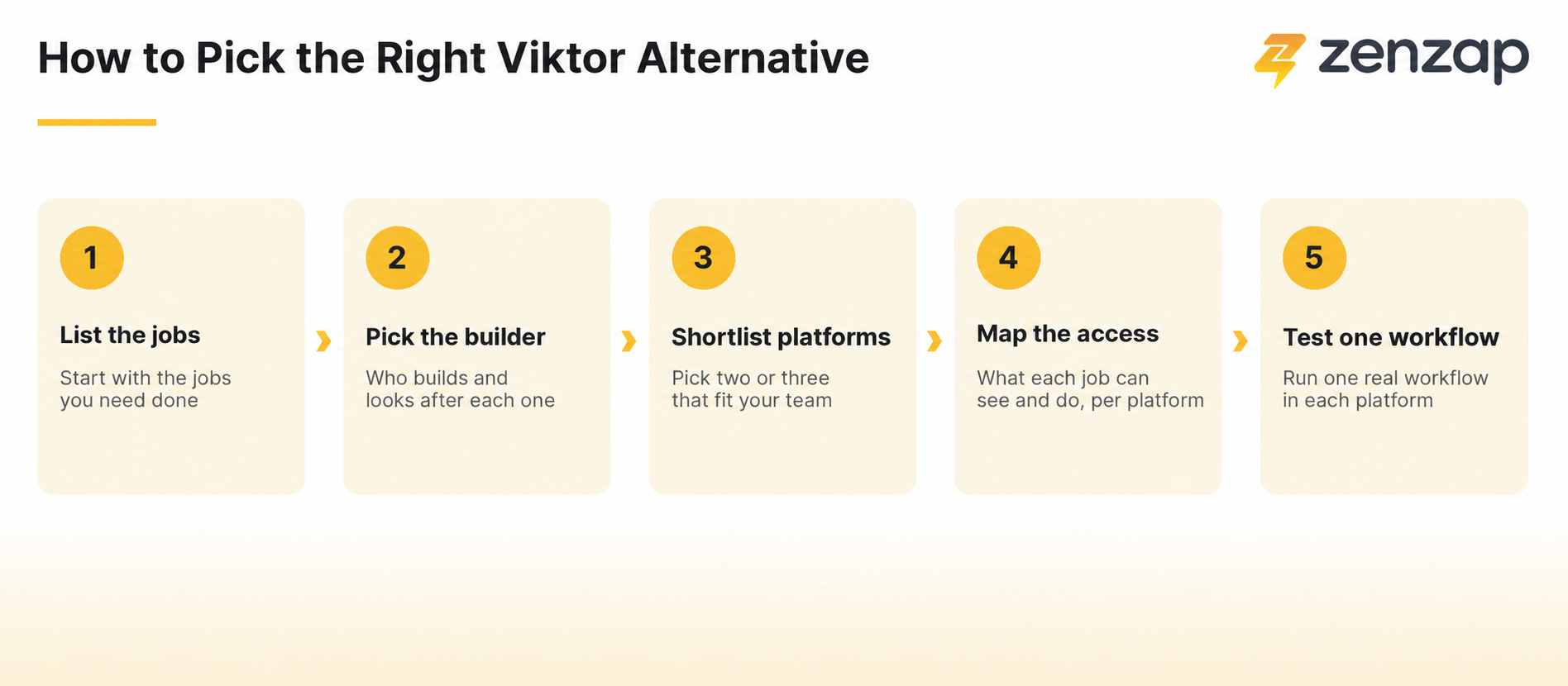
The criteria above tell you what a good platform offers. The steps below help you narrow the list and test which platform actually fits your team before you commit.
- Start with the jobs you need done: Write down the three to five jobs you want AI agents to do, such as answering support tickets or sending weekly sales updates. Each job will likely become its own AI agent.
- Name who will build AI agents and look after each job: If that person isn’t technical, rule out platforms that need code or an IT admin to change a workflow.
- Shortlist two or three AI agent platforms: Use the jobs and builders from the first two steps to pick the ones from this list that fit your team best. The next two steps test each one, so you can compare them before you commit.
- Map the access each job needs: For each job, list the tools and data it should reach and the actions that should wait for approval. Then check whether each platform on your shortlist can set this per AI agent.
- Run one real workflow for a week: Pick a job your team does often, build it in each shortlisted platform, and break it on purpose once. See whether the team finds out in the conversation or has to go looking.
Teams that want people to build their own AI agents, with separate access for each job and problems flagged right in the chat, will find Zenzap the strongest fit.
Choose the Viktor Alternative That Fits Your Team
Viktor is a simple way to give a team its first shared AI agent. The right alternative depends on why you’re looking for one and how your team works together.
If you want the people you allow to build as many AI agents as they need, without code, and work with them together in your team’s chats, try using Zenzap.
FAQ
Can Viktor run more than one AI agent?
No. Viktor runs as one AI agent shared by the whole workspace, with the same context and security policies across departments.
Can I keep Viktor while trying an alternative?
Yes. You can start by moving one job, such as weekly reports, to a new platform and compare results before you move more.
Which Viktor alternatives let your whole team work with the same AI agent?
Zenzap, Copilot Studio, and Agentforce let a team use the same AI agent where it already works, and in Zenzap, the AI agents and people work together in the same chat. With Workspace Studio, Grok Bot, ChatGPT workspace agents, and Claude Cowork, each person mostly works with the AI agent on their own.
Do I need a developer to build multiple AI agents?
No. No-code platforms like Zenzap let the people you allow build AI agents in plain words.
Which Viktor alternatives work in Slack or Teams?
Copilot Studio works in Teams. Agentforce, Relevance AI, ChatGPT workspace agents, and OpenClaw can work in Slack, and Grok Bots can be added to Slack or Teams.
Which Viktor alternative is best for non-technical teams?
Zenzap is the best fit for non-technical teams, because building an AI agent works like texting, including on mobile.