Key Takeaways
- Build AI agents around repeat work, not one-off prompts, because the value shows up when the same workflow runs across tools and chats.
- Put the AI agents inside team conversations so context, approvals, and follow-ups stay in one place instead of getting scattered across private messages and separate apps.
- Start with one workflow that already happens every week, then measure time saved, errors reduced, or deals moved forward.
- Use approvals, scoped memory, and controlled tool access so sensitive actions stay inside a clear policy.
AI agents for work are moving from private helpers to shared operations inside team chats. That shift matters because work already lives across messaging, documents, ticketing systems, CRMs, and calendars, and every handoff adds time and risk.
The teams getting value are not asking for bigger prompts. They are building AI agents that can read context, act in connected tools, and keep the conversation visible to the people who own the work.
A recent Informat analysis on enterprise collaboration tools says AI agents are increasingly handling information retrieval, task coordination, and routine execution, which cuts down status questions that used to take 30 minutes of manual gathering across half a dozen systems. That is the pattern this guide follows: pick a repeatable workflow, connect the right tools, and keep the AI agents inside the team chat where decisions happen.
Introduction
If you want AI agents that work across tools and team chats, the first move is to stop treating chat and execution as separate systems. The best setups turn conversation into action, then keep the action visible to the team that asked for it.
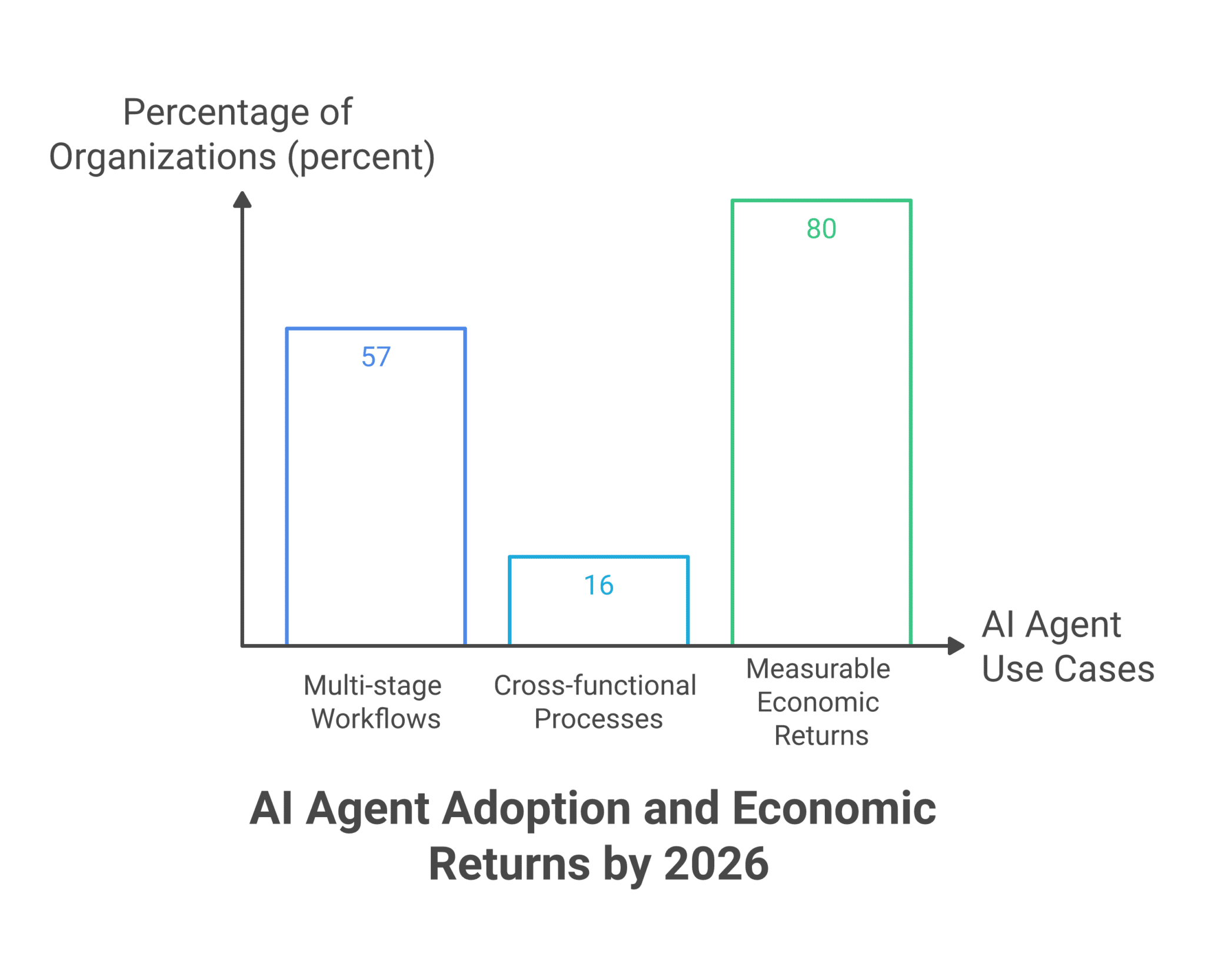
That is why the strongest buying signal in 2026 is not just AI summarization. In a GoSearch roundup of AI collaboration platforms, the emphasis is on teams completing work across the tools they already use, because search alone does not move work forward. The same pattern shows up in enterprise adoption data: Anthropic’s 2026 State of AI Agents Report says 57% of organizations already use AI agents for multi-stage workflows, 16% use them in cross-functional processes spanning multiple teams, and 80% report measurable economic returns.
This guide gives you the sequence. You will see how to choose a workflow, map it across tools, add the AI agents to the right chat, set controls, and measure the result.
Table of Contents
- Why AI agents now belong inside team chats
- Step 1: Pick a workflow worth automating
- Step 2: Map the tools, people, and approvals
- Step 3: Add the AI agents and connect the tools
- Step 4: Put the AI agents in the right chat
- Step 5: Set guardrails, memory, and approvals
- Step 6: Measure the result and expand
- A practical workflow table
- What to do next
Why AI Agents Now Belong Inside Team Chats
AI agents work best when the conversation and the action happen in the same place. That shortens handoffs, gives the AI agents more context, and lets the team correct course while the work is still moving.
Enterprise platforms are already moving in that direction. Atlassian said in its February 25, 2026 announcement on agents in Jira that teams can assign work to Atlassian Rovo and third-party AI agents in Jira, then iterate with them in comments and embed them directly into workflows. That matters because it confirms the direction of travel, AI agents are no longer sidecars to work, they are being placed inside the work surface itself.
The market signals are just as clear. IDC figures cited by Thunderbit put unified communications and collaboration software in 93% of enterprises, while Microsoft Teams has 320M+ monthly active users. In other words, the collaboration layer already exists. The open question is whether the AI agents can act where people already talk and decide.
Step 1: Pick A Workflow Worth Automating
Start with one workflow that repeats often, has clear inputs, and ends with a measurable outcome. The best first build is usually something that already wastes time every week, not a flashy demo with no operational owner.
A good test is simple: if the same question, request, or approval appears in chat every week, the workflow is ready. Anthropic’s report says 39% of organizations are already developing AI agents for multi-step processes and 29% are deploying them for cross-functional projects, which tells you the market is moving toward repeatable operations instead of isolated experiments.
For a support team, that might be ticket triage and draft replies. For a sales team, it could be lead routing and account status checks. For a legal or finance team, it may be intake, review, and approval routing.
- Choose one task that creates visible friction in a group chat or a shared inbox.
- Keep the first version narrow enough that one person can check the result in minutes, not days.
- Define the payoff before you build, such as minutes saved per request, fewer missed follow-ups, or faster response time.
Step 2: Map The Tools, People, And Approvals
A useful AI agent needs a clean map of who does what, which tools it can touch, and what requires permission. That map prevents the build from becoming a loose collection of prompts and disconnected automations.
The strongest deployments follow the same pattern: one source for the request, one or more connected tools for action, and one owner for approval. Anthropic says integration challenges are one of the top barriers to scaling, at 46%, followed by data quality requirements at 42% and change management needs at 39%. The lesson is direct, if the workflow is messy on paper, it will be messy in production.
For example, a customer support workflow may need a ticket system, a knowledge base, and a CRM. A construction workflow may need field notes, a job log, and a scheduling calendar. A franchise or retail workflow may need store chat, inventory data, and a task queue.
A Practical Workflow Map
Use this table to decide where the AI agents should pull from, where they should post, and when a person needs to step in.
| Workflow piece | What the AI agents do | Who stays involved | Best metric |
|---|---|---|---|
| Request intake | Summarize the ask, classify urgency, and route it to the right owner. | Manager or team lead for edge cases. | Time to first response. |
| Cross-tool lookup | Pull status from multiple systems and answer in chat. | Ops owner for exceptions. | Minutes saved per lookup. |
| Approval step | Prepare the change, then pause for sign-off on sensitive actions. | Approver named by policy. | Approval cycle time. |
Step 3: Add The AI Agents And Connect The Tools
Once the workflow is mapped, add the AI agents to the tools it needs and keep the setup small enough to test in a day. The point is to get a live workflow running, not to design a giant automation program before anyone sees value.
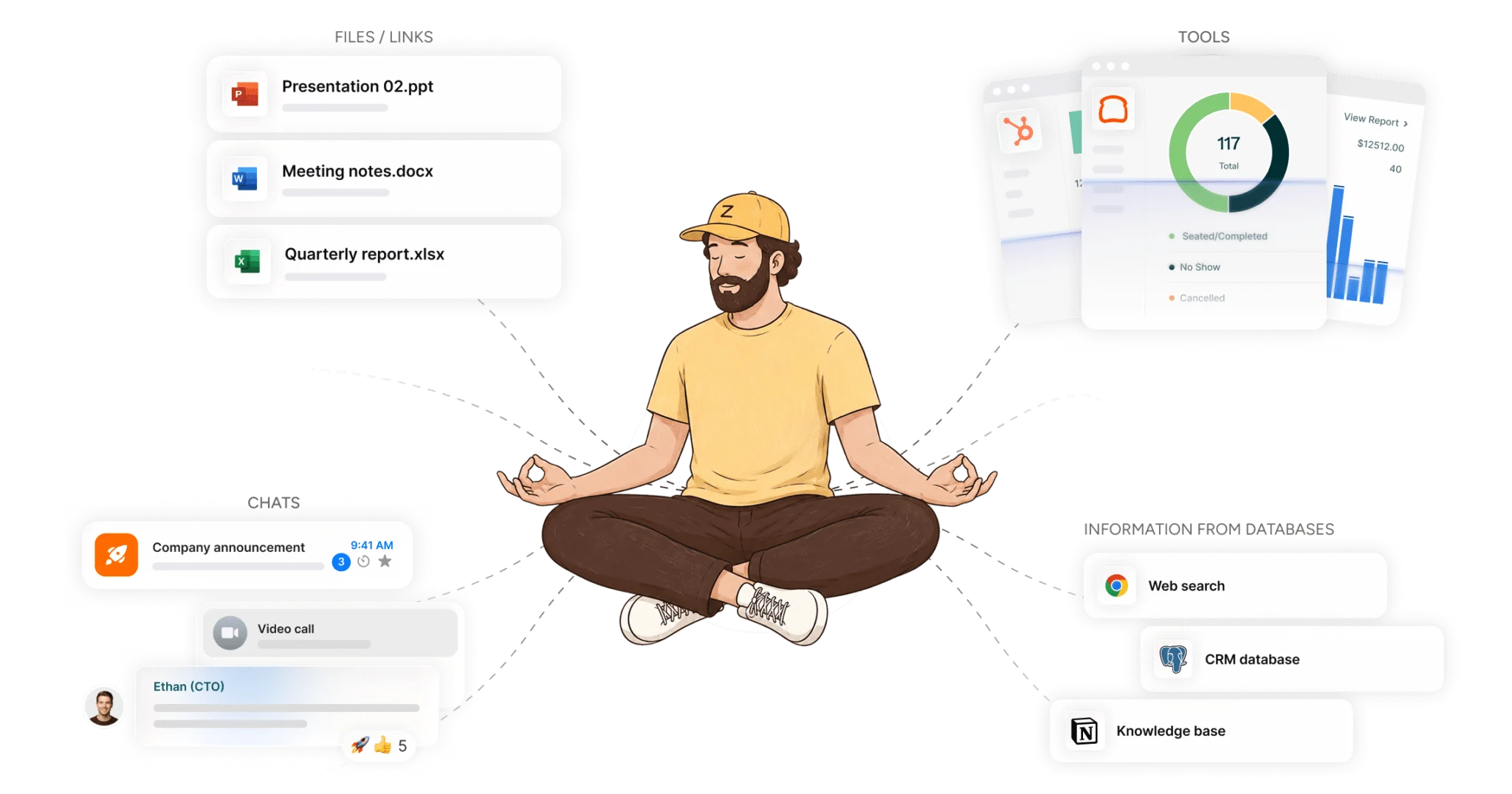
This is where a no-code setup saves time. Zenzap’s model is built around one-click setup, so a manager, director, or employee can build an AI agent without waiting on a developer. That matters because the first useful version of a workflow should come from the person closest to the work.
For a SAAS support team, that can mean connecting ticketing, docs, and chat. For a finance team, it may mean invoices, approvals, and a shared conversation thread. For a healthcare or home care team, it can mean intake notes, schedule changes, and secure review.
What To Connect First
The first connection set should include only the systems that change the outcome. If the AI agents can answer the question, route the request, or write the draft with those tools alone, do not add more yet.
- Connect the system that receives the request so the AI agents know where the work starts.
- Connect the system that holds the answer so the AI agents can act across tools instead of only summarizing them.
- Connect the system where the team tracks the result so the outcome can be measured in one place.
Step 4: Put The AI Agents In The Right Chat
The next move is to place the AI agents in the group chat where the team already works. That gives everyone the same context, and it keeps corrections, follow-ups, and approvals visible.
This is the multiplayer part of the build. Taskade’s 2026 writing on agent collaboration says the unsolved problem is real-time co-edit between humans and AI agents on the same project, and that is exactly why the chat layer matters. When the team can correct the AI agents in public, the work gets smarter from the whole conversation, not one private exchange.
This is also where the business value compounds. Deloitte’s 2026 State of AI in the Enterprise report, cited by GoSearch, found that 66% of organizations report productivity and efficiency gains from AI. A chat-based workflow helps those gains show up in day-to-day work because the team does not need to leave the thread to keep moving.
Step 5: Set Guardrails, Memory, And Approvals
Good AI agents need limits. They should know what to remember, what to ignore, what can run automatically, and what needs a person to approve first.
That control matters because the risks are practical, not theoretical. Anthropic’s report says the biggest barriers to scaling AI agents are integration challenges, data quality, and change management, and a secure setup addresses all three by keeping memory scoped to the topic and by requiring approval for sensitive actions. A controlled build also keeps the AI agents focused on the exact workflow they were added to support.
Zenzap’s approach fits that model with topic-scoped memory, secure tool access through a trusted proxy, and approval controls for destructive or sensitive writes. In practice, that means an AI agent can summarize a thread, draft a response, or prepare a record, while a person still reviews the final change before it goes live.
Guardrails That Keep The Workflow Safe
The safest AI agents are the ones that can only do the work they were set up to do. This section is where you lock in the rules that keep the build useful without making it risky.
- Scope memory to the topic so the AI agents keep context where it belongs and do not bleed details into unrelated work.
- Limit tool access to approved domains and endpoints so the AI agents can act only where the business expects them to act.
- Require approval for sensitive writes, refunds, deletions, or record changes so the team keeps control over high-impact actions.
Step 6: Measure The Result And Expand
The last step is to measure the workflow in plain business terms. If you cannot point to time saved, revenue moved, or risk reduced, the build is not finished yet.
There is already enough evidence to justify the approach. Model N reported a 47% productivity boost in customer support after deploying AI agents to monitor tickets, pull context, and draft responses, and Unthread says automation can reduce support ticket volume by up to 60% and cut first response times by 37%. Those figures are useful because they tie the workflow to throughput, not novelty.
Once the first workflow is working, expand into the next repeat process. A legal team may move from intake to contract review. A retail team may move from stock alerts to reorder routing. A consulting team may move from meeting notes to follow-up drafts and task assignment.
What A Good First Build Looks Like
A strong first build is narrow, visible, and easy to explain. It should solve one repeated problem, use connected tools, and live where the team already talks.
You can also compare the setup against the collaboration market itself. Thunderbit cites a $33.49B team collaboration software market in 2026, with a 13.6% CAGR, while Unthread cites a $36.1B market in 2024 projected to reach $57.4B by 2030. The scale is already there, and the gap is execution across the tools people use every day.
One internal guide that helps teams think about this is how to centralize conversations using team communication tools, which shows why scattered threads slow work down. Another useful read is the case for a centralized workspace instead of app juggling, because AI agents work better when the team and the tools share the same context.
Build The First Workflow The Team Can See
The fastest way to get value is to build one AI agent that does one real job, in one shared thread, with one clear metric. Once the team sees the workflow reduce back-and-forth, the next one becomes much easier to add.
If you want to move from private automation to shared execution, start with AI agents that live in team chats, connect to real tools, and keep approval where the business wants it. That is the path to work that is visible, measurable, and easier to run across the whole team.
FAQ
Q: What should I build first if I want AI agents across tools and team chats?
A: Start with a workflow that repeats every week and already creates friction in a team conversation. Good first picks include ticket triage, lead routing, status lookups, approval prep, or meeting follow-ups. The best first build is small enough to test quickly but real enough to measure. If the result can be tracked in minutes saved, faster response times, or fewer errors, you picked the right starting point.
Q: How do I know which tools to connect first?
A: Connect only the tools that change the outcome of the workflow. That usually means the place where the request starts, the place where the answer lives, and the place where the result is tracked. If the AI agents can complete the workflow without a fourth or fifth system, leave those out for now. Fewer connections make the first build easier to test and easier to trust.
Q: Why put AI agents in a group chat instead of using them privately?
A: Group chat gives the AI agents shared context and gives the team a shared record of what happened. That makes it easier to correct mistakes, add missing details, and review decisions without copying messages across tools. It also keeps the work visible, which is useful when multiple people own the same process. The chat becomes part of the workflow instead of a separate place where notes go to disappear.
Q: What guardrails should I use for sensitive workflows?
A: Use topic-scoped memory, approval controls, and limited tool access. Sensitive writes should wait for a human approval step, especially for changes that affect money, records, or compliance. Keep the AI agents on approved domains and endpoints only. That gives you useful automation without handing over control of the risky parts.
Q: How do I measure whether the workflow is working?
A: Measure the outcome that matters to the team, not just how often the AI agents were used. Common metrics include first response time, minutes saved per task, ticket volume, approval time, error rate, and work completed per week. If a workflow is meant to move deals, track the number of deals that move forward faster. If it is meant to reduce mistakes, track the number of corrections avoided or caught earlier.
About Zenzap
Zenzap gives you AI agents that do real work, connected to your tools and your team through a secure chat. Setup takes one click: no code, no developer. Unlike Claude or ChatGPT, the agents come already built and connected. You talk to them like a coworker: tag them into chats, correct them once and they remember. They act across your tools, automate workflows, build reports and graphs, summarize chats, flag what needs attention and coordinate people and tasks. One person gets value alone. Add your team, and every correction makes the agent sharper. Agents start in about 300 ms and run on managed infrastructure. Memory stays isolated by topic, and agents never hold credentials. They reach only approved domains, and sensitive actions need your approval.