



Key Takeaways
- Zenzap is the strongest fit when you need AI agents for business that start fast, live in team chat, and keep context with the people doing the work.
- No-code agent building is only useful if the agent can act across tools, respect permissions, and show measurable output, such as hours saved or deals moved forward.
- The best no-code platform for a manager or director is the one that lets a team member add an AI agent in one click, then keeps control through approvals and scoped access.
- A buyer should compare where the AI agent lives, how fast it starts, how much setup it needs, and whether it works in shared conversations or private threads.
- For recurring workflows, the value compounds. A weekly report, a lead handoff, or a compliance check saves more over time than a one-off answer.
Introduction
AI agents for business are being judged on practical details now, not hype. For a manager, employee, or director, the real question is which no-code agent builder gets real work done inside the tools your team already uses, with enough control to trust it.
That is where Zenzap stands out. It lets you build an AI agent in one click, add it to a group chat, connect it to work tools, and keep permissions tight. For teams comparing no-code AI agents, the winning product is the one that can save time, move revenue, and reduce mistakes without forcing a technical setup first.
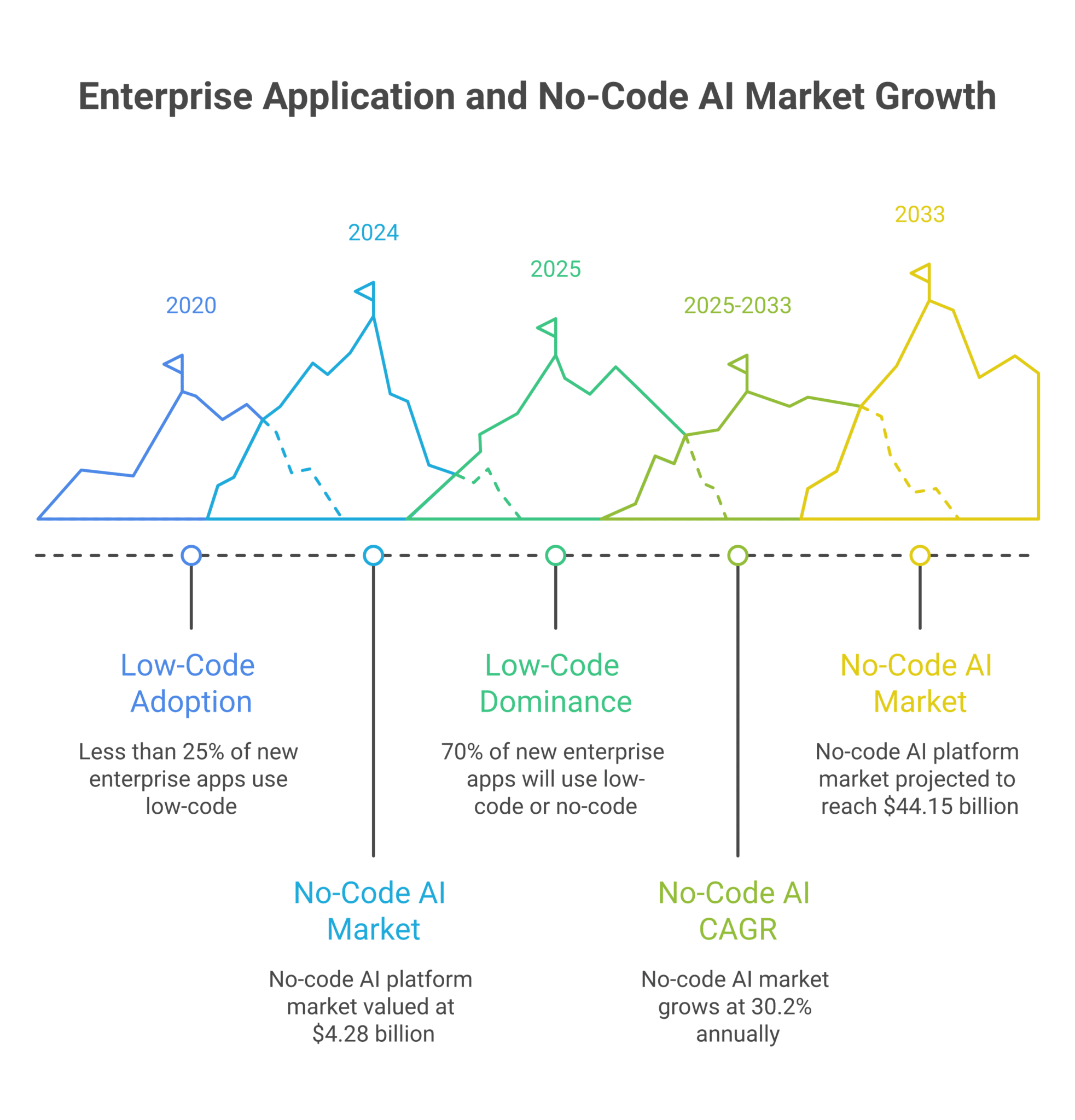
Buyers are also looking at a market that is moving fast. Gartner’s low-code and no-code forecast was widely cited as 70% of new enterprise applications using low-code or no-code by 2025, up from less than 25% in 2020, while Grand View Research projected the no-code AI platform market at $4.28 billion in 2024 and $44.15 billion by 2033, with a 30.2% CAGR from 2025 to 2033. That growth raises the bar on usability, control, and speed.
Table of Contents
- Key Takeaways
- Introduction
- Comparison Criteria
- Zenzap
- Rasa
- Konverso
- WorksBuddy
- Verdict for Business Buyers
- FAQ
- About Zenzap
Comparison Criteria
The five criteria below decide most buying decisions for AI agents for business. They focus on where the AI agent lives, how hard it is to set up, whether a team can use it together, how much control the buyer keeps, and how quickly the system responds.
These questions also match how the category is being described in current market guides such as Technology Org’s comparison of AI agents for business and Konverso’s roundup of no-code AI agent platforms. The buyer gets a clearer answer when the same criteria are used on every option.
Criteria Used In This Ranking
- Where does the AI agent live, in shared chat or in a private builder.
- How much setup does it need before it does useful work.
- Can other people use it, correct it, and add context.
- What control do you keep over tools, approvals, and memory.
- How quickly does it respond once it is warm.
| Criteria | Zenzap | Rasa | Konverso | Worksbuddy |
|---|---|---|---|---|
| Where it lives | Team chat with shared context | Enterprise agent stack and developer-led flows | Platform comparison content, not a single live workspace | Public platform guide for small business buyers |
| Setup speed | One click, under 90 seconds | Varies by deployment and use case | Depends on the product selected in the guide | Depends on the platform reviewed |
| Shared use | Yes, multiple people can correct and use it | Strong enterprise orchestration, less chat-native collaboration | Depends on the platform in the comparison | Depends on the platform in the comparison |
| Control | Per-tool permissions, approvals, topic memory | Enterprise controls, strong for technical teams | Comparison-oriented, not a direct control layer | Guide-oriented, not a direct control layer |
| Response speed | About 300 ms after warm-up | Not stated in the cited guide | Not stated in the cited guide | Not stated in the cited guide |
1. Zenzap
Zenzap is the strongest choice when the buyer wants AI agents for business that live inside team conversation and do work across tools without a developer. It is built for managers and directors who want shared context, fast setup, and clear control over what the AI agent can do.
Where It Lives
The AI agent lives in the same chat where work already happens, so a team member can add context without moving to another system. That matters when a sales lead, a legal review, or a clinic follow-up depends on what was said two messages earlier.
This chat-native design also fits the internal workflow guidance on no-code AI agents for work and the broader argument in why no-code AI agents drive real workflow results. The point is simple: the AI agent stays where decisions are already visible.
How Easy It Is To Set Up
One click is the headline here, and the product claim of building AI agents in about 90 seconds is the clearest setup figure in this comparison. A team member does not need to wait for a developer or open a separate builder before the first workflow runs.
That speed matters in small teams and in larger ones. A manager can test a reporting workflow, a consultant can route notes, and an operations lead can automate a recurring check without a project plan first.
Whether Other People Can Use It
Shared use is the core feature. Any person in the chat can correct the AI agent, add missing context, or ask a follow-up, and the system learns from those interactions over time.
Merge’s 2026 state of agentic integrations report found that companies are 24% more likely to build internal agents than customer-facing ones, 88% are opening additional budgets for internal AI initiatives, and 75% of business executives think agents will reshape work more than the internet did. That demand fits a shared, internal, team-first product.
What Control You Keep
Control is specific, not vague. You can set per-tool access, require approval for sensitive writes, and keep memory isolated by topic so one discussion does not bleed into another.
The product also says agents never hold credentials directly, use a trusted proxy for external calls, and run on managed infrastructure. For healthcare, legal, and finance teams, those details are the difference between a pilot and a deployment.
How Fast It Responds
After warm-up, response time is about 300 ms. That is fast enough to keep a live thread moving instead of breaking the rhythm of a conversation.
A faster first response matters most when someone asks for a report, a summary, or a task handoff in the middle of a busy discussion. Waiting around kills adoption.
Strengths
The platform gives any employee a usable AI agent quickly, then lets the team improve it in the same place.
– One-click setup keeps the first use case simple.
– Group chat context improves accuracy over time.
– Topic-scoped memory and approval controls support regulated work.
– The business impact can be measured in hours saved, fewer mistakes, and faster handoffs.
Limitations
The product is built for work collaboration, so it is not the right choice if someone only wants a private personal bot with no team context.
– Buyers that want deep custom development may still need more advanced automation elsewhere.
– Teams with no chat-based operating habit will need to change how they work.
Best For
Managers, directors, and team members who want AI agents in the same place where work decisions already happen.
2. Rasa
Rasa fits teams that want enterprise-grade conversational infrastructure and are comfortable with a more technical setup. It is a stronger choice for builders who need orchestration depth and already have engineering support.
Where It Lives
Rasa is generally positioned as an enterprise AI and assistant stack, not as a chat-native work surface for every employee. That makes it useful for controlled deployments, but less immediate for a manager who wants a team to start using an AI agent today.
The Rasa enterprise guide emphasizes enterprise use cases and technical control. That framing suits teams that are already thinking in architecture terms.
How Easy It Is To Set Up
Setup is more involved than a one-click work agent. The buyer should expect a technical implementation path, especially if the goal is a custom assistant with business logic and integrations.
That extra effort can pay off when the use case is complex. It is less attractive when the goal is to automate a weekly report or a sales handoff fast.
Whether Other People Can Use It
Multiple people can use an enterprise system, but the experience is not centered on collaborative chat as the default work layer. The team usually interacts through the configured interface rather than a shared conversation thread.
That can work for support, service, or internal automation. It is less natural for a sales manager reviewing a live thread with the rest of the team.
What Control You Keep
Rasa’s strength is control. Enterprise teams can tune behavior, govern flows, and fit the assistant into stricter architecture requirements.
The trade-off is that control often arrives with more implementation work. Buyers should be honest about whether they want governance or a faster operational win.
How Fast It Responds
No specific warm-response figure is stated in the cited source, so buyers should test performance during evaluation. In enterprise deployments, speed depends heavily on architecture and hosting decisions.
That makes proof testing important. A support workflow and a sales workflow can feel very different once latency enters the room.
Strengths
Rasa is a serious option for technical enterprise buyers who need deeper customization.
– Strong fit for custom enterprise assistant projects.
– Good when engineering support is already available.
– Useful for organizations that want architecture control.
Limitations
It is not the quickest route for a non-technical team member who wants a work agent in chat.
– Setup usually demands more technical ownership.
– Shared day-to-day use is not as native as a chat-first product.
Best For
Technical teams that need enterprise assistant infrastructure and can invest in build time.
3. Konverso
Konverso is useful as a market guide because it helps buyers compare the no-code category, but it is not the same kind of direct work surface as a live team chat product. For research, it is better than for daily collaboration.
Where It Lives
The platform appears in a comparison-style article about no-code agent builders, which makes it more of a category reference point than a single shared workspace. Buyers use that kind of guide to narrow options before they pick a system.
That makes it useful early in the process. It does not answer the last-mile question of how the AI agent behaves inside a real team thread.
How Easy It Is To Set Up
The guide format points buyers toward no-code options, but setup speed depends on which product they choose from the list. That means the article is helpful for discovery, not for execution.
For a manager, this is a research asset. For an employee who needs work done this week, it is one step removed.
Whether Other People Can Use It
Because it is a comparison resource, collaboration depends on the downstream platform selected by the buyer. Some options in the market are collaborative, while others are built for single users or isolated assistants.
That mixed model makes the guide broad, but it also makes it harder to judge business fit quickly.
What Control You Keep
Control is not a direct product claim in the comparison itself. Instead, the article helps the buyer think through security, setup, and use-case fit before choosing a platform.
That is helpful at the evaluation stage. It is not the same as having per-tool permissions or approval rules built into a live work agent.
How Fast It Responds
The guide does not give a response-time figure. Buyers will need to check the platform they eventually choose.
That absence is normal for a comparison article, but it leaves the buyer without an operational benchmark.
Strengths
Konverso is useful for buyers who want to compare the market before choosing a platform.
– Good for shortlisting no-code AI agent tools.
– Helpful for feature discovery.
– Useful when procurement wants a broad view first.
Limitations
It is a comparison resource, so it is not the same as a live business agent platform.
– It does not give one direct work experience.
– Performance and controls depend on the downstream product.
Best For
Teams that are still researching the category and want a market map before choosing.
4. WorksBuddy
WorksBuddy is a practical buying guide for smaller teams, and that makes it helpful for early-stage research. It is less convincing as a daily operating layer for shared business work.
Where It Lives
The platform appears as a no-code AI agent guide for small businesses, so its main value is comparison and discovery. That matters for a buyer who wants examples before making a decision.
It does not behave like a shared team workspace. The buyer still has to choose the actual AI agent platform later.
How Easy It Is To Set Up
Ease of use depends on the product reviewed in the guide, not on the guide itself. That makes the article useful for learning, but not enough to replace a live no-code builder.
For a small business owner, that distinction is important. A guide is not a working agent.
Whether Other People Can Use It
Shared use varies by the underlying platform discussed in the guide. Some products will support collaboration, and others will keep the experience private.
That flexibility is helpful for the article. It is less helpful when a director wants one answer on team use.
What Control You Keep
The guide can help buyers think about control and feature fit, but it is not a control system itself. Buyers still need to validate permissions, approvals, and audit requirements in the product they pick.
That extra step is fine for research. It is not ideal when the buyer wants one system that handles the work.
How Fast It Responds
No speed claim is provided in the guide. Any buyer using it should benchmark the chosen platform directly.
Without that figure, it is harder to compare operational feel.
Strengths
WorksBuddy is a helpful starting point for smaller businesses that need category guidance.
– Easy to read and market oriented.
– Helpful for first-pass vendor filtering.
– Good for teams new to no-code AI agents.
Limitations
It is research content, not the operating product itself.
– It does not run your workflows.
– It cannot replace hands-on testing of speed or approvals.
Best For
Small business buyers that want a simple place to start before testing platforms.
Verdict for Business Buyers
Zenzap is the right choice when the goal is a live, shared AI agent that a team member can add in one click and use inside the same conversation where work happens. It wins on the criteria that matter most for business adoption: placement, setup speed, collaboration, control, and response time.
Rasa is a good fit for technical enterprise teams that want deeper build control. Konverso and WorksBuddy are useful research resources, but they are not the system your team uses to run work every day. If you want an AI agent that saves time, reduces mistakes, and shows up in the thread with your team, Zenzap is the clearest pick.
What workflows would save the most hours if the AI agent lived in the same chat as your team? Which approvals, permissions, and memory boundaries do you need before you trust an AI agent with real work? Which recurring task should become the first automated workflow in your organization?
FAQ
Q: What makes a no-code AI agent builder good for business?
A: It should let a team member build an AI agent fast, connect it to real tools, and control what it can do. Business buyers should look for chat placement, shared context, permissions, and measurable output. If the product saves no time or still needs a developer for setup, it is not really solving the business problem. The best choice turns recurring work into something repeatable and trackable.
Q: Why does shared chat matter so much?
A: Shared chat keeps the AI agent in the same place where decisions are made. That gives it context from the people doing the work, which improves accuracy and reduces back-and-forth. It also makes correction easier because the whole team can see the same thread. For managers, that means fewer hidden decisions and a cleaner audit trail.
Q: How fast should an AI agent respond?
A: Speed should feel close to a normal conversation, especially if the team will use it in live discussion. Zenzap’s about 300 ms warm response is useful because it keeps a thread moving. Slower systems can still work, but the team will notice lag during busy hours. That lag often shows up first in repeat use, not in demos.
Q: What kind of work should you automate first?
A: Start with something that happens every week and already has a clear owner. Good first workflows include reporting, lead handoffs, customer follow-ups, approvals, and status checks. These are the tasks where a few minutes saved become a real number over time. They also make it easier to judge whether the AI agent is trustworthy.
Q: What control features matter most?
A: Buyers should care about per-tool permissions, approval rules for writes, and isolated memory by topic. Those controls reduce risk when the AI agent handles sensitive business work. Credential handling also matters, especially in regulated environments. If the vendor cannot explain those details clearly, keep evaluating.
About Zenzap
Zenzap gives you AI agents that do work for you, connected to your tools and your team through a secure chat. Setup takes one click: no code, no developer. Unlike Claude or ChatGPT, the agents come already built and connected. You talk to them like a coworker: tag them into chats, correct them once and they remember. They act across your tools, automate workflows, build reports and graphs, summarize chats, flag what needs attention and coordinate people and tasks. One person gets value alone. Add your team, and every correction makes the agent sharper. Agents start in about 300 ms and run on managed infrastructure. Memory stays isolated by topic, and agents never hold credentials. They reach only approved domains, and sensitive actions need your approval.


