


Everyone’s talking about AI today, and you probably feel like your company should already be running on it. It’s on your peer group’s agenda every month, in your board’s questions, in every vendor pitch, and on your LinkedIn feed every morning. A year ago, the question might have been whether you were looking into AI. Now it’s what your company is doing with it.
65% of CEOs now worry they’re underinvesting in AI, up from 53% a year ago. 69% of CEOs see AI adoption as mandatory just to stay competitive, and rolling out agents alongside employees has become one of CEOs’ top three priorities for 2026.
Every day you wait to use AI tools that are cheap and available costs you time and money: hours your team spends on follow-ups, invoice matching, scheduling, and reporting that an AI agent could be handling.
56% of CEOs see zero return on their AI spend. If you run a company with 50 to 100 people, you’ve probably already had an AI win somewhere on your team. The hard part is turning that one win into something everyone runs on.
The pressure reaches beyond the boardroom too. 79% of U.S. CEOs tie keeping their job over the next 2 years to showing measurable business gains from AI. Half of CEOs tie their own job stability to getting AI right in 2026.
This is personal for you too, and the rest of this guide is about the structure you build around it, the part that determines whether your AI spend pays off.
AI Is Already Part of Your Company’s Daily Work
If your company has 50 to 100 people, you’re in the highest AI adoption bracket for your size. Adoption climbs from 57% at companies with 5 to 9 employees to 84% at companies your size.
That adoption number comes with exposure built in. Someone on your team is almost certainly using ChatGPT or a personal AI account for work right now, on a deal, a report, a client email. That shows up in every survey of businesses your size.
That’s a bigger risk than it looks:
- Whatever an employee types into a personal AI account, client details, financials, internal plans, stays tied to that one account, under that person’s login and that vendor’s terms.
- The knowledge goes with them too. Every prompt, every refined workflow, every bit of history sits in that one account, and it leaves with them the day they do.
- Company data ends up scattered across however many personal accounts your team has opened, each one invisible to the next and impossible to check from a single place.
- Whatever an AI agent sends on the company’s behalf goes out unreviewed, since the output lives in that same personal account.
- Whether the tools are free or expensed, the company carries the risk every time, while the upside stays with whoever’s using them.
The fix sits in the chat your team already works in. Agents that live in a shared, company-owned chat inherit the same access rules as people: a new hire inherits the AI agents already in their chats, and removing someone removes their access to those same agents in the same step. The rest of this guide is about building that structure.
Where Does Your Company Rank on the AI Adoption Scale?
Most companies your size are still at the stage where a few people ask ChatGPT for help on their own, or use whatever AI features happen to be built into the apps they already have.
Getting one real workflow running is what actually separates you from the pack. The shift that matters happens once an AI agent moves into a team’s shared chat: the whole team gains visibility, and oversight finally begins.
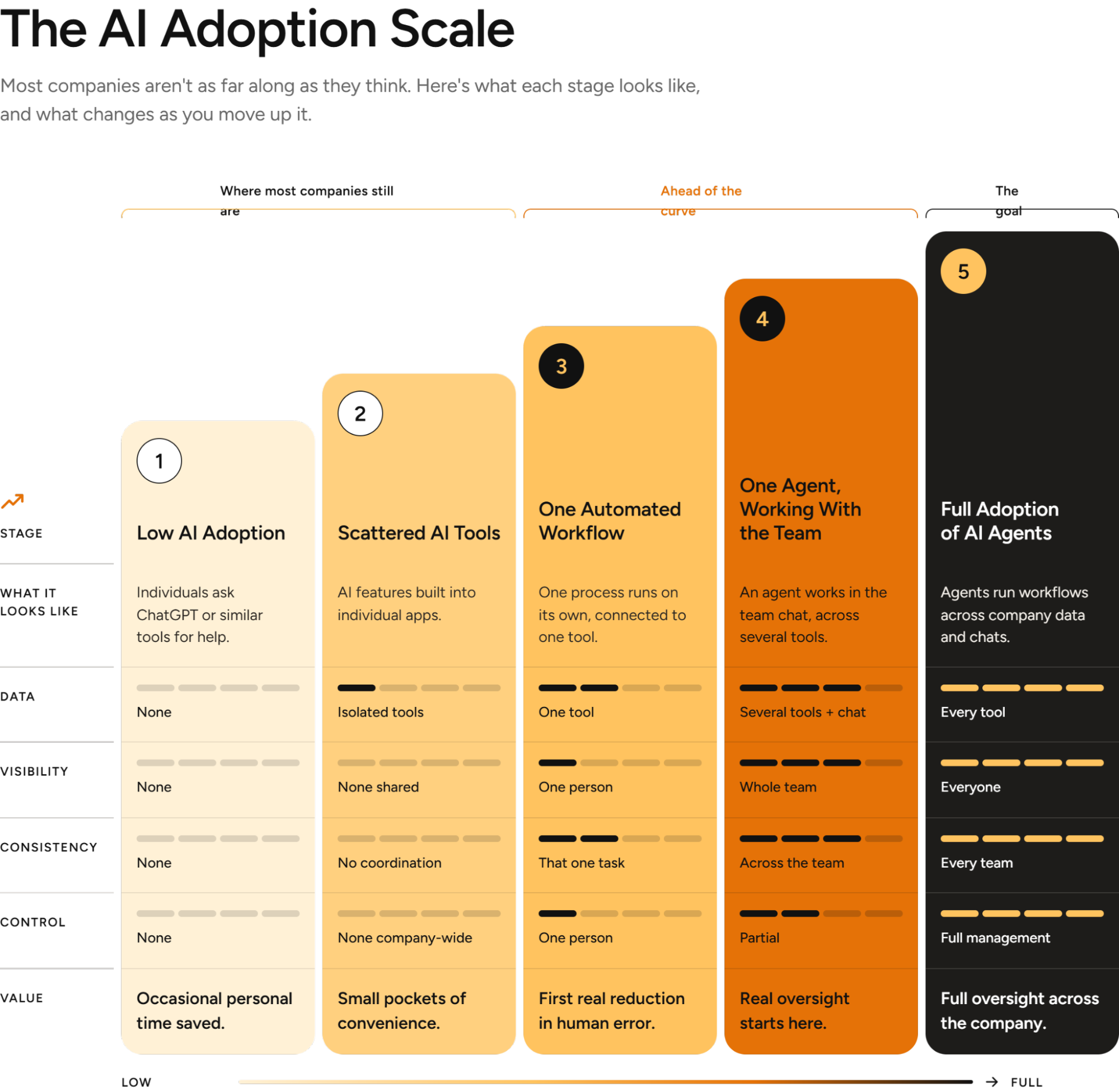
Right now, a handful of people on your team probably use some kind of generative AI, or use whatever AI features are built into the email, CRM, or document tools they already have. Each person manages their own account and the output stays personal instead of being owned by the company.
Some companies have one or two processes running with AI: an invoice gets matched, a report gets built, the same task happens the same way every time. That’s good progress, since a task can run on autopilot instead of depending on someone’s memory, but it still belongs to one person and answers to that person alone.
What changes things is an AI agent moving into a team’s shared chat instead of staying with one person. That way the whole team can see what the AI agent is doing, beyond just the person who set it up. Mistakes get caught faster because more eyes are on the output, and the work keeps running even after that one person leaves the company.
The aim is every department working with AI agents woven into their daily work, connected to the tools they already use, escalating to a person only when something needs one. Everything that matters stays visible, and leadership has a single view across the whole company instead of a patchwork of individual habits.
How One Person’s AI Win Can Become the Whole Team’s
Here’s the pattern, almost every time: one person on your team tries an AI tool, it works for them, and it stays with them.
These people get called “super-users,” and while they get strong individual results, everyone else on the team has to go through them to use what they’ve built. Only 23% of organizations have scaled an AI agent in even one business function. Yours probably has a pilot that lives with one person, with the rest of the team still waiting for a version they can use.
Three things usually decide whether that first win spreads:
Visibility. Your team picks up AI tools on their own, with limited view for you into what they’re using or how. When that person leaves or moves to a different project, the win leaves with them.
Trust. 78% of small business owners say they trust AI with low-level tasks only when someone checks its work. That caution makes sense. Build in a check at the point the output matters most.
Ownership. The first win usually happens by accident, someone tried something and it worked. Scaling it takes a deliberate decision, and at a company your size, that decision rests with you.
The Structure Layer Your Company Still Needs
Automating a workflow is the easy part now. Zapier and Make already handle that, and most teams can set it up themselves.
What your company still needs sits one level above the workflow:
- Who has access to what
- Which team owns which agent
- What a new hire inherits on their first day
- What happens when someone leaves
That’s the layer that turns “we automated one task” into “we run the company on this.” Right now, every AI win is personal property: the person who built it owns it, understands it, and takes it with them if they go.
Once that structure exists, it changes. An agent placed into your sales team’s chat becomes something everyone on the team can use, beyond whoever built it. Add a new hire to that same chat, and they inherit everything the team already knows, agents included.
Real Processes an AI Agent Can Take Off Your Team’s Plate
These are documented use cases you can swap in directly. Pick the ones that match your own departments.
Operations
- Meeting Action Router: Sends action items from any meeting to their owners and tracks them. Decisions turn into tracked action on their own.
- Team Progress Digest: Sums up what each team shipped and posts it company-wide. You stop chasing updates.
Sales
- Stalled Deal Alert: Flags deals quiet for two weeks and suggests a next move. Deals stop going cold unnoticed.
- Post-Call CRM Update: Logs call notes, next steps, and deal stage to the CRM. Reps spend their time selling.
HR
- New Hire Onboarding: Assigns setup tasks to IT, the manager, and the buddy before day one. The new hire is productive on day one.
- Handbook Q&A: Answers employee questions from the handbook and routes the rest to HR. Managers stop repeating themselves.
Finance
- Overdue Invoice Follow-Up: Drafts reminders for overdue invoices and alerts the account owner. Fewer late payments, less manual chasing.
- Month-End Close Tracker: Tracks close tasks by owner and flags what’s still missing. The close stops depending on one person’s follow-up.
Customer Support
- Support Ticket Triage: Drafts replies to common tickets from help docs and routes the rest to the right owner. Faster replies, and people handle the cases that need them.
Management
- Weekly Priorities Brief: Drafts the week’s priorities for leadership from goals, deadlines, and open items. You start the week with the picture already built.
Four Controls That Decide Whether You Can Trust an AI Agent
Control is what worries CEOs most about AI agents. Security and control over autonomous agents is CEOs’ number one concern, even while rolling out agents ranks as a top-three priority for the same group.
Four settings close that gap, checkable on day one, regardless of which AI agent tool you pick:
- Who can turn an AI agent on. Open to the whole team, restricted to managers, or locked to admins only.
- What each agent can do, per connected tool. Full access, read-only, or approval required before it acts.
- Which chats or data each agent can see. An agent should only have context on the chats or data it’s been added to.
- Which actions need a human sign-off. Worth deciding before the AI agent goes live.
Your Practical Plan to Roll Out AI Across Your Company
Here’s what it actually takes, in five steps.
Step 1: Check What People Spend the Most Time On.
Sit down with each department head and ask what their team spends the most time on every week. Look for the work people do over and over: chasing status updates, sending the same reminders, putting together the weekly report, answering the same questions for the tenth time. Sort what comes back into one of three buckets: something that saves time or money, something that moves revenue forward, or something that stops a costly mistake before it happens.
Example: Say your ops team spends 6 hours a week matching invoices to purchase orders by hand. At a loaded hourly cost of about $40, that’s roughly $1,000 a month, close to $12,000 a year sitting in one task. That’s a number worth starting with, because you can report it, defend it, and watch it move.
Step 2: Set the Company Up in Zenzap.
Set up the teams and the chats they work in, and add people by department. A workflow tied to one person’s personal account disappears the moment they do. A shared chat outlasts them.
Step 3: Build an AI Agent for Each Department.
Build an AI agent for each department and connect the tools that team uses. Each one takes about 90 seconds, and the tool connections are one click each, far less time than most CEOs budget for it.
Step 4: Decide Which AI Agent Actions a Person Approves First.
Before the AI agents start working, choose which of their actions a person approves before it happens. Anything that goes out to a client and anything involving money are good starting points. That way you can step in whenever it matters, and having it settled from the start makes the AI agents easy to trust.
Step 5: Let the Teams Use Them.
The team tags the AI agent in the chat they’re already working in, and when it gets something wrong they correct it right there, so everyone sees the correction and it improves with use. You can see every chat, department, and agent in one place, a level of visibility personal ChatGPT accounts leave entirely to chance. Because the work happens in the company’s chats, the data and the history stay with the company, and removing someone removes their access to the AI agents in the same step.
Track it the same way for every department: pick the number each team cares about, hours saved, dollars moved, deals closed, and report it in that language. Once one department’s agents are running well, repeat the same five steps for the next one.
Which Workflow to Tackle First in Each Department
Good first workflows share one trait: you can name the number before you’ve built anything.
- Sales: Following up with leads who’ve gone quiet, logged automatically.
- Operations: Flagging vendor invoices that mismatch the purchase order before payment goes out.
- Professional services: Flagging contracts or retainers coming up for renewal, since that’s revenue sitting in a date on a calendar that needs a closer watch.
- Front office or clinical: Sending a notification the moment a patient or client status changes, so the right person hears about it right away.
- Field or site teams: Flagging a missed shift handover or an expiring certification before it turns into a bigger problem.
Each of these has an hour, a dollar, or a mistake already attached to it before you’ve built a thing.
Common Pitfalls When Rolling Out AI Company-Wide
- Borrowing enterprise AI language. Governance councils and nine-figure benefit cases are built for companies with a dedicated AI team. Save them for when you have one.
- Overselling autonomy. Your team wants AI to handle the busywork, while a person still makes the calls that carry legal, financial, or reputational weight. Promise a human escalation path alongside the AI.
- Letting the win stay with one person. If the only person who can explain your AI setup is the one who built it, you’ve already found your next single point of failure.
- Adding a second tool before the first one has structure. Structure the first workflow fully before adding another tool to the mix.
How to Introduce This to Your Team
- Frame the launch around the task. Keep the conversation focused on what the AI agent will handle, and save any discussion of roles for a separate time.
- Name the human checkpoint out loud. Do this in the first meeting. When people know exactly where the override sits, they trust the rest of the system faster.
- Appoint a point of contact other than yourself. If you’re fielding every “how do I use this” message yourself, that’s a sign the setup still needs work.
- Expect a mistake in the first week. Use it to fix the setup.
How to Troubleshoot Your First AI Workflow
- The output is wrong: Check the AI agent’s access and instructions before you blame the model. Most early misses trace back to a missing permission or an unclear step, both fixable in minutes.
- The team stops using it: Check whether the human checkpoint sits at the wrong step. Move the sign-off to the moment the output needs a second look, and keep it there.
- The number stays flat: Check the size of the workflow you picked. A workflow too small to move your KPI produces a result too small to notice. Pick something bigger.
Signs You’re Ready to Expand to Another Department
- The first department’s agents have run for at least a month on their own, with the original builder stepping back
- You can state the result as a specific number
- A new hire on that team has picked up the workflow on their own
- You know who can turn it off or change what it’s allowed to do
Check all four before you add a second department. Whichever one falls short is where to spend more time first.
Why Team Chat Is the Right Place to Build This Structure
Most of what you need already lives inside a team chat: who’s on which team, who has access to what, what a new hire gets handed on day one.
Zenzap agents live inside Zenzap’s own chat, because the whole platform was built around this idea from the ground up. Move your team into Zenzap, and an AI agent dropped into your sales team’s chat gets everything that chat already has, the people, the context, the permissions, the same way a new hire would.
The same setup works in reverse when someone leaves. Remove them from the chat, and their access to every agent in it goes with them, in that same step. An admin sees every chat, department, and agent from one place, the same view that already runs the rest of your team.
Roll Out AI to Your Company Today
Every stat in this guide points to the same gap: AI adoption is already high, but it isn’t reaching the whole company. The fix is structure, not a better tool: workflow inside a shared chat, a person who can step in when it matters, and a number you can defend.
Every day you wait is a day someone on your team keeps doing by hand what an AI agent could already be handling. Deploy AI to your company now.