Key Takeaways
- Start with lead qualification and routing, because it creates visible revenue impact fast and gives teams a clear reason to keep using intelligent agents.
- Build intelligent agents around repetitive workflows first, such as reporting, approvals, summaries, follow-ups, and issue escalation.
- Put each workflow in a shared chat space with scoped permissions so the team can correct the intelligent agents, add context, and keep one source of truth.
- Use guardrails from day one, including approval steps for sensitive writes, topic-scoped memory, and tool access that is limited to approved systems.
- Measure results in hours saved, deals moved, errors caught, or tickets cleared, because those numbers justify the rollout.
Introduction
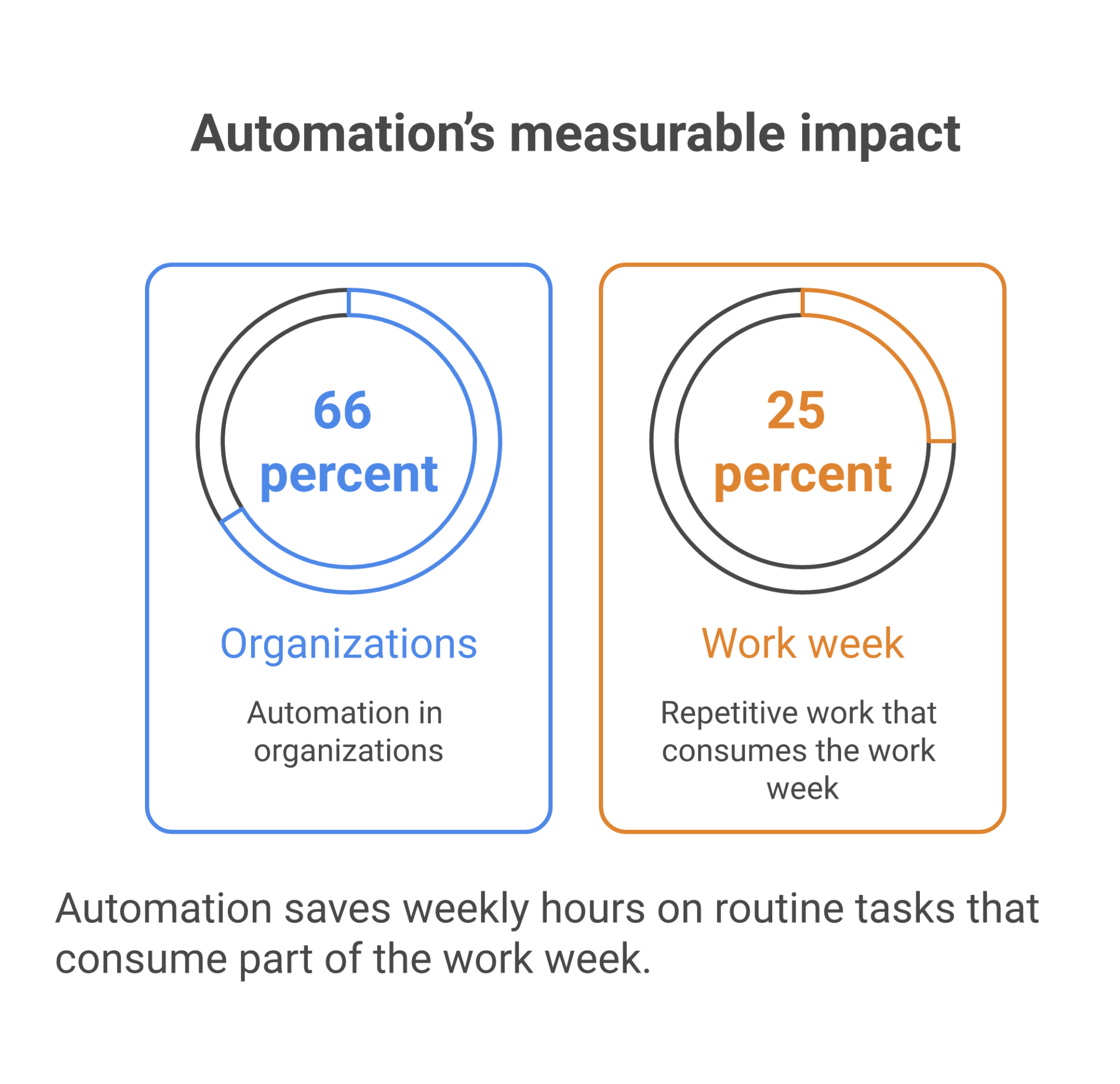
Intelligent agents for work are moving from private assistants to workflow-executing systems, and the teams that get the most value in 2026 will build around that shift early. The best starting point is the workflow with the clearest business payoff, which is lead qualification and routing, followed by reporting, approvals, summaries, and follow-ups. McKinsey has said automation is already in place in 66% of organizations, up from 57% the year before, and workers still lose about 25% of the work week to repetitive tasks, according to Smartsheet data cited by Coworker AI. Shiver Agents best practices for agentic workflows also points to the same pattern, start with repetitive work that repeats every day.
The ranking below follows a simple rule: the items are ordered by how fast they produce measurable business impact in a shared work environment. That matters because intelligent agents only stick when they remove visible busywork, reduce mistakes, and connect to the systems where work already moves. A strong setup can save 7 to 10 hours a week on routine tasks, while a weak one becomes another inbox to check. If you want to build intelligent agents that automate workflows in 2026, start with the jobs that touch revenue, reduce risk, and can run inside a secure chat with the team.
Table of Contents
- Lead qualification and routing
- Reporting and status updates
- Approval handling and exception review
- Chat summaries and action-item extraction
- Follow-up automation across customers and vendors
- Cross-tool task execution
- Ongoing monitoring and escalation
| Rank | Item | Why it ranks here | Who it matters most to |
|---|---|---|---|
| 1 | Lead qualification and routing | It touches revenue first, creates fast proof, and shows clear ROI when an intelligent agent enriches, scores, and hands off leads without delay. | Sales leaders, agencies, SaaS teams, and any manager watching pipeline speed |
| 2 | Reporting and status updates | It removes recurring manual reporting across teams and gives directors a repeatable weekly win. | Managers, directors, operations teams, and consultants |
| 3 | Approval handling and exception review | It lowers risk by routing sensitive work through the right person before money or decisions move. | Finance, legal, procurement, and compliance-heavy teams |
| 4 | Chat summaries and action-item extraction | It cuts the cost of internal coordination and keeps teams from losing decisions inside long message threads. | Team members, project leads, and distributed groups |
| 5 | Follow-up automation across customers and vendors | It prevents dropped work in sales, support, and operations by keeping the next step moving. | Customer success, account teams, home services, retail, and hospitality |
| 6 | Cross-tool task execution | It turns the intelligent agent from a note-taker into a worker that updates records, moves tasks, and changes system state. | Operations teams, RevOps, HR, and IT-adjacent managers |
| 7 | Ongoing monitoring and escalation | It creates continuous value, but only after the workflow, permissions, and review paths are already proven. | Operations, support, healthcare, construction, and multi-site teams |
The closest call is between ranks 2 and 3, since reporting and approval handling both save time and reduce risk, but reporting is easier to roll out and show in one week.
1. Lead Qualification And Routing
Lead qualification and routing ranks first because it creates the fastest link between an intelligent agent and revenue. A manager can see whether the workflow shortens response time, improves handoff quality, and reduces missed opportunities in the first week.
A useful setup does three things at once. It reads inbound requests from forms, email, or chat. It enriches the record with the right fields. It then routes the lead to the right rep or channel based on territory, size, service line, or urgency.
That pattern lines up with market behavior. Zapier cites McKinsey data showing employees are about 3 times more likely to use intelligent agents at work than leaders expect, and McKinsey via Zapier also notes that 87% of enterprises have leadership buy-in for intelligent agent adoption. Those numbers point to a simple fact, the hard part is not interest, it is getting the first workflow into daily use.
A sales team using a secure chat interface can add the intelligent agent to the same conversation where reps discuss the lead, ask for context, and correct a bad routing rule once. In that setting, the agent becomes a shared part of the handoff instead of a hidden assistant on one laptop. Zenzap’s one-click setup fits this use case because the team can build the workflow without a developer and keep the context with the people doing the work.
2. Reporting And Status Updates
Reporting comes next because it saves time on a schedule and gives leadership a consistent view of what changed. The strongest version reads from connected systems, pulls the latest numbers, and turns them into a short update with charts or plain-language notes.
That matters in consulting, SAAS, retail, construction, and healthcare because each group repeats the same questions every week. What changed? What is blocked? What needs attention? An intelligent agent can answer those questions from live systems instead of waiting for someone to assemble a slide or spreadsheet.
Forrester TEI has been cited as showing a 248% three-year ROI for workflow automation platforms, and McKinsey has been cited as estimating intelligent agent automation could add $2.6 trillion to $4.4 trillion in annual value. The number does not come from the report alone. It comes from repetition at scale, where one clean report becomes 52 clean reports a year.
A manager gets the most value when the report lands in the same chat where the team already talks about the work. A Zenzap-style setup lets the intelligent agent read the latest tool data, post the update in the group thread, and answer follow-up questions without forcing people to switch tabs. For teams that run weekly check-ins, that turns a recurring chore into a documented KPI.
3. Approval Handling And Exception Review
Approval handling ranks third because it protects the business before money moves or a decision gets locked in. It is the right fit for expenses, purchase requests, discounts, change orders, and any process where a write action needs a human signoff.
A strong approval workflow routes requests by amount, department, or risk level. It can auto-handle low-risk reads, then pause for explicit approval before a destructive or sensitive write. That kind of control is especially useful in legal, finance, procurement, and medical admin work.
The guardrails are not a nice extra. RelenshTech’s guide on intelligent agents in business automation for 2026 stresses integrations, monitoring, and human approval for sensitive actions, which matches what teams need in practice. Visioneer IT’s enterprise buyer guide also frames automation around control and fit, not just output.
A topic-scoped chat helps here because the intelligent agent only sees the requests for that workflow. It does not need access to unrelated conversations, and it does not need raw credentials. Zenzap’s approval controls and trusted proxy model fit the use case well, since the agent can prepare the request while the right person approves the final action.
4. Chat Summaries And Action-Item Extraction
Chat summaries land in the middle of the ranking because they remove a lot of noise, but they do not always touch revenue or risk as directly as routing or approvals. They still matter a great deal in teams where decisions are made in long message threads and people miss context after a day away.
The useful version does more than summarize. It names decisions, flags open questions, assigns owners, and notes what needs follow-up. That saves managers from rereading 60-message threads and helps new team members catch up faster.
Workers still lose about 25% of their week to manual, repetitive tasks, according to Smartsheet data cited by Coworker AI. A large slice of that loss comes from re-reading, re-asking, and retyping the same context. When an intelligent agent turns a thread into a clean summary and task list, it cuts that churn.
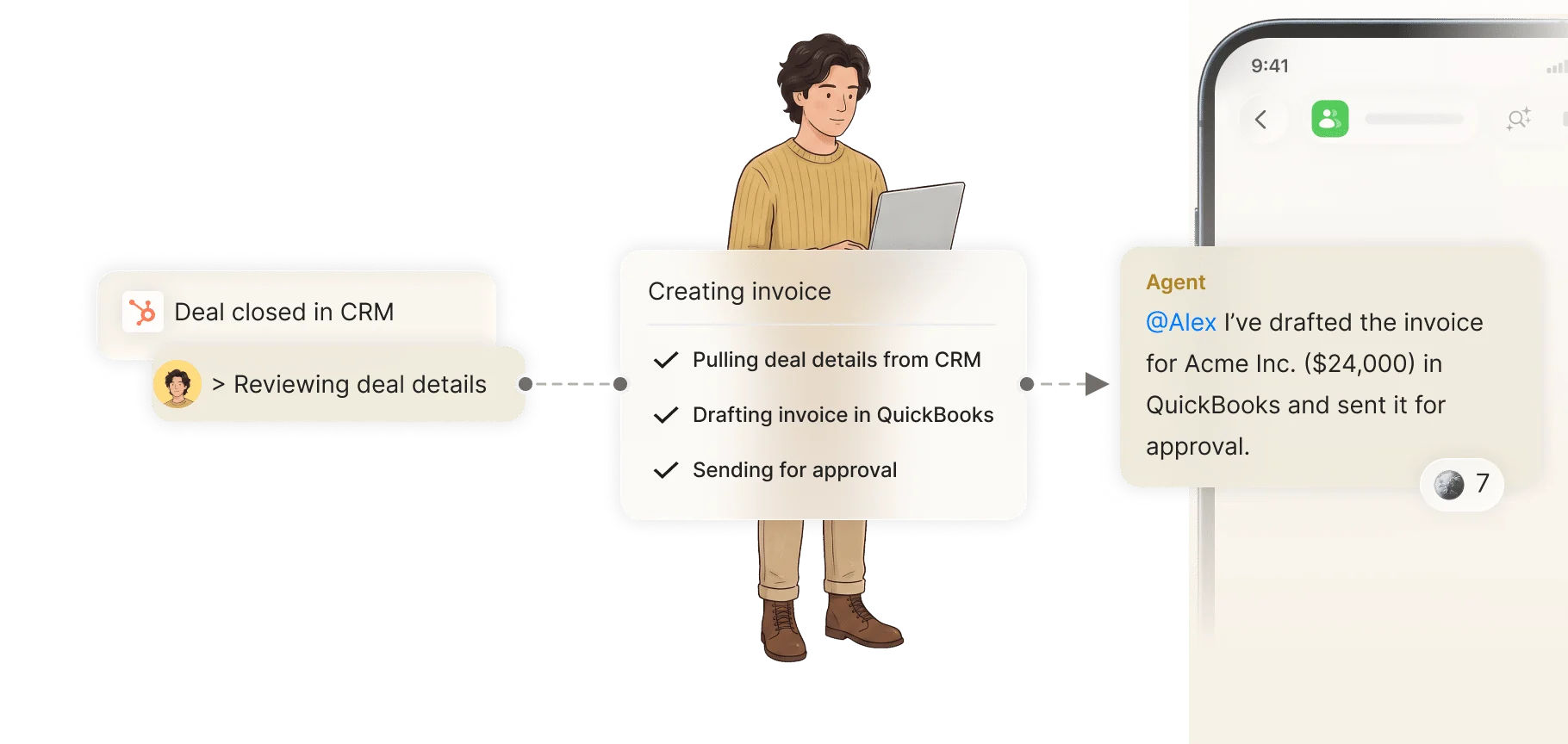
This is one of the clearest examples of intelligent agents that do work for you, connected to your work tools and your team via a secure chat interface. In a group chat, the intelligent agent can summarize a discussion, tag the right people, and keep the next action visible where everyone can see it. That is more useful than a private answer no one else can review.
5. Follow-Up Automation Across Customers And Vendors
Follow-up automation ranks fifth because it prevents work from dying after the first reply. It is especially valuable in sales, support, home services, hospitality, and ecommerce, where a missed follow-up often becomes a lost deal or an angry customer.
A good workflow watches for silence, incomplete replies, or unresolved tasks. It then sends a reminder, drafts a response, or routes the thread to the right person. For a support manager, that can mean reopening an unresolved issue. For a franchise operator, it can mean reminding a location manager about a vendor delay.
The big benefit is consistency. The intelligent agent never forgets to nudge a thread at 4:00 p.m. Or after a contract review sits untouched for 48 hours. In a shared chat, the team can see what was sent and correct the tone once if needed.
For teams that already use the guide to building intelligent agents across tools and team chats, this is usually the point where adoption spreads. One person sees fewer dropped leads or late replies. Then the rest of the team wants the same workflow in their own chat.
6. Cross-Tool Task Execution
Cross-tool task execution sits below follow-ups because it needs a little more setup, but it is the step that turns an intelligent agent into a real operator. Once the workflow can read one system and write to another, it can update CRM records, create tickets, move tasks, and post status updates without manual copy-paste.
That is the difference between a chat helper and a work agent. Microsoft has described agents as systems that can answer questions and take action, and that action piece is what people need once a workflow crosses tools. In practice, that means the agent might pull a form submission, update a row in a spreadsheet, create a task in project software, and alert the owner in chat.
The risk is control, so permissions have to be narrow. Sensitive writes should stay behind approval. Read-only actions can move freely if the tool scope is tight.
A secure chat interface helps because the context, the request, and the follow-up all stay in one place. Zenzap’s one-click setup and tool connections fit teams that want to build intelligent agents without a developer, then place them in the conversation where the work is already happening. This guide on collaborative intelligent agents without coding is the right next read for teams that want to move from one workflow to several.
7. Ongoing Monitoring And Escalation
Monitoring and escalation closes the ranking because it is the most durable pattern, but it only works well after the earlier workflows are stable. Once the system knows what normal looks like, the intelligent agent can watch for anomalies, flag issues, and send the right alert to the right person.
This pattern fits support queues, incident response, stock alerts, spend spikes, patient call notes, and construction site reporting. A retail manager may want a stock reorder alert. A healthcare coordinator may want a patient note routed into the correct record. A construction lead may want a daily site report summarized for the project manager before noon.
Mordor Intelligence forecasts the hyperautomation market at $45.17 billion by 2031, with 19.36% CAGR, which shows how much demand there is for workflows that keep running after the first setup. Yet the value only shows up when the alerts are scoped well and the noise stays low. That is why isolated topic memory and per-workflow permissions are useful.
Zenzap is built for that kind of shared, controlled monitoring in group chats. The intelligent agent can flag what needs attention, post the alert where the team already talks, and keep unrelated topics out of the way. That is the cleanest way to make intelligent agents part of ongoing operations without burying them in private threads.
Put The First Agent On A Workflow That Pays Back Fast
If a team can only start with one or two workflows, lead qualification and reporting are the best first bets. They show revenue movement, clear time savings, and a clean path for the rest of the team to trust the system.
The next wave is approval handling and cross-tool execution, because those two add control and real action. Once those are working in a shared chat, the value gets easier to measure and easier to spread.
For managers and directors, the practical move is simple. Add an intelligent agent to the workflow that repeats every week, connect it to the tools it needs, and keep it in the same chat where the team already works. The first workflow to build is lead qualification and routing, because it produces pipeline faster and proves the model quickly.
FAQ
Q: What kind of workflow should I automate first with intelligent agents?
A: Start with a workflow that repeats often, has clear handoff rules, and already costs the team time every week. Lead qualification, reporting, and follow-ups are common first choices because the result is easy to see. If the workflow already lives in chat, email, or a CRM, it is usually a strong candidate. Teams also get faster adoption when the first win is visible to a manager, not just one employee.
Q: Do intelligent agents need a developer to get started?
A: No, not if the platform is built for no-code setup. A manager or team member can add an intelligent agent, connect the relevant tools, and define the workflow in plain language. That matters because the first version should be easy enough to test without waiting on engineering. Zenzap is designed around that one-click setup model.
Q: Why put intelligent agents in a shared chat instead of a private workspace?
A: Shared chat gives the intelligent agent the context it needs to work like part of the team. People can correct it, add details, and see the same output in the same place. That reduces confusion and keeps the workflow visible. It also makes it easier to audit what happened when a question comes up later.
Q: How do teams keep intelligent agents safe around approvals and sensitive tasks?
A: The safest setup gives the intelligent agent only the permissions it needs and requires approval for sensitive writes. Read actions can usually run automatically, while actions that move money, send messages, or change records should wait for review. Topic-scoped memory also helps by keeping one workflow from seeing another workflow’s context. Separate access and clear approvals lower the chance of mistakes.
Q: What business outcomes should I measure after adding an intelligent agent?
A: Measure time saved, revenue moved, mistakes avoided, and tasks completed on time. Those numbers are easier to defend than vague claims about productivity. A team might track hours saved per week, response time to new leads, or the number of approval delays removed. When the KPI is visible, the value of the workflow is easier to justify.
About Zenzap
Zenzap gives you intelligent agents that do work for you, connected to your tools and your team through a secure chat. Setup takes one click: no code, no developer. Unlike Claude or ChatGPT, the agents come already built and connected. You talk to them like a coworker: tag them into chats, correct them once and they remember. They act across your tools, automate workflows, build reports and graphs, summarize chats, flag what needs attention and coordinate people and tasks. One person gets value alone. Add your team, and every correction makes the agent sharper. Agents start in about 300 ms and run on managed infrastructure. Memory stays isolated by topic, and agents never hold credentials. They reach only approved domains, and sensitive actions need your approval.