


Key Takeaways
- Measure throughput as on-time handovers with open tasks, owners, and next actions recorded.
- Start with one location and a repeatable shift cutoff.
- Shared chat lets incoming staff correct assignments where colleagues can see them.
- Keep sensitive actions behind approval and review exceptions before counting a handover as complete.
- Compare weekly completions and review time before expanding the workflow.
A shift manager who cannot find the outgoing team’s handover loses time chasing updates and risks leaving tasks unfinished. No-code AI workflow automation can increase weekly handover throughput by collecting open items, posting a draft in shared, secure team chat, and flagging missing owners. Count completed handovers, connect the relevant task source, and keep sensitive actions behind approval.
Start with one location and one recurring handover. A manager can test the workflow alone, then invite colleagues to review and correct the output in the same conversation. The target is a handover the incoming shift can act on before work begins.
Increase Completed Handovers With No-Code AI Workflow Automation
1. Count Completed Handovers Before Automation
A weekly count gives you a baseline for judging whether the workflow moves more handovers to completion.
Define a completed handover as one posted by the deadline with open tasks, owners, and next actions recorded. For a working example, use a location with 10 scheduled handovers each week and 6 completed on time. These figures are illustrative starting points to adjust, not industry benchmarks.
Record the count for a typical week and note how long the manager spends assembling each handover. Count late handovers separately so a faster draft does not conceal missed deadlines. Our task and messaging guide covers keeping tasks alongside the conversation where staff discuss them.
2. Choose One Repeatable Trigger
A fixed trigger gives the handover a predictable place in the shift schedule.
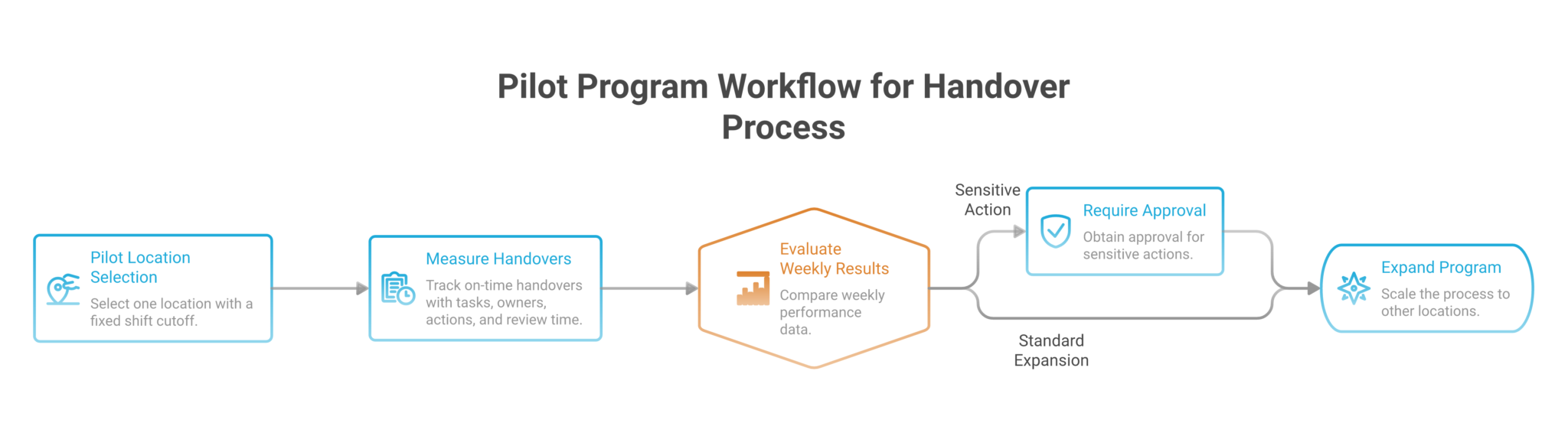
Set the workflow to run before the outgoing manager leaves, using the same cutoff for every handover in the pilot. Choose sources the team already maintains, such as a task list and the relevant location chat. We support scheduled workflows that collect information from connected tools and report back in chat.
Decide what the AI agent should do when information is missing. For example, it can flag an unassigned maintenance request for the manager to review. A person still decides who takes the task.
Automation is already part of many organizations’ operations: Shno’s workflow automation statistics roundup reports a Duke University finding that approximately 60% of businesses had automated at least one workflow. The roundup does not specify the study’s sample size.
3. Add an AI Agent and Connect the Sources
Connecting the right records gives the AI agent the context it needs to prepare a usable draft.
A manager can add an AI agent in one click without code or a developer. Connecting the task source and setting the schedule and instructions are separate workflow setup steps. Give the AI agent access only to the location and tools needed for the pilot, then specify the fields the summary should include.
We use a trusted proxy for authenticated tool calls, so our AI agents do not hold credentials directly. Topic-scoped memory separates context by chat or topic, while approved domains restrict external access. Review who can enter the chat and who can authorize connected-tool actions before the first run.
Use a prompt with an explicit output and escalation rule:
“Before the evening shift, summarize open tasks for this location. List each task’s owner and next action. Flag missing owners and ask the shift manager to assign them.”
Our secure task tracking guide covers security considerations for connected tasks.
4. Put the Handover in the Team Conversation
A shared conversation gives the incoming shift one place to review the handover and correct it.
Add the AI agent to the relevant group chat after the manager has tested the output. A handover can name an unresolved equipment issue, the person assigned to it, and the next check. If the owner has changed, a team member can correct the assignment where colleagues see the update.
The AI agent can use that context for follow-up within the topic. Keep the connected task record current when an assignment changes so the handover and the source of record stay aligned. Our workflow AI agent guide describes adding AI agents to connected workflows.
5. Require Approval for Sensitive Actions
Approval rules let routine summaries proceed while a manager retains control over consequential changes.
For the pilot, reading open tasks and drafting a summary can run automatically. Reassigning a task, changing a schedule, or sending an external message can wait for review. We support approval controls for sensitive or destructive actions, with access set according to the job.
Check exceptions during the first week: missing owners, conflicting updates, and tasks that appear closed in one tool but open in another. Route each exception to a person who can resolve it. Count the handover only after its required fields are complete.
6. Review Throughput and Adjust the Workflow
A weekly review shows whether the handover process completes more work and where it still stalls.
Count on-time handovers, unresolved tasks without owners, and minutes spent reviewing each output. In the example, an increase from 6 to 8 on-time handovers means 2 more completed handovers in the week, or a one-third increase. Check that the additional handovers meet the same completion rule used for the baseline.
If owners are often missing, change the prompt or the task-entry process. If review takes too long, narrow the summary to open items and exceptions. Expand to another location only after its manager knows who owns the workflow and how to correct it.
| Step | What increases | Zenzap capability |
|---|---|---|
| Count completed handovers | Visibility into the weekly baseline | Tasks recorded in conversations |
| Choose a trigger | Opportunities to prepare handovers before cutoff | Scheduled workflow runs |
| Connect the sources | Relevant task information available for review | Controlled access to connected tools |
| Share the handover | Visibility of owners and corrections | Group chat with AI agents |
| Require approval | Manager oversight of sensitive actions | Approval controls for sensitive actions |
| Review throughput | Completed handovers per week | Reports and chat summaries |
In the illustrative pilot, completing 8 handovers instead of 6 increases weekly throughput by 2 handovers, or one-third.
Put the Next Shift in Control
Choose one location and record its current handover count before making a change. The incoming manager can then see unresolved work, ask for a correction, and assign an owner in the same conversation. In the working example, a one-third increase means 2 more completed handovers reach the next shift each week. That increase makes it possible for more incoming shifts to begin with named owners and visible next actions.
FAQ
Q: What should count as a completed handover?
A: Count a handover when it is posted by the agreed deadline and includes open tasks, owners, and next actions. Apply the same rule before and after the pilot so the weekly comparison is meaningful.
Q: Can one manager start the workflow alone?
A: Yes. A manager can add an AI agent, connect a tool, and test a recurring summary before inviting colleagues into the conversation.
Q: What happens when an AI agent finds a task without an owner?
A: It can flag the missing owner for the manager. The manager can then assign responsibility and update the task record.
Q: Should an AI agent change schedules automatically?
A: Schedule changes can be placed behind approval. Set the rule according to the action and the authority of the person reviewing it.
About Zenzap
Zenzap gives you AI agents that do work for you, connected to your tools and your team through a secure chat. Setup takes one click: no code, no developer. Unlike Claude or ChatGPT, the agents come already built and connected. You talk to them like a coworker: tag them into chats, correct them once and they remember. They act across your tools, automate workflows, build reports and graphs, summarize chats, flag what needs attention and coordinate people and tasks. One person gets value alone. Add your team, and every correction makes the agent sharper. Agents start in about 300 ms and run on managed infrastructure. Memory stays isolated by topic, and agents never hold credentials. They reach only approved domains, and sensitive actions need your approval.