


Multiplayer AI agents are AI agents that work in a shared space with your whole team, so everyone can talk to the same AI agent, see what it does, and build on it together. A single-player AI agent works with one person at a time. A multiplayer AI agent works with the group.
Zenzap coined the term multiplayer AI to describe where AI at work is heading, and built its platform around it: AI agents for teams that live in group chats, next to the people they work with.
AI made each person on your team faster. The work between people hasn’t sped up. You still wait for finance to send the numbers, for a manager to approve the schedule, for someone to answer one question.
Multiplayer AI agents cut that waiting down, because the AI agent is in the chat where the question, the answer, and the approval already happen.
What Is Multiplayer AI?
Multiplayer AI is AI that a whole team uses together, in one shared place, with shared context. Each person doesn’t hold a private conversation with an AI tool. Everyone works with the same AI agent in the same group chat, and the AI agent sees what the team sees.
Zenzap’s definition of multiplayer AI has three parts:
- The AI agent lives in a group chat.
- Anyone in that chat can talk to it, correct it, or follow up.
- It connects to your business tools and acts on what the team decides.
The phrase comes from gaming. Games went from single-player to multiplayer when players could share one world at the same time. AI at work is making the same shift.
What Single-Player AI Is Missing Today
AI at work usually comes in two forms, and each has a gap.
A personal AI assistant knows you, but it can’t work with your team. Its answers stay in your window until you copy them out.
An AI bot brought into a team conversation sees that conversation and little else. In Slack and Microsoft Teams, an AI agent gets pulled in with an @-mention, and no shared memory carries between chats.
What if one AI agent lived in your team’s chat? One that follows the conversation, takes action in your tools, and answers anyone on the team using only that chat’s context, so private things stay private?
That’s a multiplayer AI agent. AI used to be single-player. Zenzap made it a team game.
Single-Player AI vs. Multiplayer AI
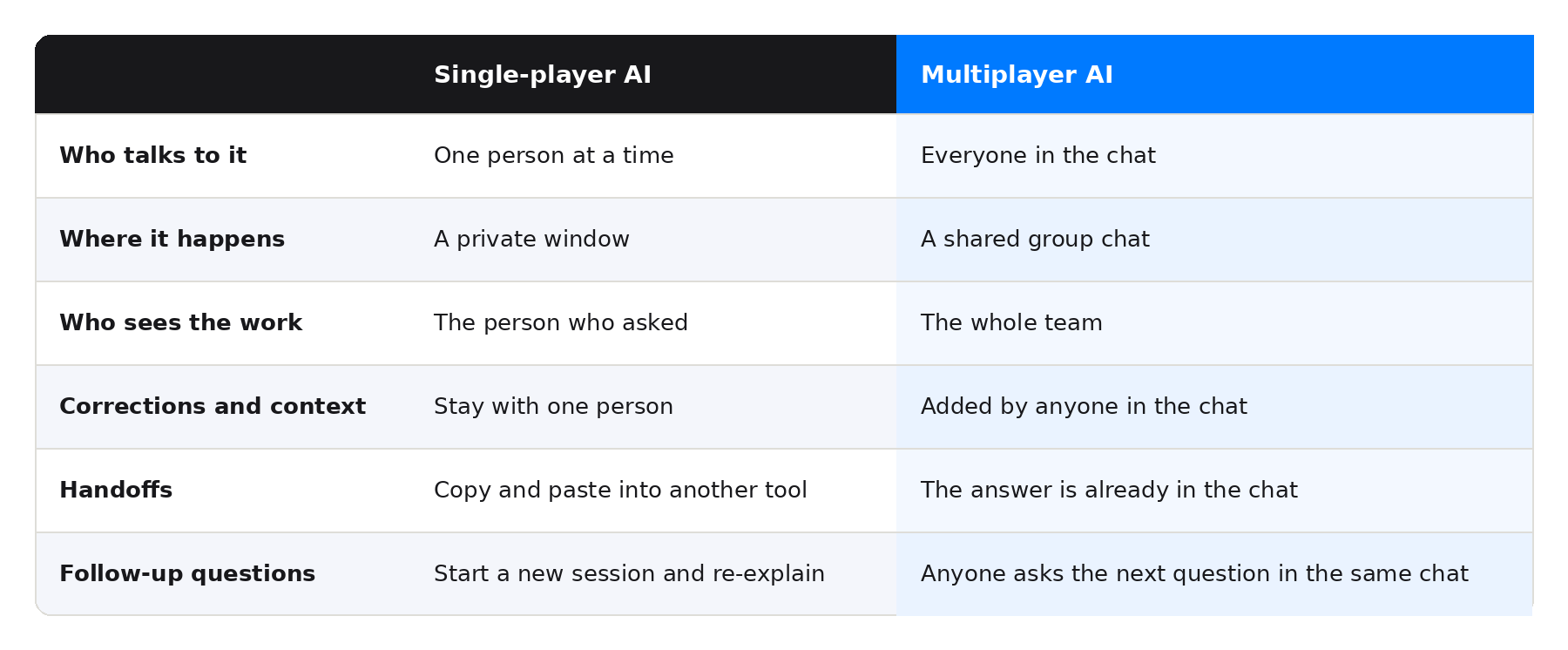
The table below shows how single-player AI and multiplayer AI differ in daily use.
Why AI Agents Are Moving From Single-Player to Multiplayer
Three shifts explain why AI at work is moving from single-player to multiplayer.
Work is a team activity
Decisions happen in conversations between people. An AI agent that talks to only one person can’t see those conversations, so someone has to carry its answers into the team chat and carry the team’s feedback back to it.
Shared documents made the same change
Teams used to email Word files back and forth and end up with five versions of one document. Shared documents put everyone in the same file at the same time. AI is at the same point now.
Shared context makes the AI agent better
A multiplayer AI agent reads the chat history, so nobody has to re-explain the project each time they ask a question. It also gets sharper from the whole team’s input, since anyone can correct it or add context.
What Multiplayer AI Agents Do for a Team
Multiplayer AI agents cut out the copy-and-paste between asking a question and getting the work done. Here is what that looks like in a team chat:
- Cover a shift: Someone asks for coverage, and a teammate volunteers. The AI agent updates the schedule in the connected scheduling tool.
- Catch up fast: A manager asks for a summary of what they missed in the management chat. The AI agent answers where everyone can read it, so nobody has to write a recap.
- Flag it before it lapses: An AI agent posts that a forklift certification expires in 30 days. The whole team sees it, and the right person handles it.
- Log it once: A deal closes, and the AI agent logs it as won in HubSpot while the sales chat watches it happen.
- Check in on a schedule: Every Monday, the AI agent sends the weather forecast to each location’s team chat.
Nobody had to forward a screenshot or re-explain the project. People made the calls that needed a person, and the AI agent handled the rest. Each example maps to a number you can measure, like hours saved on follow-up or mistakes caught before they cost you money.
Browse more examples by industry and role in the Zenzap workflow library.
How to Set Up a Multiplayer AI Agent in Zenzap
Here are the steps, in order:
- Build the AI agent. Click to build it, no code needed. It takes about 90 seconds. You can start from the pre-built agent library or build your own.
- Connect your tools. Pick the tools you want it to use. Zenzap has 2,000+ one-click tool connections.
- Add it to the right chats. The AI agent can only see the chats you add it to.
- Start working with it. Anyone in the chat can type to it, tag it, or send a voice note.
Only the AI agent’s owner can add it to a chat, and only to chats the owner belongs to. When someone other than the owner asks it something, it answers using that chat’s context only.
Where Your Team’s AI Knowledge Lives
With single-player AI, the context lives in one person’s private conversation. When that person closes the window or leaves the company, the context goes with them.
With a multiplayer AI agent, the context lives in your team chat, which belongs to your business. When someone leaves, you remove their access in one click, and the conversation history stays with your company.
Why the Chat Platform Matters for Multiplayer AI
An AI agent can only be as shared as the app it lives in. Zenzap’s AI agents are multiplayer because they’re built on Zenzap’s chat platform: group chats, direct messages, calls, to-dos, and full history, all designed mobile-first. Adding an AI agent to a group chat is as natural as adding a person.
Building an AI agent in Slack starts with an admin setting up Agentforce, and in Teams it goes through Copilot Studio, which takes IT or a developer. In Zenzap, building takes one click.
Who Is Building Multiplayer AI Agents?
The shift is underway across the market. Dust, Lindy, and Gumloop have put shared AI agents in front of teams, and Slack and Microsoft Teams have added their own.
Zenzap is an AI agents platform where a team builds AI agents in one click and works with them in a shared chat connected to its business tools. Zenzap named this category, and its AI agents sit on a chat platform that was built for teams before AI agents arrived.
How to Keep Multiplayer AI Agents Under Control
When a whole team shares an AI agent, control matters. Zenzap puts the settings with the admin:
- Admins choose who can build AI agents: everyone, admins only, or admins and managers.
- One admin can build several AI agents and add each to the right chats, so the rest of the team uses them without building anything.
- Access is set per AI agent and per tool: full access, read-only, or approval required.
- Approvals arrive as a plain-language Approve or Deny card in the chat, and no response means denied.
- Zenzap is SOC 2 Type II, GDPR, and HIPAA compliant, with US or EU data residency.
Conclusion: Multiplayer AI Agents Are Where Team AI Is Heading
Multiplayer AI agents change who AI works with. Instead of answering one person in a private window, an AI agent sits in your team’s group chat, reads what the team reads, acts in your connected tools, and answers anyone who asks. Answers, corrections, and follow-ups stay in one place.
That’s why AI at work is moving from single-player to multiplayer. Work happens between people, so the AI that helps most is the AI that’s in the conversation. Teams that make the move spend less time waiting on replies and copying answers between tools, and people keep the calls that need a person.
Zenzap coined multiplayer AI and built its AI agents on a chat platform made for teams, with admin control over who builds and what each AI agent can do.
Build your first AI agent in Zenzap and put multiplayer AI to work for your team.
Multiplayer AI Agents FAQ
These are the questions teams ask most often about multiplayer AI agents.
What are multiplayer AI agents?
Multiplayer AI agents are AI agents that work inside a shared group chat with a whole team. Anyone in the chat can talk to the AI agent, correct it, and see its work. Zenzap coined the term multiplayer AI for this model of AI agents for teams.
What is the difference between single-player and multiplayer AI?
Single-player AI works with one person in a private window, so context and corrections stay with that person. Multiplayer AI works with a group in a shared chat, so everyone sees the same answers and adds to the same context.
Are multiplayer AI agents the same as collaborative AI agents?
They’re closely related. Multiplayer describes who is in the room: a whole team sharing one AI agent. Collaborative describes how the work gets done. Read more in our guide to collaborative AI agents.
Do multiplayer AI agents need a developer?
You don’t need a developer to build a Zenzap AI agent. Building takes one click, and an admin can choose who on the team is allowed to do it.
Can I add a Zenzap AI agent to Slack, Teams, or WhatsApp?
Zenzap AI agents work inside Zenzap’s own chat. Moving a team’s conversations into Zenzap is what makes an AI agent shareable across that team.
Are multiplayer AI agents secure?
Zenzap lets owners control what each AI agent can do per tool, and each AI agent only sees the chats it’s been added to. Every outbound request is logged. Zenzap doesn’t claim any AI system is perfect, so owners stay in control.