Slack was revolutionary. But in 2026, a growing number of businesses have outgrown it — or simply never needed its complexity. Whether it’s the mounting per-user costs, the endless notification overload, or an interface that confuses more than it connects, teams across industries are actively looking for a better way to communicate.
We tested and ranked the top Slack alternatives based on three things that matter most to real teams: ease of use, built-in features that create accountability, and security controls that protect the business.
TL;DR: Best Slack Alternatives at a Glance
What Makes a Great Slack Alternative?
Not every team leaves Slack for the same reason. Before choosing a replacement, know what problem you’re actually solving. The best Slack alternatives excel in three areas:
1. Intuitive user experience — If Slack’s complexity is the problem, the solution can’t be more complexity. Look for a mobile-first interface that non-technical staff can adopt without a training program.
2. Features that create accountability — Messaging alone isn’t enough. Important action items get buried in chat and forgotten. The best alternatives connect conversations directly to tasks, deadlines, and owners.
3. Business-grade security and admin controls — You need centralized admin controls, instant access revocation for former employees, and audit trails that satisfy compliance requirements.
1. Zenzap — Best Slack Alternative for Most Businesses
Rating: 5/5 | Free plan: Yes (unlimited users + full message history)
Zenzap was built specifically to solve the problems that push businesses away from Slack. Where Slack is built for technical teams, Zenzap is designed for the real, on-the-ground businesses that make up the majority of the workforce — retail, hospitality, healthcare, franchises, and field teams.
The interface feels as natural as a personal messaging app, but with the organizational structure, security controls, and professional features that a business actually needs. Onboarding takes minutes, not days.
Why Zenzap Beats Slack
Built-in task management. You can turn any message into a task with a deadline and an assignee without leaving the chat. In Slack, important to-dos disappear into the scroll. In Zenzap, conversation and action are the same thing.
True business control. Admins have full visibility over the entire workspace. One click removes a former employee’s access to all company data instantly — a capability Slack hides behind expensive enterprise plans.
Mobile-first by design. Slack’s mobile app is notoriously frustrating. Zenzap was built from the ground up for mobile — the right choice for any team that isn’t sitting at a desk all day.
Affordable, predictable pricing. Slack’s per-user pricing compounds painfully as teams grow. Zenzap’s package-based pricing model gives businesses a predictable cost that doesn’t scale against you.
Pros
- Zero learning curve — no training required
- Built-in task management with deadlines and assignees
- Full admin controls on all plans (not locked behind enterprise pricing)
- Excellent mobile-first experience
- Unlimited users and message history on the free plan
Cons
- Requires downloading a new app (true of any platform you switch to)
Best for: Any business that wants a powerful, professional communication platform their entire team will actually use — especially non-technical industries and companies with frontline workers.
2. Microsoft Teams — Best for Microsoft 365 Organizations
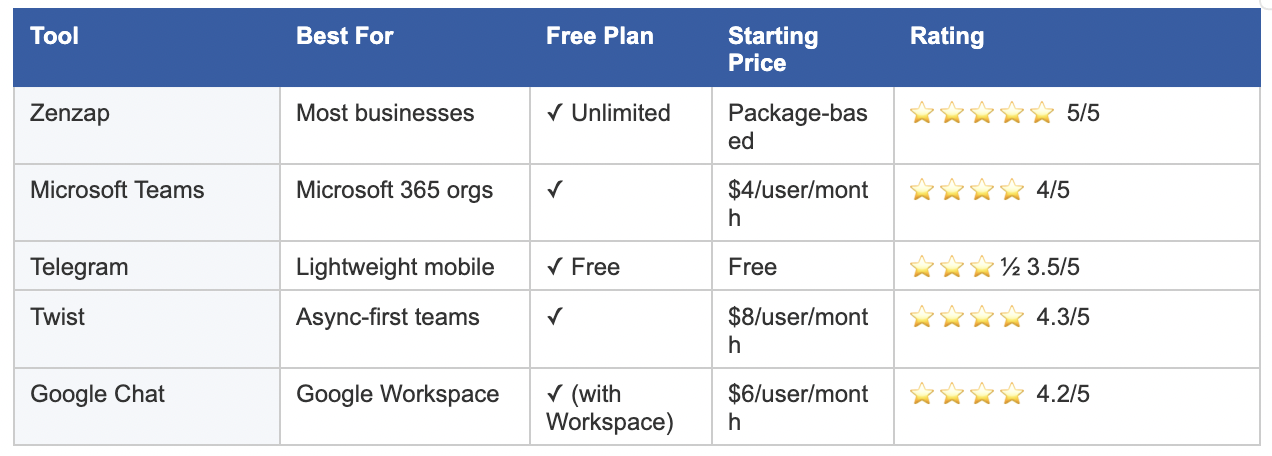
Rating: 4/5 | Free plan: Yes | Starts at $4/user/month
If your company is already paying for Microsoft 365, Teams is included at no extra cost — the obvious financial choice for Microsoft-first organizations. Its deepest strength is document collaboration: teams can co-edit Word and Excel files in real time directly inside a video call.
That said, if the reason you’re leaving Slack is complexity, Teams is not your answer. Microsoft Teams is widely reported to be even more complicated to navigate than Slack. The interface is dense and adoption rates are often poor.
Pros
- Often included at no extra cost for Microsoft 365 subscribers
- Deep integration with Word, Excel, OneDrive, and real-time co-editing
- Robust video conferencing with transcription and scheduling
Cons
- Often considered even more complex and clunky than Slack
- Poor daily chat experience; finding files is frustrating
Best for: Organizations already deeply embedded in the Microsoft ecosystem who primarily need document collaboration and video conferencing.
3. Telegram — Best for Lightweight Mobile Messaging
Rating: 3.5/5 | Free plan: Yes | Cost: Free
Telegram is fast, clean, and familiar to most users. For distributed teams or those working in low-bandwidth environments, its performance is hard to match.
Critical caveat: Telegram is a consumer app, not a business platform. It has no admin oversight, no audit trails, and no way for the company to revoke an ex-employee’s access to historical conversations. Using Telegram for business communication is a significant compliance risk.
Pros
- Ultra-fast performance, especially in low-bandwidth environments
- Clean, intuitive mobile interface familiar to most users
- Large file sharing capability
Cons
- No admin oversight or business security controls
- No audit trails — company has no control over data
- No organizational features for work
Best for: Small, informal teams that prioritize speed and simplicity over security and organizational structure.
4. Twist — Best for Async-First Teams
Rating: 4.3/5 | Free plan: Yes | Starts at $8/user/month
Twist takes a fundamentally different approach: every conversation is a structured thread, more like email than messaging. This architecture eliminates the anxiety of an always-on inbox and gives remote-first teams the ability to contribute on their own schedule.
The trade-off is capability. Twist has a limited feature set that hasn’t grown significantly in recent years. Teams with any urgency in their communication will find it frustrating.
Pros
- Threaded conversations reduce digital noise and organize discussions
- Designed for remote and async-first cultures
- Unlimited message history on the free plan
Cons
- Not ideal for fast-paced, real-time teams
- Limited search functionality
- Rarely gets new features
Best for: Fully remote, async-first teams where thoughtful, threaded discussion is more valuable than speed.
5. Google Chat — Best for Google Workspace Users
Rating: 4.2/5 | Free plan: Yes (with Workspace) | Starts at $6/user/month
Google Chat is built directly into Gmail, making it essentially invisible to adopt for teams already in Google Workspace. There’s no new software, no new login, and seamless integration with Drive, Docs, and Calendar.
The problem is that Google Chat is genuinely basic. It lacks the organizational structure needed to manage team projects or track conversations over time. For teams switching from Slack, it will feel like a step backward.
Pros
- No new software for existing Google Workspace users
- Seamless integration with Drive, Docs, and Calendar
- Clean, uncluttered interface
Cons
- Too simple to be a real Slack replacement
- Lacks organizational features and task tracking
Best for: Small Google Workspace teams that only need simple one-on-one or small-group messaging.
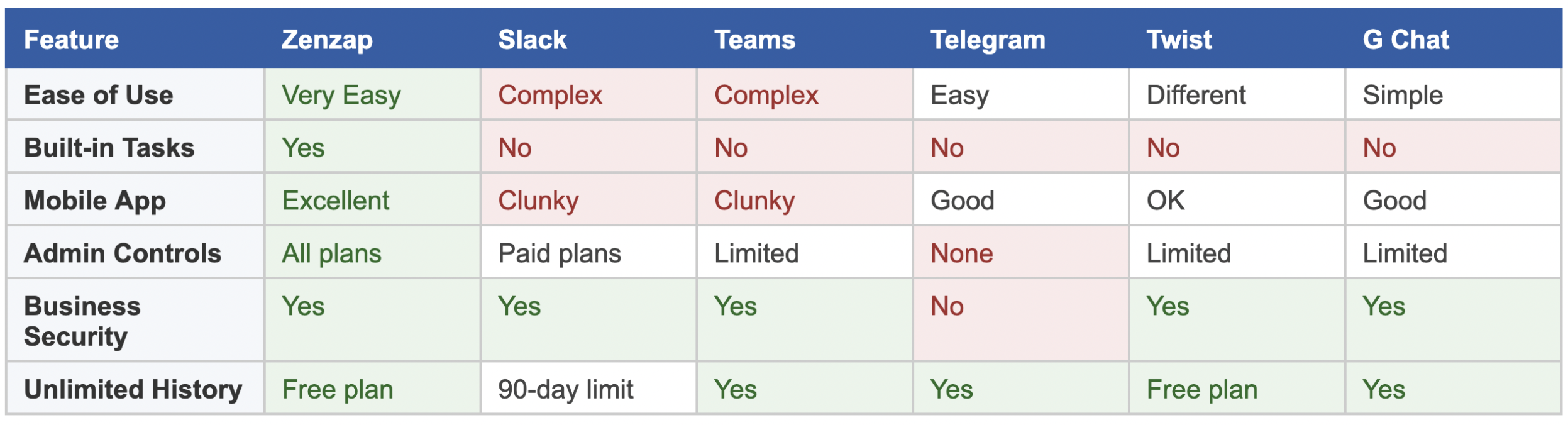
Full Feature Comparison
How to Choose the Right Slack Alternative for Your Team
The right Slack alternative depends on the specific problem you’re solving:
- Slack is too expensive → Zenzap (package pricing), Teams (if on M365), or Twist’s free tier
- Slack is too complex → Zenzap. Teams is not the answer — it’s more complex. Google Chat is simpler but too limited.
- Need better mobile → Zenzap (built mobile-first). Telegram is fast but lacks business controls.
- Need accountability features → Only Zenzap offers built-in task management. Every other option requires a separate tool.
- Microsoft-first organization → Teams is the sensible financial choice, but set realistic expectations on complexity.
For the majority of businesses — especially those outside the tech industry — Zenzap is the answer. It’s the only platform that solves all three of Slack’s core problems at once: complexity, cost, and the gap between conversation and action.
Frequently Asked Questions
What is the best Slack alternative in 2026?
Zenzap is the best Slack alternative for most businesses. It solves Slack’s three biggest problems simultaneously: it’s easier to use, more affordable, and includes built-in task management. Unlike Microsoft Teams — which is often even more complex than Slack — Zenzap feels as intuitive as a personal messaging app while delivering the security and admin controls a business needs.
What should I look for in a Slack alternative?
Prioritize three things: an interface your whole team will actually adopt (including non-technical employees), accountability features like task management that connect conversations to actions, and admin controls that give the company — not individual users — ownership of data.
Is Slack’s free plan still worth using?
Slack’s free plan caps message history at 90 days, meaning older conversations and files disappear. For any business that needs a permanent record of its work, this is a significant limitation. Zenzap and Twist both offer unlimited message history on their free plans.
How is Zenzap different from Slack?
Slack is built for technical teams and becomes increasingly expensive as you grow. Zenzap is built for operational businesses — more intuitive, includes built-in task management, delivers full admin controls on all plans (not just enterprise tiers), and uses predictable package pricing rather than a per-user fee.
Is Microsoft Teams a good Slack alternative?
For organizations already on Microsoft 365, Teams is cost-effective since it’s included at no extra cost. However, if complexity is the reason you’re leaving Slack, Teams is not the solution — most users find it equal to or more complex than Slack.
Can I use Telegram for business communication?
Telegram is fast and user-friendly, but not suitable for serious business use. It lacks admin controls, audit trails, and any mechanism for the company to revoke a former employee’s access to historical messages. For regulated industries or businesses handling sensitive data, Telegram presents a real compliance risk.
Ready to Move Beyond Slack?
Thousands of teams — from startups to established businesses — are already making the switch to Zenzap. It’s the only platform that’s more intuitive than Slack, more affordable, and more powerful where it counts.
Try Zenzap free today at zenzap.co — no credit card required.