



.svg)

.svg)

.svg)

.svg)

.svg)

.svg)

.svg)

.svg)

.svg)

.svg)
.svg)


























How to Know If Someone Blocked You on iMessage
If you’ve sent a message on iMessage and didn’t get a reply, it’s natural to wonder: Did they block me?
Here’s how to know if someone blocked you on iMessage.
How to Tell If Someone Blocked You on iMessage
There isn’t a single sign that confirms someone blocked you on iMessage. Instead, you have to look for patterns.
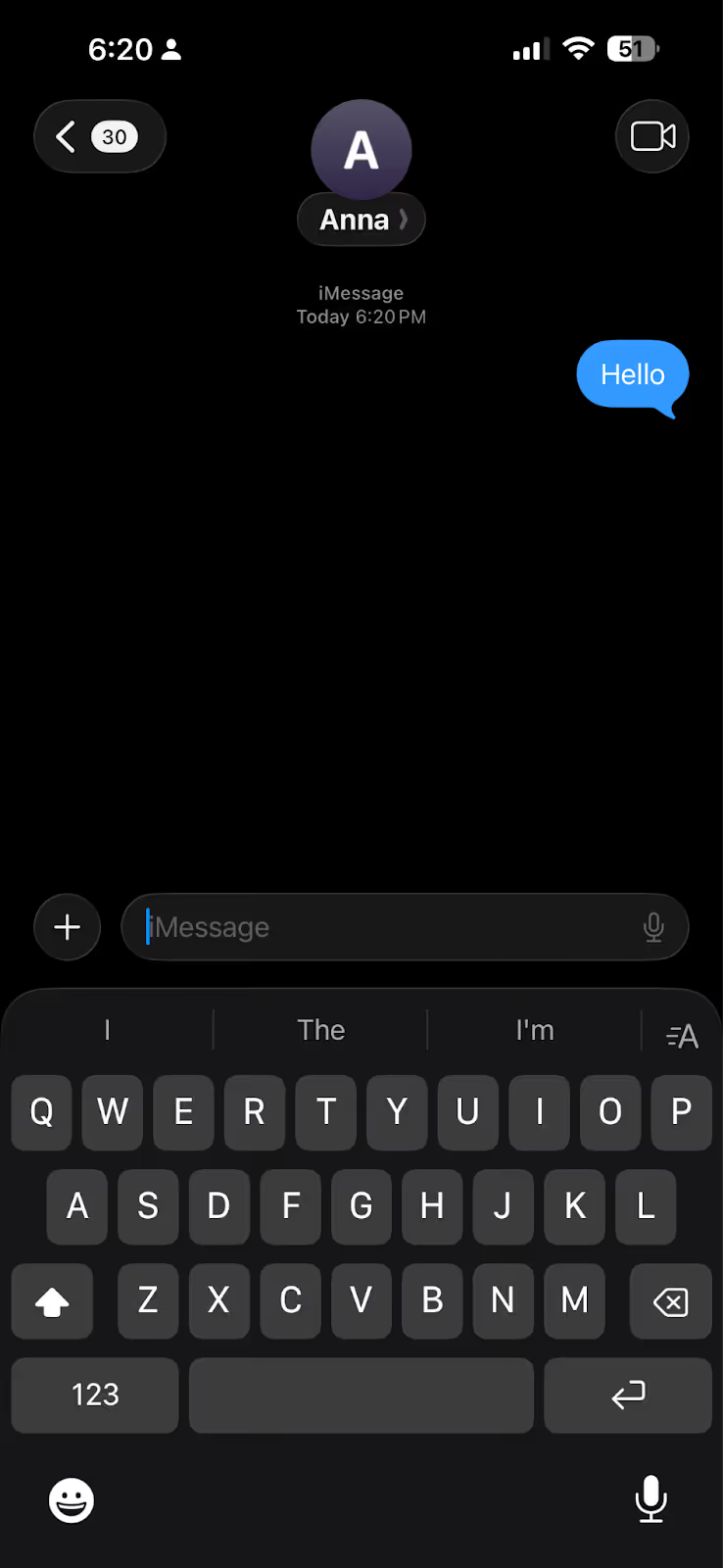
1. Messages Don’t Show “Delivered”
When iMessage is working normally, you’ll see a “Delivered” label under your message.
If that status disappears and never returns, it could mean:
- The person blocked you
- Their phone is off
- They’re offline
- iMessage is disabled
It’s a signal, but not proof.
2. Messages Switch from Blue to Green
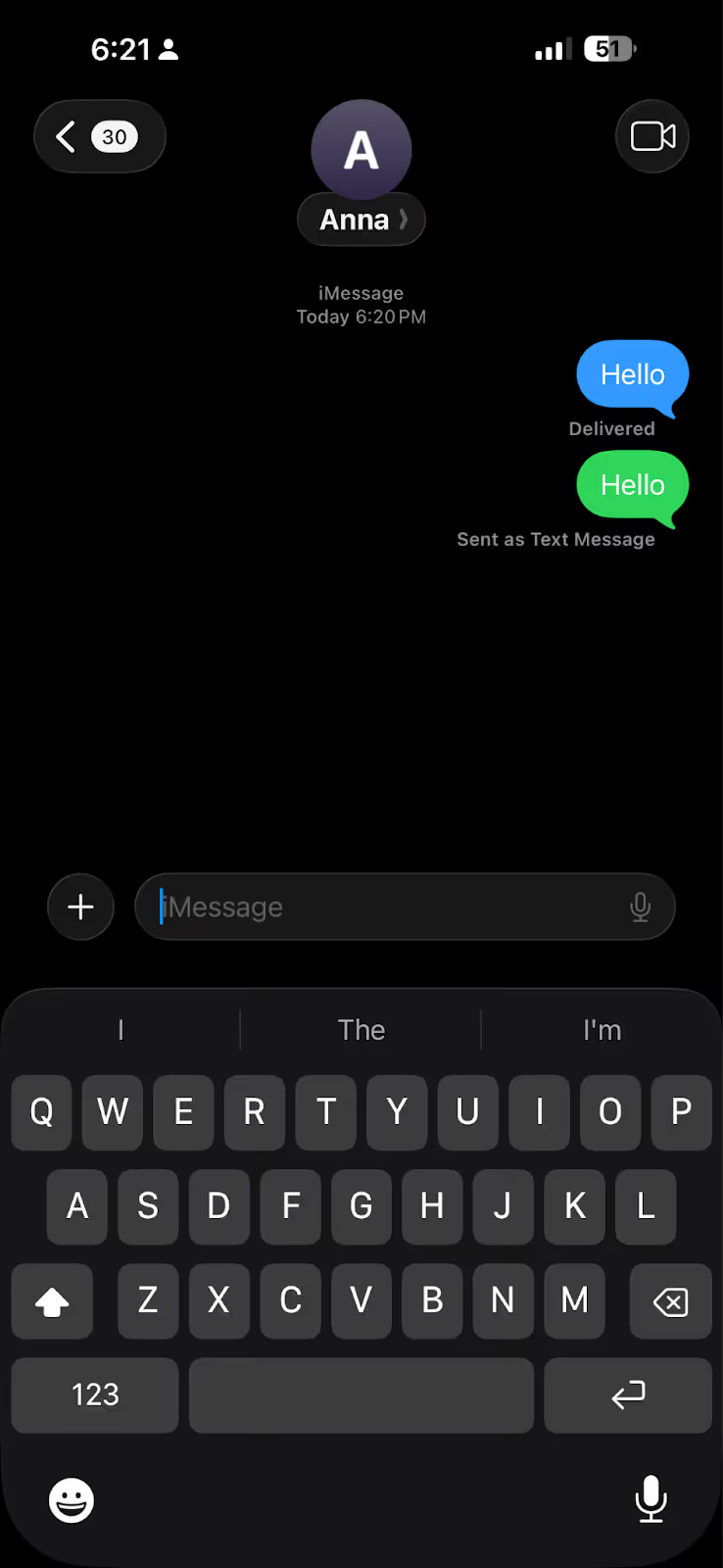
iMessages appear in blue bubbles. SMS messages appear in green.
If your messages suddenly turn green, it may indicate:
- iMessage is disabled on their device
- There’s a network issue
- You’ve been blocked
Again, this alone doesn’t confirm anything.
3. Calls Don’t Go Through
If you try calling the person and:
- The call goes straight to voicemail
- It rings once and stops
It could mean you’ve been blocked.
Or it could just be their phone settings or signal.
4. FaceTime Doesn’t Connect
FaceTime calls may fail or stop ringing quickly if you’re blocked.
But like the other signs, it’s not conclusive.
5. No Read Receipts
If you previously saw read receipts and they suddenly stop, it may mean:
- They turned the feature off
- You’ve been blocked
There’s no way to tell which.
Things to Keep in Mind About iMessage Blocking
- There is no official notification when someone blocks you
- None of the signs above confirm blocking on their own
- Network issues and device settings can produce the same behavior
- You may still see the person in group chats even if they blocked you
- Blocking only affects direct communication, not shared group conversations
The Problem with Using iMessage for Team Communication
iMessage is designed for personal use. When it’s used for work, these limitations can create confusion and risk.
No Visibility on Message Delivery
You can’t confirm if a message was received or seen.
If someone blocks you, your messages won’t be delivered—but you won’t know. You may assume they are ignoring you, when in reality they never saw the message.
Team Communication Gaps Caused by Blocking
Anyone can block anyone on iMessage without others knowing. You have no way of seeing who is blocking whom or controlling who can communicate with whom. This lack of visibility means:
- Important updates may not reach the right person
- Follow-ups may be missed
- Work can stall without explanation
There is no oversight to prevent or identify these gaps.
Inconsistent Team Communication in Group Chats
You can still be in the same group chat with someone who blocked you.
This creates confusion:
- You can see their messages in the group
- Your direct messages may not reach them
- Team Communication becomes inconsistent
This leads to crossed wires and missed context.
Ensure Clear and Trackable Team Communication
For team communication, relying on personal messaging software like iMessage can create uncertainty. A professional team chat app solves these problems by keeping conversations in one place, providing visibility, and allowing teams to turn messages into actionable tasks.
Zenzap is the best team communication app that is intuitive and easy to use, while providing the professional features businesses need. It removes the uncertainty that comes with personal messaging apps and gives teams clear, controlled team communication.
With Zenzap, you can:
Know if Messages Are Seen and Acknowledged
Unlike iMessage, you will not have to guess whether someone received your message, because with Zenzap, you can see if messages are delivered and read. You can keep everyone in the loop without chasing replies or wondering if your message was seen.
Keep Team Communication Consistent Across the Team
With iMessage, anyone can block anyone without others knowing, and blocking someone on iMessage creates gaps in team communication, even within group chats.
In Zenzap, blocking or limiting communication is a company-level decision, not an individual action.
For example, you can prevent Team A from contacting Team B. Admins maintain full control over who can communicate with whom.
With Zenzap, you can control exactly who can see and do what, so team communication stays organized and managed at the company level.
Instantly Remove Access When Needed
Instead of relying on personal settings like blocking, with Zenzap, admins can instantly remove access to company messages and data when someone leaves the company.
By managing access at the company level, you maintain a clean and organized team communication environment, prevent unauthorized access, and reduce the risk of data leaks while keeping team communication controlled, secure, and professional.
Stop Guessing and Make Team Communication Clear
There’s no reliable way to know if someone blocked you on iMessage. And that uncertainty is built into how the platform works.
A professional team communication app like Zenzap removes the guesswork so your team can stay aligned, informed, and in control.
Zenzap ensures messages are received, tracked, and actionable. It prevents gaps caused by personal settings or missed deliveries, keeps conversations organized across individuals and groups, and allows you to control exactly who can access what.

Take Control of Your Team Communication
Chat, organize, and get work done - all in one place.
Other Blog Posts

