



.svg)

.svg)

.svg)

.svg)

.svg)

.svg)

.svg)

.svg)

.svg)

.svg)
.svg)


























How to Recover Deleted iMessages
You deleted a conversation to clean up your message list, and now you need something that was in it. Can you get it back?
Here's every option, in the order you should try them.
Steps to Recover Deleted iMessages
You can recover messages you deleted within the last 30 to 40 days, as long as you're on iOS 16, iPadOS 16.1, or later.
Which method you need depends on how long ago you deleted them. One type of message can't be recovered at all, since Apple permanently deletes anything you removed with Undo Send.
Recover Deleted iMessages from Recently Deleted
This is the fastest method to recover deleted iMessages.
- Open Messages and tap Edit in the top corner of the conversation list. On iOS 17 or earlier, tap the Filters button instead.
- Tap Show Recently Deleted.
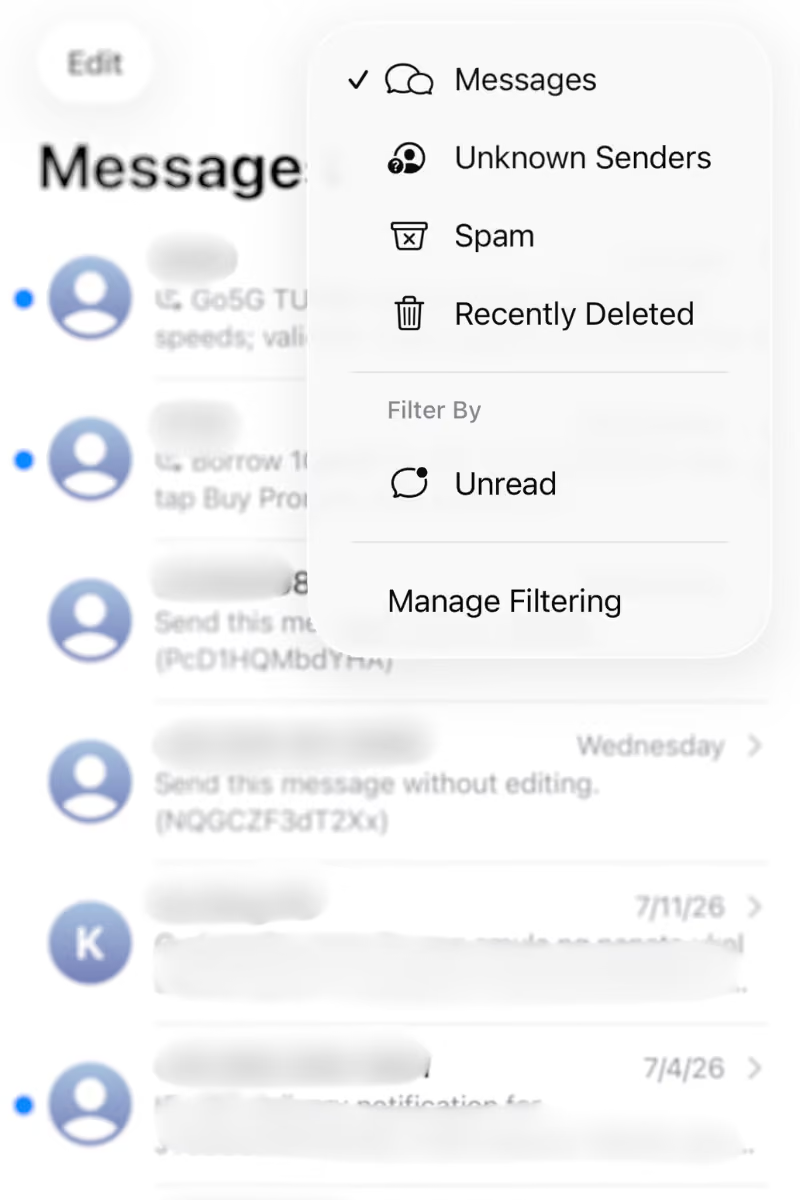
- Select the conversations with the messages you want back.
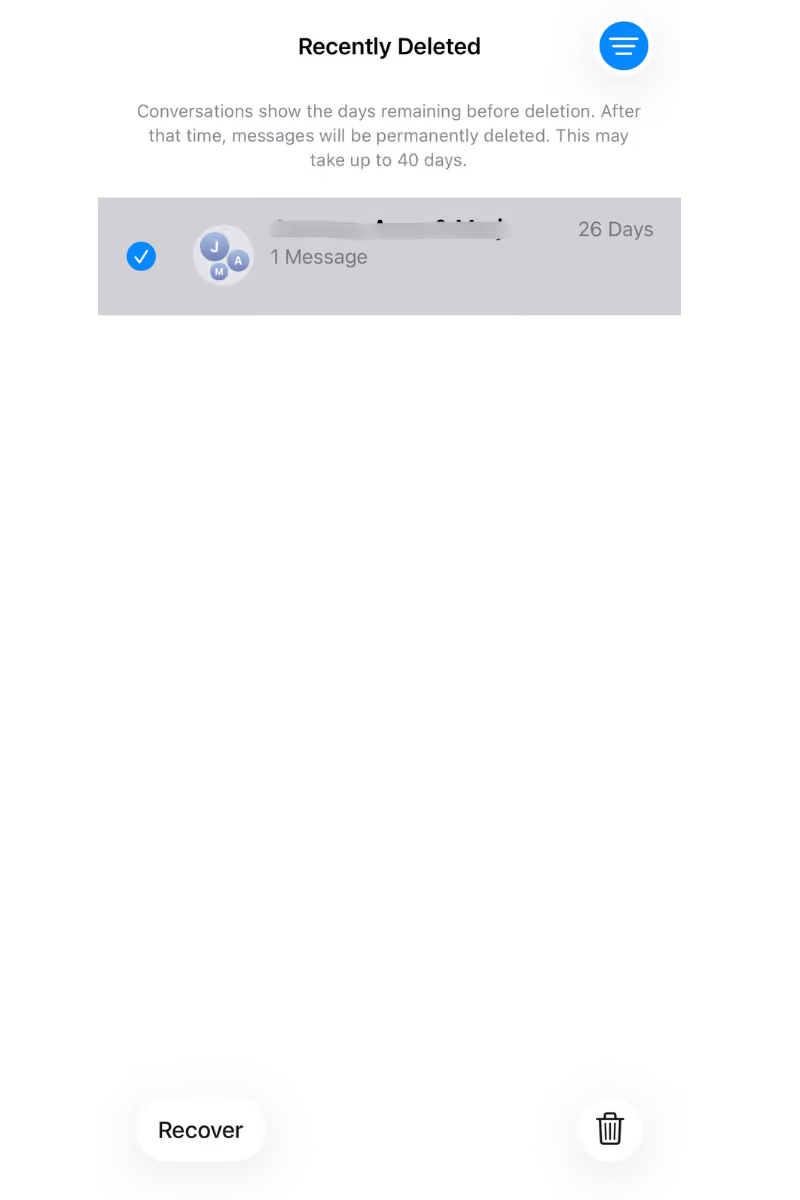
- Tap Recover, then tap Recover Message or Recover [Number] Messages.

The messages move back into your main conversation list, right where they were.
If you use Messages in iCloud, recovering a message on your iPhone restores it on every device where the feature is turned on.
Recover Deleted iMessages from a Backup
Once the 30 to 40 days have passed, your last option on your own phone is a backup you made before deleting the messages.
- If you back up to iCloud, you have to erase your iPhone first, then pick that backup when the phone walks you through setup again.
- If you back up to a computer, nothing gets erased. Connect your phone, open Finder on a Mac or the Apple Devices app on Windows, and select Restore Backup.
Either way, think hard before doing this for a single text thread. Your whole phone goes back to how it looked on the backup date, so photos, messages, and app data from after that date disappear unless they're saved somewhere else.
What to Do When You Can't Recover a Deleted iMessage
If Recently Deleted is empty and restoring from an iCloud or computer backup doesn't work, the other people in the conversation still have their own copy of it. They can screenshot the messages you need or forward them back to you.
Be careful with recovery apps that promise more, since anything they find has to come from your device or your backups, the same two places you've already checked.
The Problem With Using iMessage for Work
Losing a personal message is annoying. Losing the messages and files your team works from is a different kind of problem, and iMessage's recovery rules make it worse.
Recovery Belongs to One Person
Recovery happens on one person's phone, under their own Apple Account. If a staff member deletes a thread with work decisions in it, no manager or admin can step in and restore it.
History Leaves With Staff
When someone leaves the company, they walk out with every work conversation on their phone, and the team keeps no copy. Nobody at the organization can pull those threads back, read them, or delete what's in them.
New Hires See Nothing
Add someone to an iMessage group, and they see nothing that came before them. Every decision and answer the team already worked through stays invisible, so somebody has to explain it all again.
Why You Should Use a Professional Team Chat App for Work
iMessage is doing what it was built to do, which is keep your conversations on your phone and under your control. Work conversations should belong to the company instead, and they need to stay reachable even after whoever sent them has moved on.
Zenzap is a professional work chat app built for team communication. The company sets up the workspace, so every message and file inside it belongs to the organization, and admins decide who's in each chat and who has access to what.
Here's how Zenzap solves the problems that send people searching for deleted iMessages:
Message History Stays in the Cloud
All messages and files stay in the cloud, and the organization owns the data. Not the staff, not Zenzap. Work history stops depending on any one person's device or backup habits.
Activity Records on Request
Your organization can request activity records for legal holds, compliance reviews, or HR investigations. Those audit logs belong to the organization, not to whoever happened to be in the chat.
Full Chat History from Day One
A new hire opens their chats, and the context is already there. Past decisions, shared files, and ongoing conversations don't reset every time the team changes.
One-Click Offboarding
When a staff member leaves, admins cut off their access to all chats, files, and media in one click. The conversations stay with the team instead of leaving with the person.
Zenzap feels just like iMessage, so staff pick it up without training, which makes it one of the best iMessage alternatives for team communication.
Keep Work Conversations Where the Company Can Reach Them
Recently Deleted will keep saving you from the occasional slip on your own phone.
It won't save your team. Your work shouldn't sit on one person's phone with a 30 to 40 day timer on it.
Zenzap is as easy to use as iMessage but built for work, with admin controls, to-dos, video calls, and integrations with the tools you already use.
Move work conversations somewhere the history belongs to the organization, so a deleted thread, a lost phone, or an employee leaving doesn't take the record with it.
FAQs
Can you recover deleted iMessages?
Yes, you can recover deleted iMessages within 30 to 40 days of deleting them. However, you need iOS 16 or iPadOS 16.1 or later, and messages removed with Undo Send can't be recovered at all.
Does recovering a deleted iMessage restore it on all your devices?
Recovering a deleted iMessage restores it on all your devices if you use Messages in iCloud. Recover it once on your iPhone, and it reappears everywhere the feature is turned on.
Can you recover deleted iMessages from an iCloud backup or computer backup?
Yes, you can recover deleted iMessages from an iCloud backup or a computer backup, as long as the backup was made before you deleted them. Restoring from an iCloud backup means erasing your iPhone first, while a computer backup doesn't.
Either way, your phone rolls back to how it looked on the backup date.
What is the best iMessage alternative for work?
The best iMessage alternative for work is Zenzap, a professional work chat app that's as easy to use as iMessage but built for team communication.

Take Control of Your Team Communication
Chat, organize, and get work done - all in one place.
Other Blog Posts

